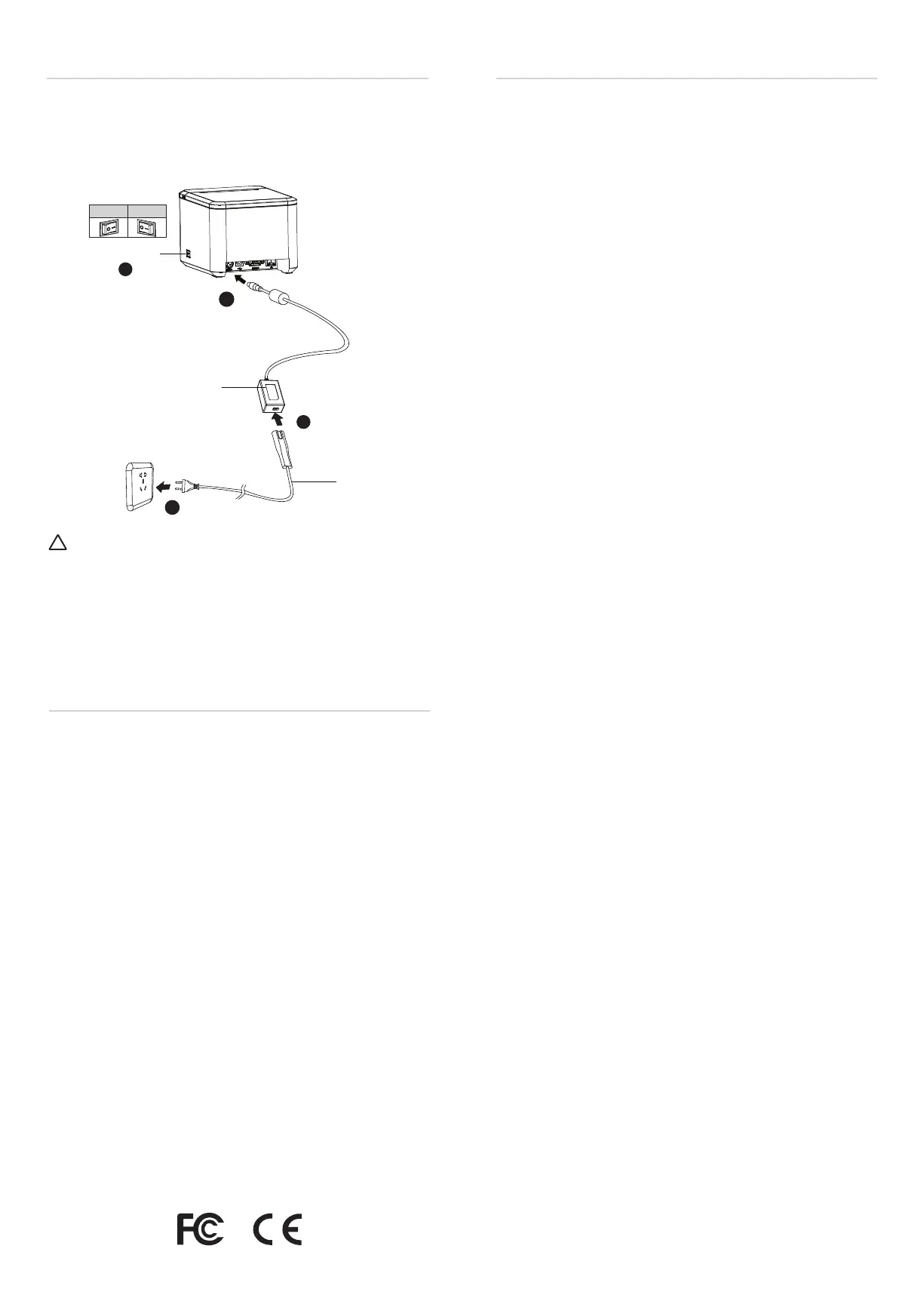
Power Supply
1. Make sure the printer is turned off.
2. Connect the power adapter to the printer.
3. Connect the power adapter to the power cord.
4. Plug the other side of the power cord into the socket outlet.
Power Cord
Power Adapter
1
2
3
4
Ethernet Setting
ON OFF
1. Connect the printer to router (or master device) through the
network cable;
2. The default Ethernet mode is Static IP Mode with IP address
“192.168.0.31”;
3. Ethernet interface parameters can be set through POS utility
or web (Master device and printer are under the same
network segment, enter 192.168.0.31 in master device
browser);
4. Please refer to User Manual for details.
Power Switch
FCC Warning
Caution:
This is a Class A product. In a domestic environment this product may cause
radio interference in which the user may be required to take adequate measures.
This device complies with part 15 of the FCC Rules. Operation
is subject to the following two conditions: (1) this device may
not cause harmful interference, and (2) this device must
accept any interference received, including interference that
may cause undesired operation.
Any changes or modifications not expressly approved by the
party responsible for compliance could void the user's
authority to operate the equipment.
NOTE: This equipment has been tested and found to comply
with the limits for a Class A digital device, pursuant to part 15
of the FCC Rules. These limits are designed to provide
reasonable protection against harmful interference when the
equipment is operated in a commercial environment. This
equipment generates, uses, and can radiate radio frequency
energy and, if not installed and used in accordance with the
instruction manual, may cause harmful interference to radio
communications. Operation of this equipment in a residential
area is likely to cause harmful interference in which case the
user will be required to correct the interference at his own
expense.
-- Reorient or relocate the receiving antenna.
-- Increase the separation between the equipment and receiver.
-- Connect the equipment into an outlet on a circuit different
from that to which the receiver is connected.
-- Consult the dealer or an experienced radio/TV technician for
help.
The device has been evaluated to meet genaral RF exposure
requirement. The device can be used in portable exposure
condition without restriction.
!
Note: The power adapter and power cord vary by country or region.


 To Previous Page
 Loading...