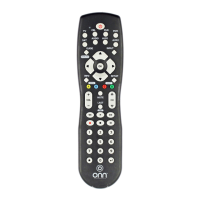
This document describes the Onn. 6-Device Universal Remote Control, model 100008755/PCL-4. This remote is designed to operate a wide range of electronic devices across various brands and models, offering control for up to six different devices. It comes pre-programmed to operate many Samsung TVs, simplifying initial setup for those users. The remote is user-friendly and easy to set up, with clear instructions provided for programming.
Function Description
The Onn. Universal Remote Control serves as a centralized control unit for multiple electronic devices, eliminating the need for individual remotes. It supports control for up to six different device categories, including TV, SAT/CBL (Satellite/Cable), AUDIO, B-RAY/DVD (Blu-ray/DVD), STREAM, and OTHER devices. Each device category has a dedicated button on the remote for easy selection.
The remote features a comprehensive set of buttons for various functions:
- POWER: Turns devices On/Off and acts as an indicator during programming.
- INPUT: Switches between different input sources connected to a TV.
- DEVICE CATEGORIES (TV, SAT/CBL, AUDIO, B-RAY/DVD, STREAM, OTHER): These buttons are used to select the specific device the user wishes to control.
- GUIDE: Provides access to the program guide for satellite and cable set-top boxes.
- PROGRAM: Puts the remote into programming mode, essential for setting up new devices or features.
- INFO: Displays on-screen content descriptions and other information.
- MENU: Accesses the device's menu.
- BACK: Returns to the previous menu or screen.
- EXIT: Exits current menus or screens.
- VOL +/-: Adjusts the volume.
- CH +/-: Changes channels.
- OK: Confirms selections and is used during programming.
- NAVIGATION (Up, Down, Left, Right): Used to navigate menus and selections.
- MUTE: Mutes or unmutes audio.
- FAV (Favorite Channels): Accesses and programs favorite channels.
- PREV (Previous Channel): Returns to the previously viewed channel.
- APPS: Provides access to smart TV applications, if supported by the device.
- CUSTOM BUTTONS (Red, Green, Yellow, Blue): These colored buttons offer shortcuts to additional features or custom apps on supported devices.
- VIDEO PLAYBACK CONTROLS (Rewind, Play, Fast Forward, Pause, Stop, Record): Standard controls for media playback.
- NUMBER KEYPAD (0-9, ENTER): Used for entering channel numbers, codes, and other numerical inputs.
Usage Features
The remote offers several features designed to enhance usability and convenience:
- Direct Code Entry Programming: This is the recommended method for programming the remote. Users press and hold the PROGRAM button, then select the device category, and finally enter a 4-digit code from an included list corresponding to their device's brand and category. A red indicator light guides the user through the process, blinking to confirm selections and turning off upon successful code entry. If an invalid code is entered, the light flashes and remains on, prompting the user to re-enter a valid code.
- Auto Code Search Programming: If a compatible code cannot be found using Direct Code Entry, the Auto Code Search method can be used. This involves powering on the target device, entering programming mode, selecting the device category, and then holding the OK button while pointing the remote at the device. The remote will cycle through codes until the device turns off, at which point the user releases the OK button to lock in the code. This method can take up to 10 minutes to scan all possible codes.
- Favorite Channels: Users can program up to 10 favorite channels for quick access. This involves entering programming mode, selecting the device, pressing the FAV button, choosing a number key (0-9) to store the channel, entering the channel number, and then pressing FAV again to save. To access a favorite channel, the user presses FAV, then the corresponding number key.
- Volume Lock: This feature allows users to lock the remote's volume control to a specific device, even when the remote is in a different device mode. For example, the TV mode can control a sound bar's volume. To enable, enter programming mode, select the device to lock the volume to, press VOL+, and then OK. To disable, enter programming mode, select the device, press VOL-, and then OK.
- Channel Lock: Similar to Volume Lock, this feature enables users to lock the remote's channel control to a specific device. For instance, the TV mode can control a satellite or cable box's channels. To enable, enter programming mode, select the device to lock the channels to, press CH+, and then OK. To disable, enter programming mode, select the device, press CH-, and then OK.
- Code Identification: If a user forgets a programmed code, the remote provides a method to identify it. By entering programming mode, selecting the device category, and then pressing the custom buttons (e.g., the red button) followed by the number keys (1-4), the remote's indicator light will flash a number of times corresponding to each digit of the programmed code.
- Pre-programmed for Samsung TVs: The remote is designed to work with many Samsung TVs right out of the box, simplifying initial setup for users with these devices.
Maintenance Features
The remote includes features to ensure its longevity and ease of maintenance:
- Battery Installation: The remote requires two AA alkaline batteries (not included). Instructions for installation are clear, involving removing the battery cover, inserting batteries as shown, and snapping the cover back into place.
- Battery Precautions: Important guidelines are provided to prevent damage and ensure proper operation, such as not mixing old and new batteries, or different types of batteries (alkaline, carbon-zinc, nickel-cadmium). Users are advised to promptly remove and properly dispose of old, weak, or worn-out batteries.
- Low Battery Indicator: The remote features a visual indicator for low battery. If the POWER button's red light flashes three times during use, it signals that the batteries need to be replaced soon.
- Code Saver: This feature allows users up to 20 minutes to change batteries without losing any programmed codes, provided the battery replacement is done quickly. This is a significant convenience, preventing the need to re-program devices after a battery change.
- Battery Saver: To conserve battery power, the remote automatically turns off if any button is pressed for more than 60 seconds (excluding during programming). This is particularly useful if the remote gets stuck with a button depressed, such as between sofa cushions, preventing unnecessary battery drain.
- Reset to Factory Default Settings: Users can reset the remote to its original factory settings if needed. This involves entering programming mode, pressing the INFO button, and then pressing the OK button. The indicator light will flash twice, confirming the reset.
The Onn. Universal Remote Control is designed to be a versatile and convenient solution for managing multiple home entertainment devices, with features aimed at simplifying setup, enhancing control, and ensuring reliable operation.

 Need help?
 General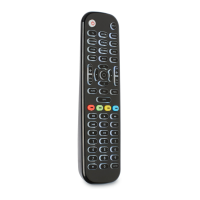

 To Next Page