EasyManua.ls Logo

Onn Indoor Speaker - User Manual

Onn Indoor Speaker
12 pages
Print Icon
To Next Page IconTo Next Page
Loading...
Indoor Speaker
Quick Start Guide
Wed love to hear from you. Scan
with your Walmart app and let us
know what you think.
What’s in the Box?
Get to Know Your indoor speaker
Power
Bluetooth® Connection
Top
Right
Quick Start Guide
TM
1
1 2 3
8
9
10
4 5 6 7
3
2
1. Bluetooth Speaker
2. Charging Cable
3. Quick Sart Guide
Check to make sure you
have everything below.
1. LED indicator
2. Power switch
3. Bluetooth
4. Volume down
5. Play/Pause/
Speakerphone
6. Volume up
7. Microphone
8. Aux in
9. Reset
10. Charging port
Aux Connection Answer calls
The Party Sync Mode also applied to another
onn speaker.
Party Sync Mode
But Wait ... There's More!
The Fine PrintThe Fine Print
to radio or television reception, which can be
determined by turning the equipment off and on,
the user is encouraged to try to correct the
interference by one or more of the following
measures:
Reorient or relocate the receiving antenna.
Increase the separation between the
equipment and receiver.
Connect the equipment into an outlet on a
circuit different from that to which the
receiver is connected.
Consult the dealer or an experienced
radio/TV technician for help.
3.The device has been evaluated to meet general
RF exposure requirement. The device can be used
in portable exposure condition without
restriction.
Rating Lable is located at the bottom of the
product.
1. Warning: Changes or modifications to this
unit not expressly approved by the party
responsible for compliance could void the
user’s authority to operate the equipment.
2. NOTE: This equipment has been tested and
found to comply with the limits for a Class B
digital device, pursuant to Part 15 of the FCC
Rules. These limits are designed to provide
reasonable protection against harmful interfer-
ence in a residential installation. This equip-
ment generates, uses and can radiate radio
frequency energy and, if not installed and used
in accordance with the instructions, may cause
harmful interference to radio communications.
However, there is no guarantee that interfer-
ence will not occur in a particular installation. If
this equipment does cause harmful interference
USER MANUAL INSERTS FOR FCC ID
Long press to power on / off the speaker
80mm
80mm
80mm
17.7.030.1872
ON/OFF
2
s
>
1
s
<
3
s
>
Activate the Bluetooth function on your
device and search Bluetooth devices,
then select “onn. Indoor SPK MD GRY”
to start connecting.
onn. Indoor SPK MD GRY
Use a 3.5mm cable (not included) to connect the
speaker to another audio source. Press Play on
the device and adjust the volume on the unit to
obtain the desired volume.
(not included)
3
s
>
Short press to answer the call
Long press to reject the call
Power on one speaker and hold Bluetooth
button 3 seconds to enter into pairing mode,
this device will be the master. The second
device will connect
automatically to the master when turned on.
After the two speakers are paired together, use
your mobile device to pair with the master
speaker utilizing the Bluetooth pairing method.
TWS
AAAGRY100006897
6
81 1 31 30988
2
Need help?
We're here for you every day
7 a.m. – 9 p.m. CST.
1-888-516-2630
Give us a call!
Question and Answer IconNeed help?

Do you have a question about the Onn Indoor Speaker and is the answer not in the manual?

Summary

Whats in the Box?

Box Contents

Lists the included items: Bluetooth speaker, charging cable, and quick start guide.

Get to Know Your Indoor Speaker

Speaker Components and Controls

Identifies the speaker's top and right side buttons, ports, and indicators.

Powering the Speaker

Power On;Off Instructions

Details the process to turn the speaker on or off using a long press of the power button.

Bluetooth Connection

Bluetooth Pairing Procedure

Steps for activating Bluetooth and connecting to the 'onn. Indoor SPK MD GRY' device.

Auxiliary Connection

Aux Cable Connection Guide

Instructions for connecting the speaker to an audio source via a 3.5mm cable.

Call Handling

Answering and Rejecting Calls

Guide on how to answer or reject incoming calls using the speaker's controls.

Party Sync Mode

Party Sync Mode Setup

Instructions for pairing multiple speakers for synchronized audio playback.

Regulatory Information

FCC Compliance and Warnings

Contains FCC ID, compliance statements, and operational warnings for the device.

Summary

Whats in the Box?

Box Contents

Lists the included items: Bluetooth speaker, charging cable, and quick start guide.

Get to Know Your Indoor Speaker

Speaker Components and Controls

Identifies the speaker's top and right side buttons, ports, and indicators.

Powering the Speaker

Power On;Off Instructions

Details the process to turn the speaker on or off using a long press of the power button.

Bluetooth Connection

Bluetooth Pairing Procedure

Steps for activating Bluetooth and connecting to the 'onn. Indoor SPK MD GRY' device.

Auxiliary Connection

Aux Cable Connection Guide

Instructions for connecting the speaker to an audio source via a 3.5mm cable.

Call Handling

Answering and Rejecting Calls

Guide on how to answer or reject incoming calls using the speaker's controls.

Party Sync Mode

Party Sync Mode Setup

Instructions for pairing multiple speakers for synchronized audio playback.

Regulatory Information

FCC Compliance and Warnings

Contains FCC ID, compliance statements, and operational warnings for the device.

Overview

This document is a Quick Start Guide for the "onn. Indoor Speaker." It provides information on what's included in the box, how to get to know the speaker's features, how to connect it via Bluetooth and Aux, how to answer calls, and how to use the Party Sync Mode. It also includes FCC information and customer support details.

Function Description:

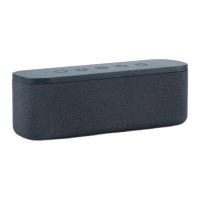
The onn. Indoor Speaker is a portable audio device designed for indoor use. It offers wireless audio streaming via Bluetooth, as well as a wired connection option through an Aux-in port. The speaker includes a built-in microphone, enabling its use as a speakerphone for answering calls. A unique feature is the "Party Sync Mode," which allows two onn. speakers to be paired together for a synchronized audio experience, with one speaker acting as the "master" and the other connecting automatically.

Important Technical Specifications:

While specific technical specifications like frequency response, battery capacity, or output power are not explicitly detailed in this quick start guide, the document highlights key connectivity and control features:

  • Connectivity: Bluetooth® for wireless audio streaming and a 3.5mm Aux-in port for wired connections.
  • Controls: The speaker features a top-mounted control panel with buttons for:
    • Power on/off (long press >2s)
    • Bluetooth pairing (long press >3s for Party Sync Mode)
    • Volume down (-)
    • Play/Pause/Speakerphone (short press for answer call <1s, long press for reject call >3s)
    • Volume up (+)
  • Indicators: An LED indicator provides visual feedback on the speaker's status.
  • Ports: In addition to the Aux-in port, there is a dedicated charging port.
  • Microphone: Integrated for speakerphone functionality.
  • Reset: A reset button is available for troubleshooting.

Usage Features:

  • Power On/Off: To power the speaker on or off, a long press (greater than 2 seconds) on the power switch button is required.
  • Bluetooth Connection:
    1. Activate the Bluetooth function on your mobile device.
    2. Search for Bluetooth devices.
    3. Select "onn. Indoor SPK MD GRY" from the list to initiate the connection.
  • Aux Connection:
    1. Use a 3.5mm audio cable (not included) to connect the speaker to an external audio source.
    2. Press "Play" on the connected device.
    3. Adjust the volume using the speaker's volume buttons to achieve the desired audio level.
  • Answering/Rejecting Calls:
    • To answer an incoming call, short press (less than 1 second) the Play/Pause/Speakerphone button.
    • To reject an incoming call, long press (greater than 3 seconds) the Play/Pause/Speakerphone button.
  • Party Sync Mode:
    1. Power on one onn. speaker.
    2. Hold the Bluetooth button on this speaker for 3 seconds to enter pairing mode. This speaker will become the "master."
    3. Power on a second onn. speaker. It will automatically connect to the master speaker.
    4. Once the two speakers are paired, use your mobile device to pair with the master speaker via Bluetooth. This creates a synchronized audio experience across both speakers. The guide mentions this mode also applies to "another onn speaker," implying compatibility across certain onn. speaker models.

Maintenance Features:

The guide does not explicitly detail maintenance features such as cleaning instructions or battery care. However, it does mention a "Reset" button, which can be considered a maintenance or troubleshooting feature for resolving operational issues. The charging cable is included for powering the device, indicating that regular charging is part of its maintenance.

FCC Information:

The document includes important FCC compliance information:

  • Warning: Any changes or modifications to the unit not expressly approved by the responsible party for compliance could void the user's authority to operate the equipment.
  • Note: The equipment has been tested and found to comply with Class B digital device limits under Part 15 of the FCC Rules. These limits are designed to provide reasonable protection against harmful interference in a residential installation.
  • Interference: The device generates, uses, and can radiate radio frequency energy. If not installed and used according to instructions, it may cause harmful interference to radio communications. There is no guarantee that interference will not occur in a particular installation. If interference occurs, users are encouraged to try to correct it by:
    • Reorienting or relocating the receiving antenna.
    • Increasing the separation between the equipment and receiver.
    • Connecting the equipment to an outlet on a different circuit from the receiver.
    • Consulting the dealer or an experienced radio/TV technician.
  • RF Exposure: The device has been evaluated to meet general RF exposure requirements and can be used in portable exposure conditions without restriction.
  • Rating Label: The rating label is located at the bottom of the product.

Customer Support:

For assistance, customers can contact onn. customer support:
  • Hours: 7 a.m. – 9 p.m. CST, every day.
  • Phone: 1-888-516-2630.
  • Feedback: Users are encouraged to scan a barcode with the Walmart app to provide feedback.

Onn Indoor Speaker Specifications

General IconGeneral
BrandOnn
ModelIndoor Speaker
CategorySpeakers
LanguageEnglish

Related product manuals