Navigation 55
To store the address data: see
descriptions above.
■ Current Position: stores the current
destination in the address book.
To store the address data: see
descriptions above.
Selecting addresses (destinations)
for route guidance, renaming or
deleting addresses
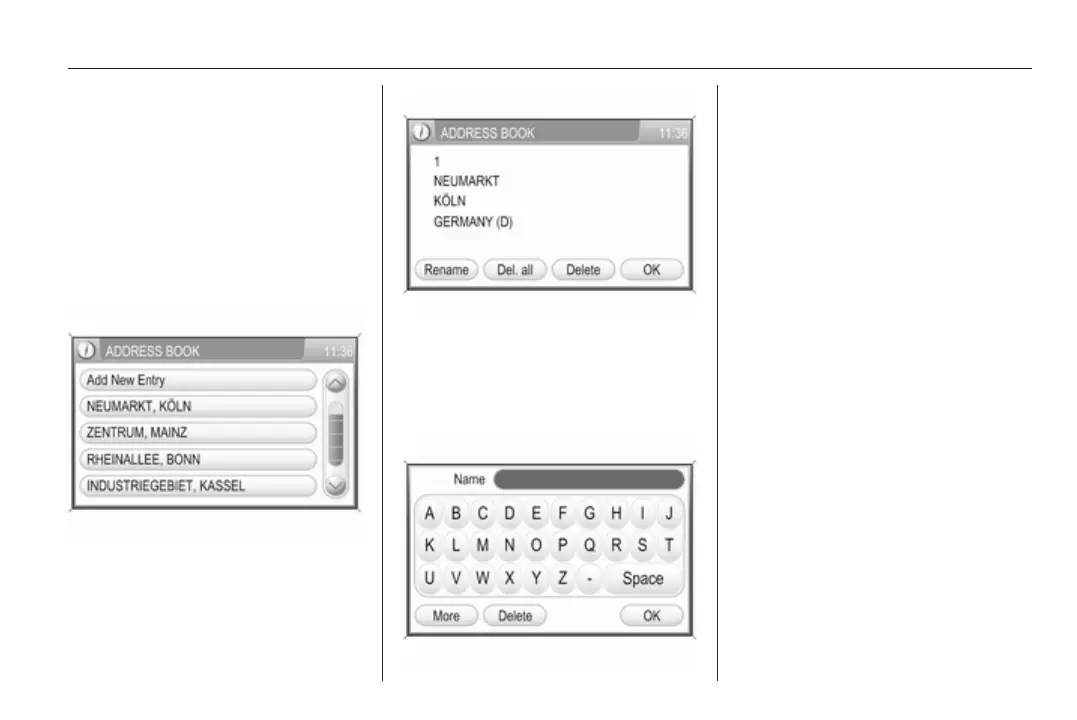
Select the desired address book
entry.
A menu is displayed that shows the
address information of the selected
address book entry.
The following menu options are
available:
■ Rename: displays a menu with
keypad for name input.
Enter a new name for the address
book entry, and select the OK
screen button to confirm the new
name.
■ Del. all: deletes all address book
entries.
■ Delete: deletes the selected
address book entry.
■ OK: sets the displayed address or
GPS coordinates as new
destination, and starts route
guidance to that destination.
Description on route guidance, see
chapter "Guidance" 3 63.
Selecting a point of interest
A point of interest (POI) is a specific
location that can be of interest, like a
petrol station, parking area, or
restaurant.
In the Infotainment system a POI is
defined by GPS coordinates
(longitude and latitude values) and a
name.









 To Next Page