8 Introduction
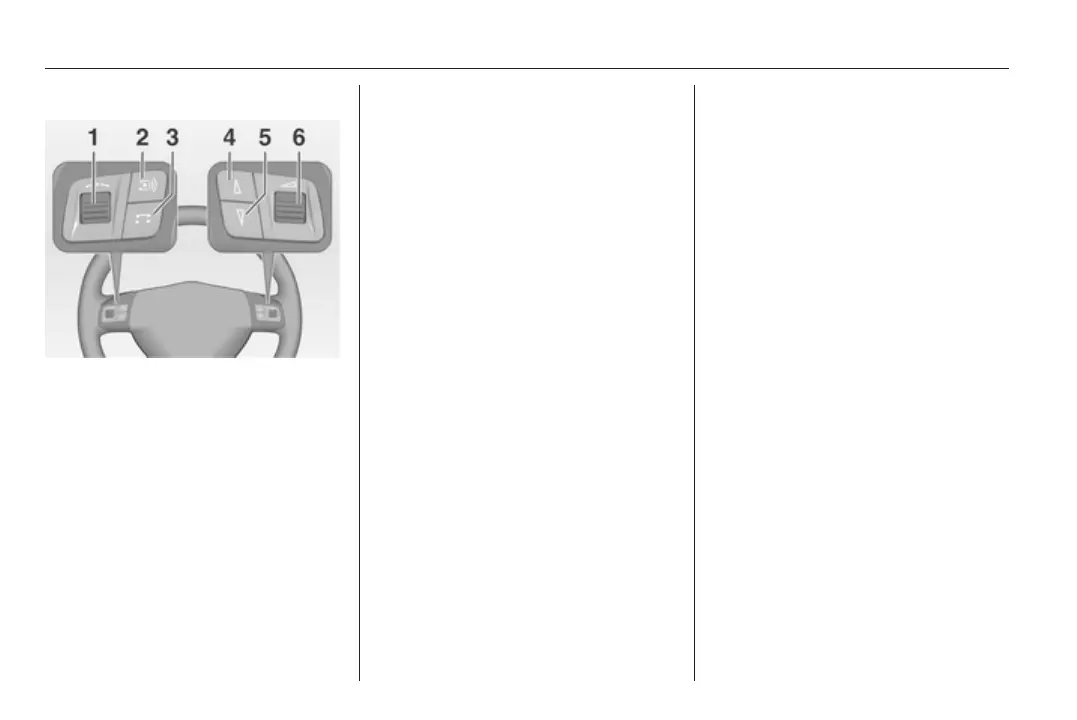
Steering wheel audio controls
1 Thumbwheel ........................... 9
Turn: select menu items
and commands ....................... 9
Press: confirm a selection
(OK) ........................................ 9
2 q button ............................... 19
Radio: select station
button .................................... 19
CD: CD restart ...................... 28
MP3: next album ................... 28
3 p button .............................. 28
Switch between radio and
CD/MP3 mode ...................... 28
4 c button ................................. 21
Radio: search backwards,
scroll down in station
memory ................................. 21
CD/MP3: skip track
backwards, fast rewind ......... 28
5 d button ................................. 21
Radio: search forwards,
scroll up in station memory ... 21
CD/MP3: skip track
forwards, fast forward ........... 28
6 Thumbwheel ......................... 17
Turn: adjust volume .............. 17
Symbols in the main display
Audio function
AM = AM waveband is selected.
FM = FM waveband is selected.
AS = FM or AM Autostore level is
selected.
[ ] = Traffic programme is
active, however no TP
station is being received.
TP = The station selected
transmits traffic
announcements.
[TP] = Traffic programme is
active, traffic
announcements will be
relayed.
TMC = RDS TMC traffic
information is being
received.
REG = Regionalisation is active.
CD in = An audio/MP3 CD is
inserted in the audio CD
slot.
MP3 = The loaded CD contains
MP3 files.









 To Next Page