BT, Openreach, and the BT logo and the Openreach identity are
trademarks of British Telecommunications plc.
British Telecommunications plc
Registered Office:
81 Newgate Street, London EC1A 7AJ
Registered in England and Wales no. 1800000
Mk 4 VDSL Filter user instructions
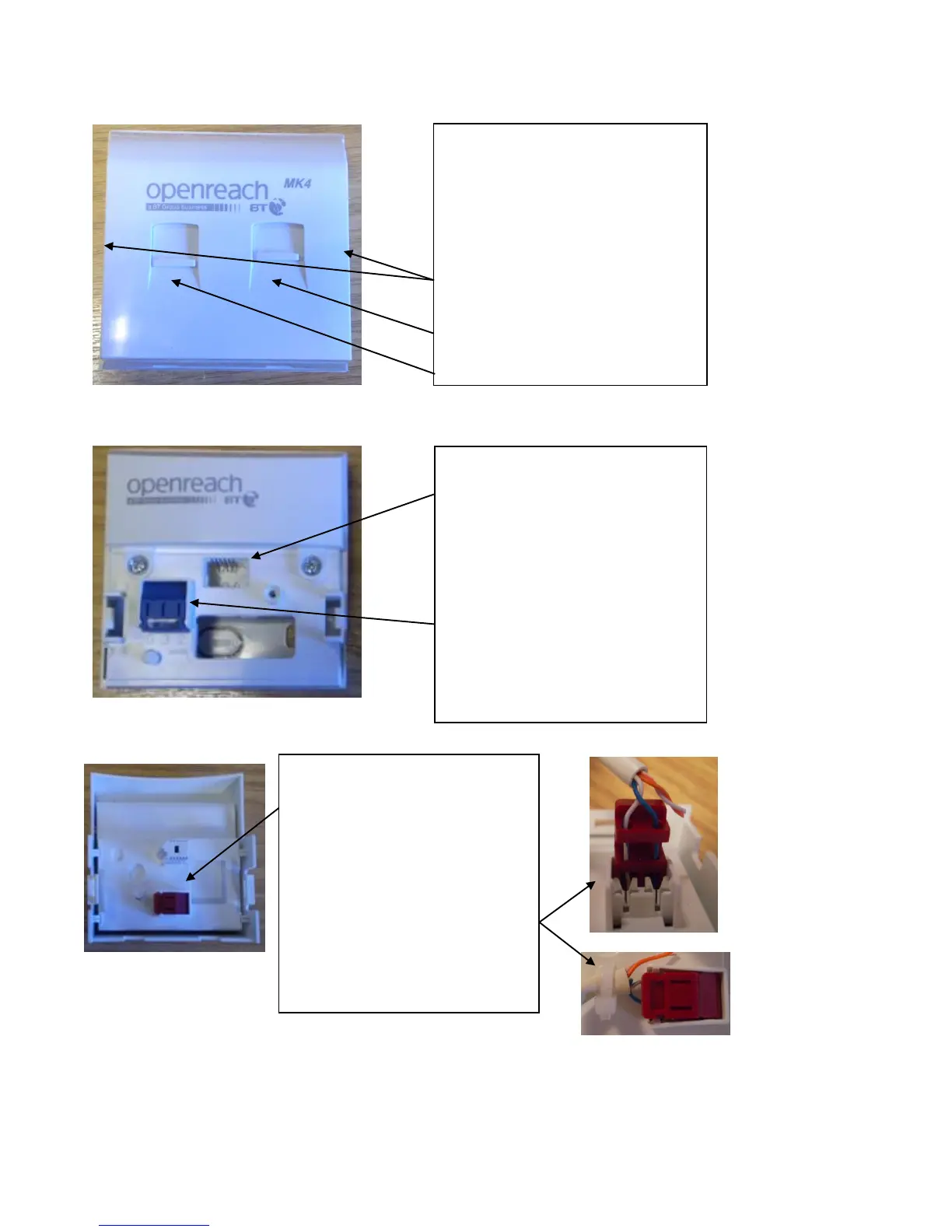
Filter - Data and Phone socket
1. The Mk4 VDSL filter front cover fits
on to the NTE5C back plate and
provides a built in micro filter with
separate telephone and data sockets.
2. It is removed by pressing the clips
on either side of the front cover and
gently pulling the plate forward.
3. Telephone socket.
4. Data socket.
In home wiring and test socket
1. With the Mk4 VDSL filter front
cover removed the test socket can be
seen at the “centre top” of the back
plate and instructions on how it is
used are shown above.
2. The back plate is the same as the
NTE5C. Instructions on how to
connect home telephone wiring to
the blue connection point are shown
above.
In home data wiring
1. The red connection point found
on the reverse of the Mk4 VDSL
filter front cover is used to connect
home data extension wiring.
2. Lift up the red coloured
connection cover and thread the 2
data cable wires in the same way as
shown above for NTE5C and close
the red cover to make the
connection.


 To Previous Page
 Loading...