5
EN 417 (for Australia: 70% butane and 30% propane) (max.
450g) Weight: 83g (2.9 oz) Measurements: 84 x 57 x 31mm /
3.3 x 2.2 x 1.2 in Power: 3000 W / 10200 BTU / 10.8 MJ/h
Burn time: up to 90 minutes at maximum output (230 g gas
canister) Boil time: As little as 3 minutes depending on
climate, altitude, etc. Injector size of stove: 0.32 mm EN
521:2006 Category: direct pressure – butane / propane mix
CE-048BN – 0045
SET UP STOVE
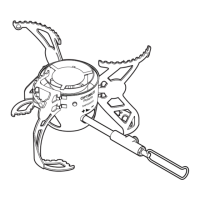
1. Fold out burner head until it springs into locked position.
FIGURE [3]
2. Fold out the control valve handle and make sure that the
valve is fully closed.
FIGURE [4]
3. Fold out pot supports.
FIGURE [4]
4. Check O-ring for damage before connecting it to gas
canister.
CONNECT STOVE TO GAS
CANISTER
1. Hold onto the stove and screw the correct gas canister
counterclockwise tightly.
FIGURE [5] Tighten by hand only
and be careful not to damage the threads when you
connect the gas canister.
2. Always keep the gas canister in an upright position while
connecting it to the stove.
3. Ensure that the stove is screwed all the way to the bottom
of the thread.
4. Make sure the stove is in a stable position so it will not tip
over.
5. Allow plenty of free space around the stove, at least 1.25
meters (4 feet) on each side and 1.5 meters (4.5 feet) above
it.
2
1



 To Next Page