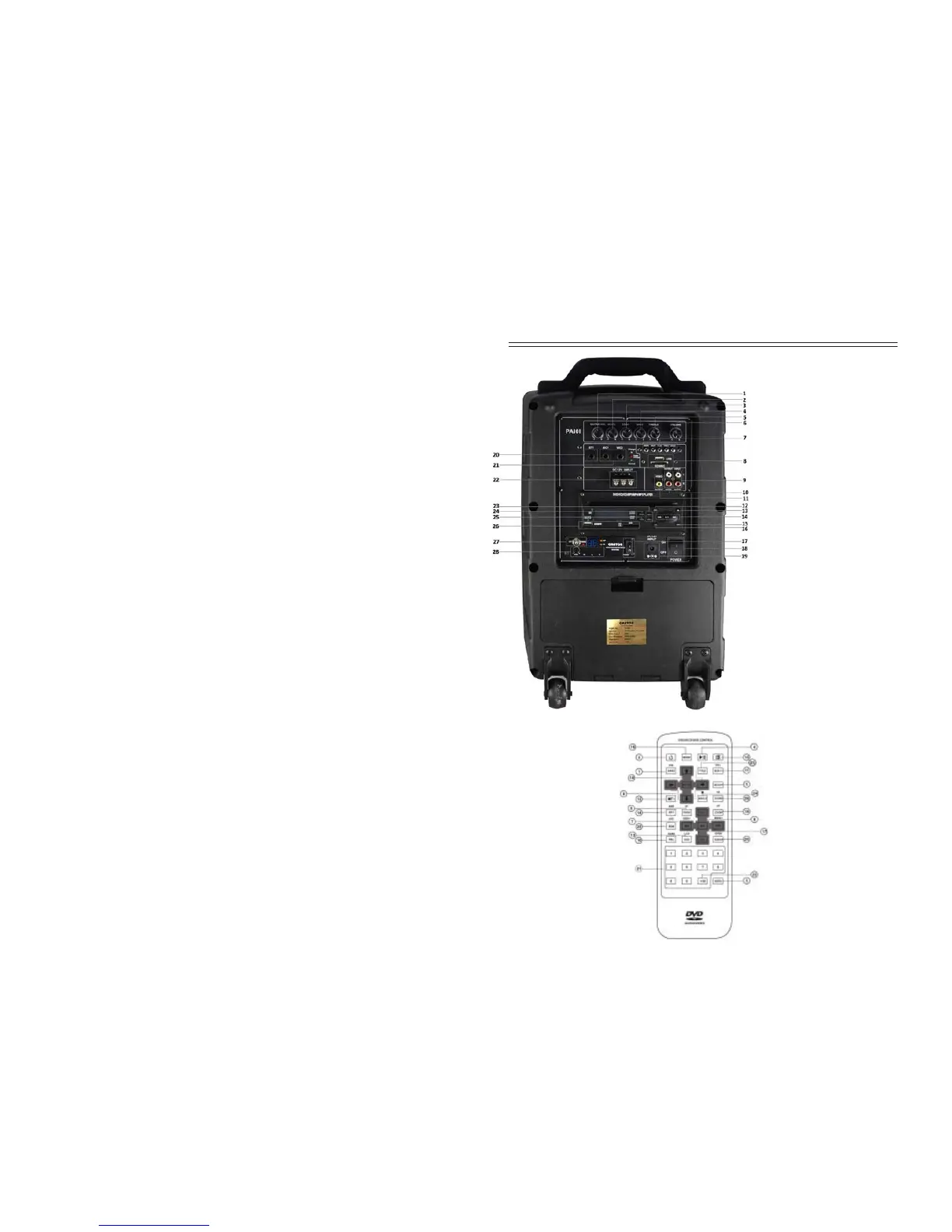
Rear Panel of the PA101 Speaker:
1. Guitar Volume
2. Microphone (cable) Volume
3. Echo Volume
4. Bass Volume
5. Treble Volume
6. Main Volume
7. Repeat:AUX/MP3/FM/
Bluetooth
MP3 Next Song
MP3 Play
MP3 Prev Song
Mode:Aux/MP3/FM/Bluetooth
8. USB/SD Input
9. Audio Input
10. Audio Output
11. Video Output
12. Mode Switch:SD/USB/FM
13. Eject Button(EJ)
14. REW/UP SEARCH/Select Station
Play/Pause
FWD/DOWN SEARCH/Select Station
15. DVD Player Power on/off
16. Channel Switching
17. UHF Micro Power on/off
18. Speaker Power on/off
19. DC Power Input 12V
FM Radio Operation:
The FM radio is incorporated into the DVD. To operate the radio, select FM on
the mode button (12). Use buttons 13 or 14 or move up/down through channel
station frequencies to select the FM station you want. A long press will search
until it finds a station & will then stop.
Additional Speaker:
If you want to add an additional speaker for extra volume output, we
recommended the passive ORATOR PA10 speaker that is manufactured for this
purpose. The PA10 is connected using the audio output (10) connectors.
Audio Input:
If you want to input audio from another audio player, such as an external DVD or
music player, use the audio input (9) connectors.
Microphone (cable) Input:
The PA101 is fitted with 2 microphone input connectors (MIC1 and MIC2) that
enable you to connect traditional cable microphones. The input volume can be
controlled by the M. VOL (2) control knob.
Guitar (cable) Input:
The PA101 is fitted with a guitar input connector (GT1) that allows you to
connect an electric guitar. The input volume can be controlled by the
GUITAR.VOL (1) control knob.
Echo Function:
The PA101 is fitted with an echo function that is normally only used for music
(karaoke) operation. If used for normal speech, the audio can sound a little
distorted so we recommend the control being left at -.
Audio Control:
The PA101 has 3 control knobs for basic audio functions. The VOLUME (6)
control is the Master Output volume controlling the output volume. Bass (4) and
Treble (5) controls allow you to create the balance between Bass & Treble in the
output that you desire. For normal operation, it is recommended that both are
centred (12 o’clock position).
Battery Operation:
There are 3 LED lights next to the MIC input connectors that display the status
of the battery. The top white LED shows that the battery is being charged. The
centre red LED shows that the battery needs charging & the bottom green light
shows that the battery is adequately charged. Ensure that the battery is charged
at least every 3 months to maximise the life of the battery.
20. Guitar Input
21. Microphone Input
22. DC 12V Input
23. DVD Volume -/+
24. MP3/MP5 Switch
25. EQ Setting
26. DVD Player USB/SD Input
27. UHF Mic Antenna
28. Wireless Mic Volume
1. Band: Change radio band
2. Power button
3. Playing time settings
4. Pause
5. Setup: Displays setup menu
6. Cursor buttons in menu mode
7. Volume +/-
8. Changes audio mode
9. Pregram tracks/chapters to play
10. Select playback control
11. Change subtitle language
12. Selects segment to repeat
13. On screen display
14. Autostore radio stations
15. Mute
16. Change from disc to radio
17. Skip track/chapters
18. Zooms the picture
19. Input button
20. In discs, changes tracks
21. Numeric buttons
22. Selects 10th digit
23. Shows disc title
24. Changes view angle
25. Random play
26. Slows play speed.
DVD Remote Functions:


 To Next Page
 Loading...