English
- 51 -
ORUS RF Programmable Thermostat User Manual
SETTING/TEST OF REMOTE ACTUATOR
The remote actuator activates the load after a radio frequency signal sent by the
programmable thermostat ORUS RF.
Operation
•
For details about the functional characteristics of the remore actuator, refer to the
documentation supplied with the instrument.
Channel setting
•
Activate setting mode ad described in the documentation of the remote actuator.
•
When the setting mode is active the actuator must receive a configuration string.
•
After string reception the channel is set and the actuator starts the normal operation.
•
For re-setting the channel, repeat this procedure. Every new setting resets the previous
one.
ORUS RF setting
•
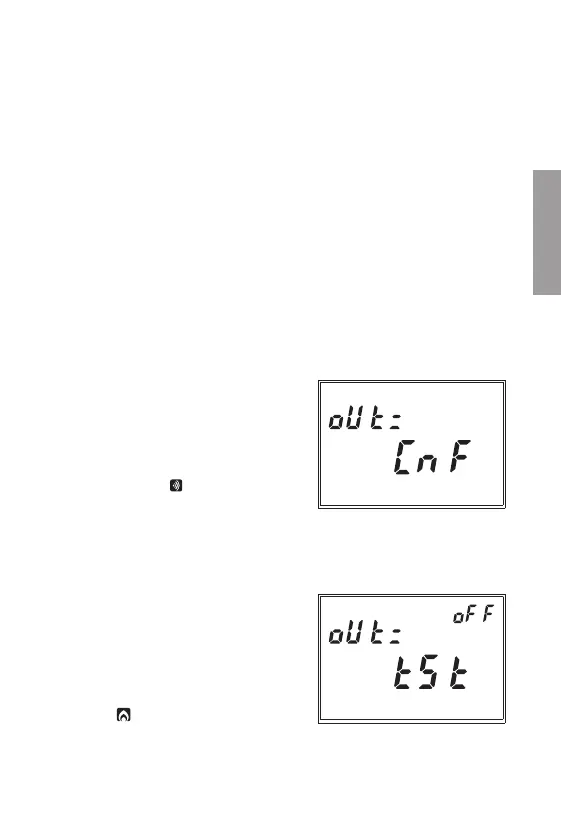
The field
(22)
displays
“oUt=
”; the field
(16)
displays
“CnF”
flashing.
•
Verify that the remote actuator is in setting
mode.
•
Press the
“PRG”
key for almost 3 seconds.
When the setting is completed, on the field
“24”
the symbol “
” appears and then
the page of radio communication test is
displayed.
TEST COMMUNICATION
•
During the test, field
(22)
displays
“oUt=”
,
field
(16)
displays
“tSt
” flashing and field
(15)
displays
“ON”
or
“OFF”
to indicate if
the test is activated or not.
•
To activate the test press for some seconds
the key
“PRG”
.
•
If the modality-test is actived, the display
shows
“ ”
when the relay is in position
ON, while the absence of this symbols
indicates that the relay is OFF. The switching


 To Next Page