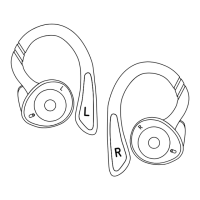
FUNCTIONS
Turn On Remove Dripz earbuds from the charging case and the earbuds will turn on automatically. Press and hold the multi-function
buttons on both earbuds for 3 seconds to turn Dripz earbuds on manually.
Turn Off Place earbuds back inside the charging case and the earbuds will turn off automatically.
Press and hold the multi-function buttons on both earbuds for 3 seconds to turn Dripz earbuds off manually.
Play/Pause Click the multi-function button on either earbud once to pause or play Dripz.
Previous/Next Hold the multi-function button on the Right earbud for 1.5 seconds to skip a song.
Hold the multi-function button on the Left earbud for 1.5 seconds to go back to a previous song.
Volume
Up/Down
Double-click the multi-function button on the Right earbud to turn the volume up.
Double-click the multi-function button on the Left earbud to turn the volume down.
Answer/End
Call
Click the multi-function button on either earbud once when receiving incoming calls to accept calls.
Click the multi-function button on either earbud once during the phone call to end the call.
Reject Call Press and hold the multi-function button for 2 seconds to reject incoming calls.
Activate Voice
Assistant
Triple-click the multi-function button on either earbud to activate your device’s voice assistant.
SPECIFICATIONS
• Earbud playback time: 5 hours
• Earbud charging time: 1.5 hours
• Carrying case charging time: 2.5 hours
• Earbud battery: 3.7V/50mAh
• Charging case battery: 3.7V/800mAh
• Accessories included: USB-C charging cable & three (3)
silicone ear tips (sizes Small / Medium / Large)
© 2020 Forty Four Group, LLC., d/b/a Origaudio
Printed in California ∙ Made in China
See more at:
www.origaudiopromo.com


 To Previous Page
 Loading...