EasyManua.ls Logo

Origin Effects Cali76 Fet Compressor - User Manual

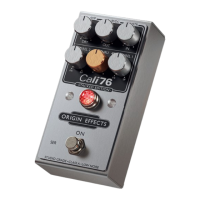
Origin Effects Cali76 Fet Compressor
2 pages
Print Icon
To Next Page IconTo Next Page
Loading...
GETTING STARTED GUIDE
A fast attack time allows the
compressor to catch transients
early on. A slower release stops the
compressor from pumping. These
settings sound natural and balance
playing dynamics.
DYNAMIC CONTROL
A slower attack time allows the
compressor to accentuate the start
of any note. A fast release time lets
the compressor recover between
notes so that phrases sound more
percussive.
PERCUSSIVE & LIVELY
1176
®
is a registered trademark of Universal Audio, Inc. Origin
E ects has no a liation with Universal Audio, Inc.
UREI
®
is a registered trademark of Harmon International Industries
Inc. Origin E ects has no a liation with Harmon International
Industries Inc.
Question and Answer IconNeed help?

Do you have a question about the Origin Effects Cali76 Fet Compressor and is the answer not in the manual?

Summary

Getting Connected

Instrument Input

Connect your guitar or other instrument to the INSTR input.

Amplifier Output

Connect the AMP output to your amplifier or modeller.

Power Supply

Use a 9VDC, 2.1mm centre-negative power supply (minimum 200mA).

Cali76 Controls

Input and Output Level

IN control adjusts signal level, OUT control sets compressed signal output level.

Attack and Release Time

Adjust ATTACK for transient response and RELEASE for sustain and recovery.

Ratio and Dry Blend

RATIO sets compression amount; DRY blends uncompressed signal for parallel compression.

Metering and Usage Tips

Gain Reduction Meter

10-LED meter provides visual feedback on compression level and circuit reaction.

Achieving Natural Compression

Experiment with various settings for natural-sounding compression, even with high gain reduction.

Overview

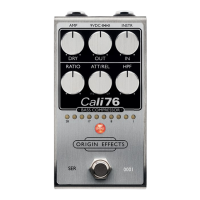
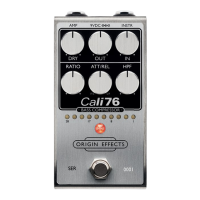
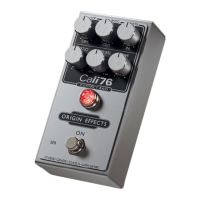
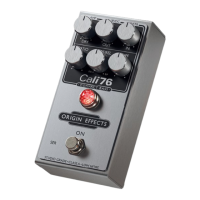
The Cali76 FET Compressor is a high-quality, studio-grade compressor pedal designed to enhance your guitar or instrument's sound. Inspired by the classic UREI® 1176®, this pedal offers a range of controls to shape your dynamics, from subtle evening out to pronounced percussive effects. It's built for musicians who seek precise control over their tone and desire the rich, musical compression characteristic of vintage studio units.

Function Description

The core function of the Cali76 is to apply FET compression to an audio signal. This type of compression is known for its fast attack and release times, often resulting in a punchy and lively sound. The pedal features a comprehensive set of controls that allow users to dial in various compression characteristics, making it versatile for different playing styles and musical genres.

At its heart, the compressor works by reducing the dynamic range of an audio signal. When the input signal exceeds a certain threshold, the compressor kicks in, attenuating the louder parts of the signal. This results in a more consistent output volume, bringing up quieter notes and taming louder peaks. The Cali76 achieves this with a FET (Field-Effect Transistor) circuit, which emulates the discrete circuitry of classic studio compressors, providing a warm and musical compression that avoids the sterile sound sometimes associated with digital alternatives.

One of the key features is its ability to blend the dry, uncompressed signal with the compressed signal. This parallel compression technique is a staple in professional studios, allowing users to retain the natural dynamics and transients of their original signal while still benefiting from the sustain and consistency provided by compression. This blend control is crucial for achieving a natural-sounding compression that doesn't feel overly squashed or artificial.

The pedal also incorporates a sophisticated power supply design. While it accepts a standard 9VDC input, it internally increases the voltage to 24V. This higher internal voltage provides significantly more headroom, which is essential for maintaining signal integrity and preventing clipping, especially when dealing with high-output instruments or when using the pedal with other high-gain effects. This design choice contributes to the pedal's studio-grade performance, ensuring a clean and robust signal path.

A visual feedback system is integrated into the pedal through a 10-LED gain reduction meter. This meter provides an accurate, real-time indication of how much compression is being applied. As the signal exceeds the compression threshold, the LEDs illuminate, showing the amount of gain reduction in decibels. This visual feedback is invaluable for understanding how the compressor is reacting to your playing and for fine-tuning settings to achieve the desired effect. It helps users avoid over-compression and ensures that the pedal is working as intended.

Usage Features

The Cali76 offers a highly interactive and intuitive user experience, despite its powerful capabilities. The controls are laid out clearly, mimicking the interface of classic studio compressors, making it familiar to those with experience in audio engineering, yet accessible to newcomers.

Getting Connected:

To begin using the Cali76, you simply connect your instrument to the "INSTR" input and your amplifier or modeller to the "AMP" output. For power, a standard 9VDC 2.1mm centre-negative power supply (minimum 200mA) is required. The pedal's internal voltage conversion to 24V is automatic, ensuring optimal performance without any additional user intervention.

Controls for Shaping Your Sound:

  • IN (Input Level): This knob controls the signal level entering the compressor. Turning it clockwise increases the input signal, which in turn increases the amount of compression applied. This is a fundamental control for setting the overall intensity of the compression.
  • OUT (Output Level): The "OUT" control determines the overall volume of the compressed signal at the pedal's output. It's used to balance the pedal's output with the rest of your signal chain, ensuring consistent volume whether the pedal is engaged or bypassed.
  • ATTACK: This control dictates how quickly the compressor reacts to an incoming signal once it crosses the threshold.
    • Slower Attack (counter-clockwise): Allows the initial transient (the very beginning of a note) to pass through uncompressed before the gain reduction kicks in. This accentuates the "snap" or "pop" of a note, creating a more percussive and lively feel. It's excellent for emphasizing pick attack or for achieving a punchy sound.
    • Faster Attack (clockwise): Engages the compression almost immediately, catching transients early. This results in a smoother, more "squashed" sound, where the initial attack of notes is softened, leading to a more even and sustained tone. This setting is often used for a more controlled, less dynamic sound.
  • RELEASE: This knob determines how quickly the compressor stops reducing gain after the signal falls below the threshold.
    • Faster Release (clockwise): Allows the compressor to recover quickly between notes. This is ideal for percussive playing, as it ensures that the compressor resets in time for the next note, preventing "pumping" or "breathing" artifacts. It helps maintain clarity in fast passages.
    • Slower Release (counter-clockwise): Keeps the gain reduction active for a longer period. This adds sustain to notes, chords, and lead lines, creating a smoother, more continuous sound. It can also help to prevent the compressor from "pumping" excessively on sustained notes.
  • RATIO: This control adjusts the compression ratio, which defines how much the signal is attenuated once it exceeds the threshold. Turning it clockwise increases the ratio.
    • Minimum Ratio (4:1): For every 4dB the input signal goes over the threshold, the output signal will only increase by 1dB. This provides a gentle, subtle compression, ideal for evening out dynamics without drastically altering the feel.
    • Maximum Ratio (20:1): For every 20dB the input signal goes over the threshold, the output signal will only increase by 1dB. This is a much more aggressive compression, approaching limiting, where the signal is heavily squashed, providing significant sustain and a very controlled dynamic range.
  • DRY (Dry Blend): This unique control allows you to blend the original, uncompressed signal with the compressed signal.
    • Fully Counter-Clockwise: Only the compressed signal is present at the output.
    • Fully Clockwise: Adds 9dB of boost to the dry signal, with unity gain (no boost or cut) at approximately the 2 o'clock position. This parallel compression technique is incredibly powerful. By blending in the dry signal, you can retain the natural attack and dynamics of your instrument while still benefiting from the sustain and consistency of the compressed signal. This helps to achieve a more natural and transparent compression effect, avoiding the overly "squashed" sound that can sometimes result from heavy compression.

Dynamic Control vs. Percussive & Lively Settings:

The manual highlights two primary approaches to using the Cali76, demonstrating its versatility:

  • Dynamic Control: For a natural sound that balances playing dynamics, you would typically use a fast attack time to catch transients early and a slower release time to prevent pumping. This setting helps to even out your playing without making it sound overly compressed, maintaining a natural feel.
  • Percussive & Lively: To accentuate the start of notes and create a more percussive feel, a slower attack time is recommended. This allows the initial transient to punch through. A fast release time then lets the compressor recover quickly between notes, ensuring that phrases sound more distinct and lively.

Metering:

The 10-LED gain reduction meter is a crucial tool for understanding and setting the compressor. It visually displays the amount of gain reduction in decibels (28, 24, 20, 17, 14, 11, 8, 5, 3, 1 dB). When the signal exceeds the threshold, the LEDs light up, indicating how much your signal is being compressed. This allows for precise adjustments and helps in achieving the desired compression level without relying solely on your ears, which can sometimes be deceptive.

Experimentation Tip:

The Cali76 is designed to deliver natural-sounding compression even with high levels of gain reduction. Users are encouraged to experiment with a wide range of settings to discover the full potential of the pedal and find the perfect tone for their specific needs.

Maintenance Features

The Cali76 is designed as a robust and reliable pedal, typical of high-quality stompboxes. While specific maintenance instructions are not detailed in the provided excerpts, general best practices for guitar pedals apply:

  • Power Supply: Always use the specified 9VDC centre-negative power supply with a minimum current rating of 200mA. Using an incorrect power supply can damage the pedal. The internal voltage conversion to 24V is automatic and requires no user maintenance.
  • Connections: Ensure all cables (instrument, amplifier, power) are securely connected. Loose connections can lead to signal loss or unwanted noise.
  • Cleaning: Keep the pedal clean and free from dust and debris. A soft, dry cloth is usually sufficient for cleaning the enclosure and knobs. Avoid using harsh chemicals or abrasive materials.
  • Environment: Store and operate the pedal in a dry environment, away from extreme temperatures and humidity, to prevent damage to the electronic components.
  • Firmware/Software: As a purely analog pedal, the Cali76 does not require any firmware updates or software maintenance. Its performance is consistent and relies on its robust analog circuitry.
  • Durability: The pedal features a sturdy metal enclosure and high-quality components, designed to withstand the rigors of live performance and studio use.

For comprehensive information, users are directed to the full owner's manual available on the manufacturer's website, www.originfx.com. This suggests that any detailed troubleshooting or advanced maintenance procedures would be covered there. The emphasis on "studio-grade" implies a design built for longevity and consistent performance, minimizing the need for frequent maintenance.

Origin Effects Cali76 Fet Compressor Specifications

General IconGeneral
TypeFET Compressor
Power Source9V DC
BypassTrue Bypass
Ratio Range4:1 to 20:1
Input Impedance1MΩ
Output Impedance1kΩ
ControlsInput, Output, Ratio, Attack, Release
Release Range50ms

Related product manuals