I.Product Overview
This product is a HD vehicle travelling video recorder which supports FHD 1080P camera shooting
and has a clear night view effect. It is mainly used for car-borne video recording. Please read this
manual carefully prior to use and keep it properly. We hope this product can satisfy your need
and serve you for long!
II. Product Structure and Description
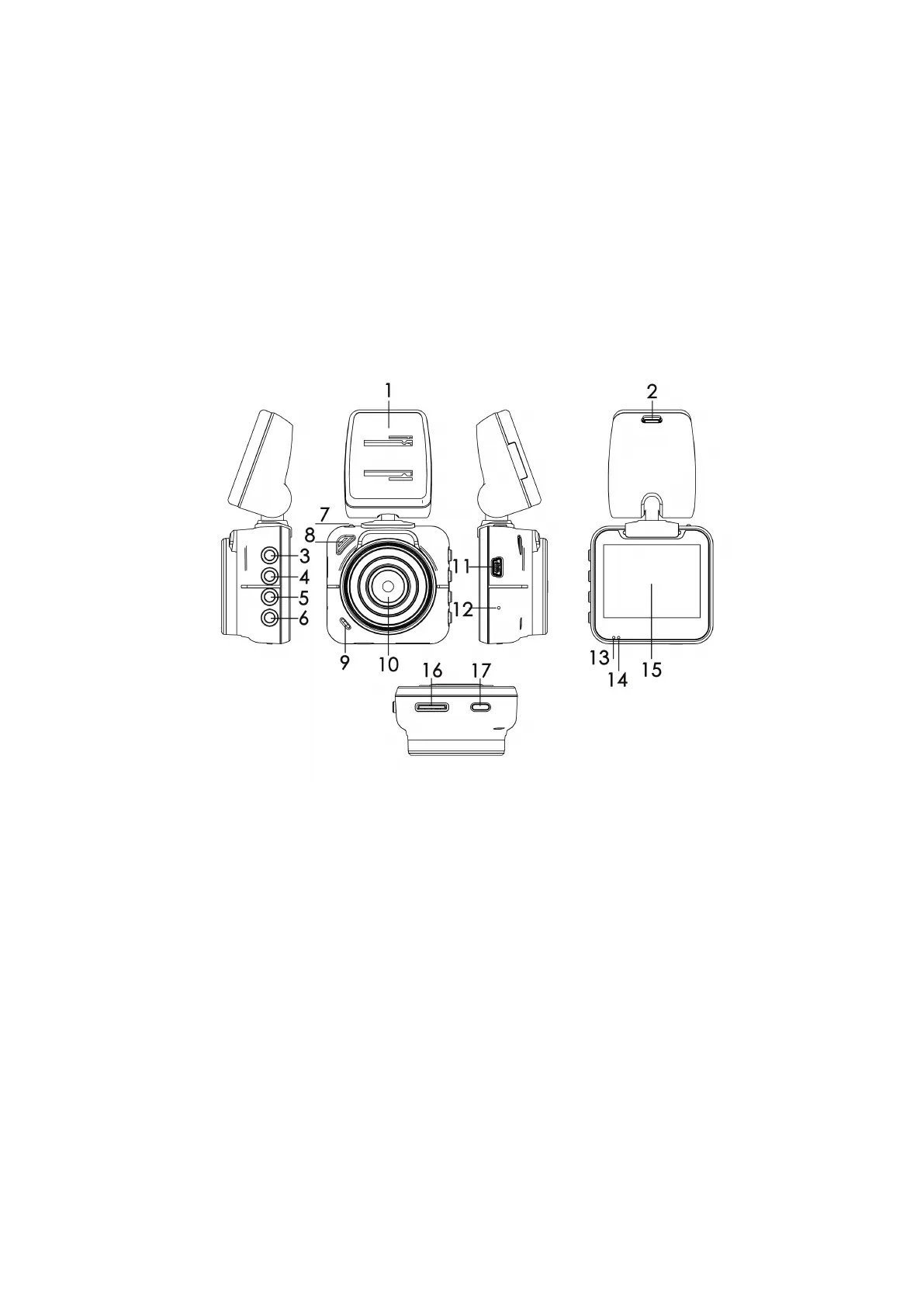
1. Bracket 2. Car charger interface 3. Menu key 4. Up key 5. Down key
6. OK key 7. Bracket lock 8. Speaker 9. MIC 10. Camera Lens
11. USB 12. Reset key 13. Video indicator light (blue) 14. Charging indicator
light(red) 15. Display screen 16. Micro SD(TF) card slot 17. Power key
Power key: In power off mode, press and hold it for 3 seconds to turn on the unit, press and hold
it again for 3 seconds to turn off the unit. In power on mode, press it to turn off/on the screen.
Menu key: In video recording mode or standby mode, press it to enter main menu; in video
playback or photo playback mode, press and hold it to enter “ File Management” menu; in
submenu directory, press it to return to the previous directory.
Up key: In function selection, system settings and file selection, press it to select upward; in video
recording mode, press it to turn off/on sound recording.



 To Next Page