ID: 1745 / ver. 201
Narrow band masking
Perform the same adjustment for narrow band masking levels, as for the telephones.
Adjustment of the mono insert telephone
The mono insert phone should be adjusted to the same levels as the normal telephones. The procedure
is the same as for the telephones. Use the output 2 output selector to select the mono insert phone.
Calibration of insert phones requires a special acoustic coupler, for example the Brüel & Kjær DB-138
2cc coupler.
Adjustment of the free field speaker
The calibration of tone to the free field speaker is the same on the audiometer, as for the telephones.
The only difference is that the audiometer automatically enables the warble tone when free field is
selected. This is to give some compensation for the reflections from the test room, so that the physical
speaker and microphone position doesn’t affect the sound level too much. Refer to the free field
calibration manual for a more detailed description of this. The warble tone may be enabled or disabled
by means of the WARBLE button, while in calibration mode 3.
Hearing level table for free field
125
250
500
750
1000
1500
2000
3000
4000
6000
8000
22
11
4
3
2
0
-1.5
-4
-6.5
2.5
11.5
Hearing level offsets (mode 4)
If, for some reaon, it is desired to change the hearing level offsets for the different transducers, it is
done in this calibration mode. When in this mode, no sound is output, it is only a mode to change and
view the hearing level offsets used to subtract when calibration in mode 3 is performed. The changes
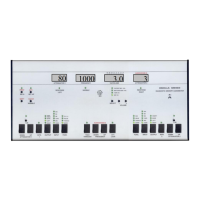
are done using the same procedure as when calibrating. Use the frequency keys to change frequency,
the output 1 and 2 selectors to choose transducer, and attenuator 1 to adjust the selected hearing level
offset. It is recommended to check the numbers in mode 4 to make sure they correspond to the
hearing level standard in use, before performing a mode 3 calibration. The values shown when selecting
insert with the channel 2 output selector, are used for stereo insert phones too.
5. SENSOR CORRECTIONS (mode 5)
It is possible to add corrections for the calibration microphone(Artificial Ear) and Bone mastoid. But as
default the function is disablet.
Ending calibration
All adjustments are stored while they are made, in a non-volatile memory. To exit adjustment mode,
press the 'DATA' key, or simply turn off the power.

 To Previous Page
 Loading...