ID: 1745 / ver. 201
Due to tolerances of the transducers and the hardware, it is necessary to adjust the audiometer’s output
signal to the correct level. The adjustment is done with the telephones, bone conductor, insert phones
and freefield speaker the audiometer is used with. If one of the transducers is replaced, the audiometer
should be adjusted again, with the new transducer. Adjustment of tone should be done through a
bandpass filter, which is set to the frequency that is adjusted. Adjustment of masking is done without
bandpass filter. Before entering the calibration mode, connect a tone generator to the TAPE input,
select the TAPE input on channel 1 and turn up the tone generator’s output level to the point just
where the 0 dB bar in the VU display turns on. The tone generator’s frequency should be 1000 Hz, sine
wave.
To enter the calibration mode, do the following:
Turn off the audiometer.
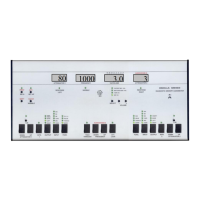
Press and hold down the keys 'ATTENUATOR DOWN', 'INTR.' and 'FUNC.' on channel 1.
Turn on the power and wait for approx. 2 second. Release the three keys again.
The 'response' lamps will flash 5 times, and stay on. The VU display will show 'CALIBRATION', and
then 'GAIN CONSTANT'. The audiometer is now in calibration mode.
There are five calibration modes:
1: GAIN CONSTANT
2: INPUT
3: OUTPUT
4: LEVEL OFFSETS (RETSPL)
5: SENSOR CORRECTIONS (Default, not in use)
Use the channel 2 attenuator to choose between the four modes. The calibration mode number is
shown in the right display. Calibration must be done in sequence 1, 2, 3. Mode 4 is not really a
calibration, but sets and displays the current hearing level standard for the different transducers.
INPUT adjustment (mode 2) Gain Constant(mode 1) Output adjustment(mode 3)
Insert
FF
BONE
LEFT
RIGHT

 To Next Page
 Loading...