ID: 1745 / ver. 201
Adjust sound level:
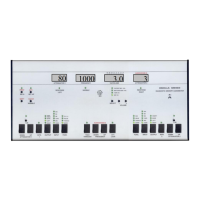
Adjustment of sound level is done at 80 dB, as default. However, if another calibration level is desired,
it may be changed by holding down the SHIFT button while pressing the channel 1 attenuator keys.
The actual calibration is done with the attenuator keys, without holding SHIFT. When calibrating, a dB
udstyrnumber is shown in the VU display. This is the calibration offset for the selected frequency and
transducer, and is changed in 0.5 dB steps. Because the hearing levels set in mode 4 are subtracted here
in calibration mode, the output levels should be set to the same level (e.g. 80 dB) at all frequncies. This
makes it faster and more practical to calibrate, because you don’t have to change the sensitivity of the
calibration equipment for each frequency. Use the frequency keys to change frequency, and the output
2 output selector to change between left and right channel.
The audiometer has RETSPL values for two telephone types, the TDH39 and the DD45. To select
which one is used, press the “ATT. LOCK” button. This will toggle between the two types, and display
the type selected.
Freequency corrections on/off
Output selection(Left/Right/Bone/Insert)

 To Next Page
 Loading...