
 Need help?
Do you have a question about the OSHIMA OP-1200 and is the answer not in the manual?
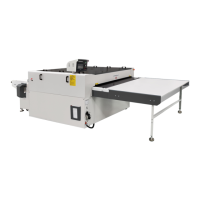
This document describes the OSHIMA Continuous Fusing Press Machine, a low-temperature continuous fusing press machine designed for bonding fabrics.
The OSHIMA Continuous Fusing Press Machine is used for continuously bonding interlining to fabric at low temperatures. It features a cooling system to ensure optimal bonding effects and prevent damage from high heat. The machine is equipped with a control panel that allows users to adjust various parameters such as temperature, speed, and pressure. It also includes safety features like a main power switch and a belt warping prevention system.
The machine comes in three models: OP-1200/L, OP-1400/L, and OP-1600/L, with varying fusing widths.
| Specification | OP-1200/L | OP-1400/L | OP-1600/L |
|---|---|---|---|
| Power supply | 3P 220V/380V | 3P 220V/380V | 3P 220V/380V |
| Heater | 21.6 kW/24kW | 26.4 kW/28.8kW | 28.8kW/33.6kW |
| Main motor | 0.4 kW | 0.4 kW | 0.4kW |
| Max temperature | 230°C | 230°C | 230°C |
| Max pressure | 0.5M pa | 0.5M pa | 0.5M pa |
| Fusing time | 7-34sec | 7-34sec | 7-34sec |
| Fusing width | 1200mm | 1400mm | 1600mm |
The electrical circuit includes a power circuit with specifications of 310mm+16mm and a control circuit with 2.5mm² wiring. It utilizes various electrical components such as circuit boards, inverters, magnetic contactors, time relays, solid relays, micro switches, and a speed controller. The machine also incorporates a cylinder for pressure application and an air released valve.
Before operation, users are instructed to read the manual carefully.
Starting the machine:
Temperature setting:
Speed and pressure adjustment:
Cooling system:
Shutting down:
Proper maintenance is crucial for the longevity and optimal performance of the machine.
Leveling: Ensure the machine is level before operation, especially after initial installation or relocation, to prevent belt deviation or uneven pressure.
Cleaning:
Lubrication:
Interlining placement: When fusing, ensure the interlining is slightly smaller than the fabric, and the entire interlining width does not exceed the belt width. Otherwise, it may affect bonding, cause belt deviation, or stop the machine.
The manual provides a detailed troubleshooting guide for various issues:
Power and Motor Issues:
Temperature Control Issues:
Belt Issues:
Temperature Controller Abnormality:
The manual provides detailed, numbered steps for replacing the belt, including disassembling and reassembling various components such as cover plates, side shields, main beams, main shafts, tension rollers, and microswitches. It emphasizes the importance of maintaining a 10CM gap when supporting the belt and ensuring the correct rotation direction (counter-clockwise for the upper belt) during installation. It also advises having two to four people for certain steps involving lifting and positioning the belt and support beams. After replacement, it is crucial to check for foreign objects, run the machine slowly to check for belt deviation, and adjust microswitches or front correction rollers if necessary.
 General
| Brand | OSHIMA |
|---|---|
| Model | OP-1200 |
| Category | Industrial Equipment |
| Language | English |

 To Next Page