4. IP Settings
Router Mode
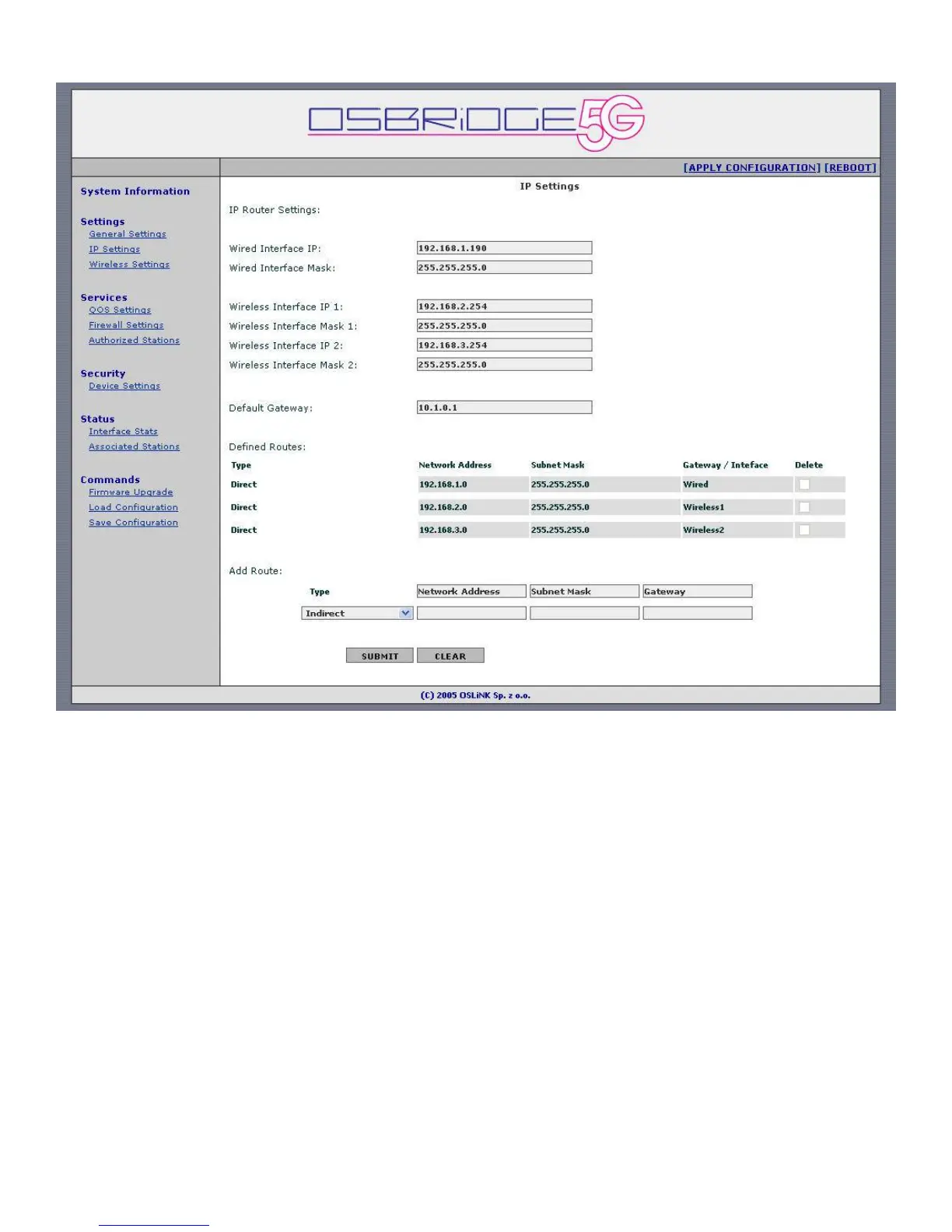
Wired Interface IP – Enter IP address of the wired interface here.
Wired Interface Mask – Enter wired network subnet mask here.
Wireless Interface IP x – Enter IP address of the wireless interface here.
Wireless Interface Mask x – Enter wireless network subnet mask here.
Default Gateway – IP address of a router where traffic not destined for defined routes / local
routes will be forwarded.
Defined Routes – This table displays currently defined static routes. To delete a route select
"Delete" checkbox and press Submit on the bottom of the page. Please note that it is not
possible to delete first two entries – direct routes to local interfaces.
Add Route:
Direct – Wired/Wireless - When router has two or more IP subnets directly attached to
its different interfaces, it can route IP packets between those subnets using a direct route.
A direct route consists of an IP Address which specifies the basic IP address to route, a
Subnet Mask which defines the class of IP addresses that will be routed, and an interface
which specifies where the IP subnet is attached. When an IP packet addressed to a
system on the directly routed subnet arrives at the router, the router will send it directly
to the target machine on the interface specified. When entering direct route use 0.0.0.0
as Gateway.


 To Next Page
 Loading...