

EasyManua.ls Logo

Osmo gf22 - User Manual

Osmo gf22
8 pages
Print Icon
To Next Page IconTo Next Page
Loading...
Question and Answer IconNeed help?

Do you have a question about the Osmo gf22 and is the answer not in the manual?

Summary

Preparation and Power On

Preparation Before Use

Prepare a 2G GSM SIM card, deactivate PIN, activate GPRS and caller ID for the tracker.

Turning the Device On

Insert the nano SIM card and long press the power button for 3 seconds to turn on the tracker.

Device Operation and Commands

Logging into the Account

Use the 15-digit IMEI as Login ID and 123456 as password for the 365GPS app.

Understanding LED Indicator Lights

Learn the meaning of Red, Yellow, and Blue LED lights for battery, GSM, and GPS status.

SMS Commands for Device Control

Utilize various SMS commands for functions like voice recording, alerts, and settings.

Action Requests via SMS

Send specific SMS commands for IMEI application, password reset, factory settings, and more.

Specifications and FAQs

Parameters and Specifications

Details on model, material, size, battery, power input, communication frequency, and positioning modes.

Frequently Asked Questions

Answers common questions about using the GPS tracker, including SIM card setup and app usage.

Troubleshooting and Advanced Usage

Troubleshooting LED Status

Diagnose issues when the yellow LED remains on or flashes, and understand device connection status.

Device Offline and APN Settings

Resolve 'offline' display issues by checking SIM card compatibility and configuring APN settings via SMS.

Voice Monitoring Setup

Learn how to set up and use voice monitoring features through the APP or SMS commands.

Advanced Features and Management

Using Voice Recorder

Instructions for using the voice recorder via the mobile app or SMS commands.

SMS Coordinates and Tracking

How to get location data via SMS commands when not using the mobile application.

Managing Multiple Devices

Guide on creating an account group to manage multiple 365GPS devices simultaneously.

Overview

The Osmo GPS Tracker is a compact, plastic device designed for personal protection and location tracking. It operates using a 2G GSM network and offers various tracking and monitoring features.

Function Description:

The Osmo GPS Tracker's primary function is to provide real-time location tracking. It utilizes a combination of GPS, LBS, and WIFI for positioning, ensuring accuracy even in areas with limited GPS signal. The device requires a Nano SIM card with 2G GSM network compatibility and GPRS service activated. Once set up, users can track the device's location via the 365GPS mobile application or by sending SMS commands.

Key functionalities include:

  • Real-time Tracking: Provides current location data through the 365GPS app.
  • Voice Monitoring: Allows users to listen in on the surroundings of the tracker by calling the SIM card number or setting up a callback via the app.
  • Voice Recording: The device can record audio for 10-15 minutes, either manually through the app or automatically when voice is detected.
  • SOS Function: A dedicated SOS button allows the user to send an alert to pre-set emergency numbers.
  • Vibration Alarm: Can be configured to send SMS alerts for vibration detection or incoming calls.
  • SMS Location Request: Users can send an SMS command to receive a Google Maps link of the device's location.
  • Remote Control: Various settings can be adjusted remotely via SMS commands, such as turning LEDs on/off, setting recording intervals, and restarting the device.
  • Multi-device Management: The 365GPS app allows users to manage multiple trackers under a single account group ID.

Important Technical Specifications:

  • Model: Osmo GPS Tracker
  • Material: Plastic
  • Dimensions: 2.6 x 1.3 x 4.3 cm
  • Battery: Integrated rechargeable 5V 350mAh
  • Color: Black
  • Power Input: 5V
  • Communication Frequency: 850/900/1800/1900MHz (2G GSM network)
  • Positioning Mode: WIFI + LBS + GPS
  • Working Temperature: -20 to 85 °C
  • Login ID: 15-digit IMEI number
  • Default Password: 123456

Usage Features:

  • SIM Card Requirement: A Nano SIM card compatible with 2G GSM network is essential. It must be activated for 24 hours if new, and its PIN code must be turned off. GPRS service and caller ID must be enabled on the SIM card.
  • Power On/Off: Long press the power button (black button next to the SIM card slot) for 3 seconds to turn on. To turn off, long press for 10 seconds with a SIM card, or 3 seconds without a SIM card.
  • LED Indicators:
    • Red LED: Indicates battery status (slowly flashing for normal, quickly for low, off when charged).
    • Yellow LED: Indicates GSM signal (slowly for normal, fast for searching).
    • Blue LED: Indicates GPS status (slowly for normal, fast for searching, off when GPS is clear without a SIM).
  • APP Usage: Download the "365GPS" app. Log in using the device's 15-digit IMEI number as the Login ID and "123456" as the password. The app provides a user-friendly interface for tracking, monitoring, and setting various functions.
  • SMS Commands: A comprehensive set of SMS commands allows for remote configuration and control of the tracker, including:
    • 000#Number#Number#Number#: Connects three phone numbers.
    • 111: Starts 10-minute TF card voice recording.
    • 222: Pauses 10-minute TF card voice recording; automatically records for 10 minutes when voice is detected.
    • 333: Activates voice-controlled callback to connection numbers.
    • 444: Deletes all memory content.
    • 555: Turns off all functions.
    • 666: Sends vibration alarm SMS to the link number.
    • 777: Sends vibration alert for calls to extensions.
    • 888: Plays recordings in memory (requires a speaker).
    • 999: Sends vibration alert for calls to extensions.
    • imei#: Requests the IMEI number.
    • pwrst: Resets default password.
    • 1122: Restores factory settings.
    • time#minute: Sets recording interval (1-120 minutes).
    • md#second: Sets recording interval (10-60 seconds).
    • LED#on / LED#off: Controls LED lights.
    • APN#parameter#account#password#: Sets APN parameters.
    • sysrst: Remote restart.
    • 6666#on# / 6666#off#: Controls vibration alert.
    • domain # IP # Port ID #: Edits IP address.
    • heartbeat#No.#(no.=second): Sets heart time package.
    • Monitor # your mobile number #: Sets voice monitoring number.
  • Open Air Test: Performing an initial test in an open-air environment helps the device acquire a strong GPS satellite signal and achieve accurate positioning.

Maintenance Features:

  • SIM Card Management: Ensure the SIM card is properly inserted and firmly connected. If the yellow LED flashes quickly, it might indicate an APN setting issue, which can be resolved by sending an SMS command to set the APN.
  • Battery Charging: The red LED indicates battery status, prompting users to charge the device when necessary. The LED will disappear once fully charged.
  • Troubleshooting: The manual provides guidance for common issues, such as the yellow LED remaining on (SIM card compatibility, proper insertion, PIN code removal) and the device showing "offline" in the app (Chinese address is normal, SIM card compatibility, PIN code removal, APN settings).
  • Factory Reset: The 1122 SMS command allows users to restore the device to factory settings if needed.
  • Remote Restart: The sysrst SMS command enables a remote restart of the device, which can help resolve minor software glitches.

The Osmo GPS Tracker is designed for ease of use and offers robust tracking capabilities, making it a reliable tool for personal safety and monitoring. Users are advised to be aware of and comply with national laws and regulations regarding the use of such devices. For support or further assistance, users can contact support@osmo-official.net.
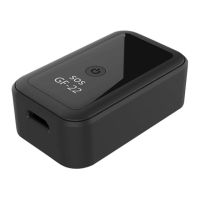
Osmo gf22 Specifications

General IconGeneral
BrandOsmo
Modelgf22
CategoryGPS
LanguageEnglish