
 Need help?
Do you have a question about the Ossur RHEO KNEE and is the answer not in the manual?
Instructions to power on the device using the ON/OFF button, confirmed by beeps and a pulsing green light.
Instructions to power off the device by holding the ON/OFF button until specific beeps are heard.
Guide to connect the Rheo Knee to the app by using the serial number for pairing.
Instructions on how to find the device's serial number, typically located on the back of the knee joint.
Overview of the app's main functionalities including battery level, profiles, exercises, and step count.
Steps for charging the Rheo Knee via the user interface panel, including charging times and battery life.
Describes critical power level warnings via sound and vibration, and actions to take if power is lost.
Details low battery indicators, including short sounds, orange light flashes, and critical low battery signals.
Explains that the knee is weatherproof but not for submersion, and precautions against salt/chlorinated water.
Instructions on how to fully straighten the knee before locking and how to unlock the mechanism.
Describes how to gently flick the knee into extension to hold it for a short period.
Guidance on cleaning the knee with a damp cloth, mild soap, or isopropyl alcohol and drying thoroughly.
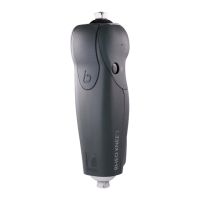
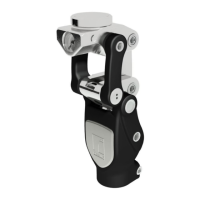
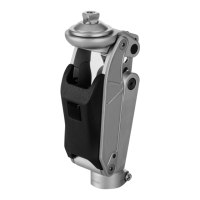
The Össur Rheo Knee is a prosthetic knee joint designed to provide stability and support for individuals with lower limb amputations, enabling them to navigate various terrains and activities with greater confidence. It incorporates advanced technology to mimic the natural movement of a human knee, offering a more intuitive and responsive experience for the user.
The Rheo Knee is an intelligent prosthetic device that utilizes sensors and microprocessors to continuously monitor and adapt to the user's movements and environment. This allows for dynamic adjustments in resistance and support, providing stability during stance and a smooth, controlled swing phase during walking. The knee is designed to offer a high degree of safety and comfort, reducing the risk of falls and minimizing energy expenditure for the user. It is equipped with a rechargeable battery that powers its electronic components, ensuring continuous operation throughout the day. The device also features auditory and vibratory warnings to alert the user to critical power levels or other important information, enhancing safety and user awareness.
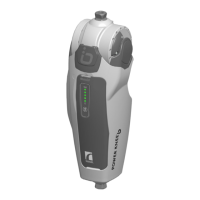
Turning On and Off: To power on the Rheo Knee, the user simply presses the ON/OFF button. A two-beep confirmation indicates that the device is active, and a pulsing green light on the user interface panel will illuminate. To turn off the device, the ON/OFF button must be pressed and held until four short beeps and one long beep are heard, after which the light indicator will also turn off.
App Connectivity: The Rheo Knee can be connected to a dedicated mobile application, which enhances its functionality and allows for personalized settings. To pair the device with the app, the user will be prompted to enter a six-digit pairing code, which corresponds to the last six digits of the knee's serial number (found on the back of the knee). The app provides an overview of the device's status, including battery level, and allows users to assign profiles, access training exercises, and monitor step count. A QR code is provided in the manual for easy access to more details about the app.
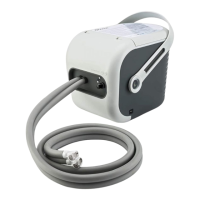
Charging: The Rheo Knee is charged by inserting the charger cable into the charging port on the user interface panel. The device can be charged whether it is turned on or off. A full charge takes approximately three hours, with 90% charge achieved in about 1.5 hours. A fully charged battery provides 48-72 hours of continuous use, depending on activity levels. Daily charging is recommended for optimal performance, and the device cannot be overcharged.
Manual Knee Lock: For enhanced stability and safety, the Rheo Knee includes a manual knee lock. To engage the lock, the knee should be fully straightened before pushing the manual lock into a locked position. To unlock it, the user simply presses the button back in the opposite direction.
Extension Hold: The Rheo Knee offers an extension hold feature, which can be activated by gently flicking the knee into extension and then pulling back slightly. The knee will remain in this extended position for up to five seconds, or until weight is put onto it. A QR code is available in the manual to demonstrate how to activate this feature.
Warnings: The device provides auditory and vibratory warnings to alert the user when power levels reach critical thresholds. If the device loses power, it will lose its ability to provide stance support, and it is recommended to manually engage the integrated extension lock to secure the knee in full extension. Battery warnings include a repeating warning pulse (a short sound every 15 seconds and an orange light flash) when the battery is low. When the battery is critically low, a buzzing, vibrating sensation and a flashing red light will signal an imminent shutdown after five seconds.
Weatherproof Design: The Rheo Knee is designed to be weatherproof, meaning it can withstand exposure to some environmental elements. However, it is not intended for submersion in large amounts of water or other fluids.
Cleaning: The device is not resistant to corrosion, so it should not come into contact with salt or chlorinated water. If it does come into contact with these substances, or with sand or dust, it is important to clean the knee with a damp cloth and allow it to dry completely before further use. For general care, the knee can be cleaned with a damp cloth and mild soap or isopropyl alcohol when needed. After cleaning, the product should be dried fully with a lint-free cloth.
Environmental Considerations: The Rheo Knee is suitable for use in most environments, but it should not be immersed in water or other fluids. Additionally, it should not be exposed to highly electrical and/or magnetic fields, such as those found near CT and MRI scanners.
 General
| Power Source | Rechargeable Lithium-Ion battery |
|---|---|
| Weight Limit | 125 kg (275 lbs) |
| Features | Adaptive stance and swing phase control, real-time gait adaptation, stumble recovery |
| Stance Extension Lock | Yes |
| Compatibility | Compatible with various prosthetic feet and sockets |
| Type | Microprocessor-controlled prosthetic knee |
| Swing Phase Control | Real-time adaptive |
| Stance Phase Control | Real-time adaptive |




 To Next Page