English-9
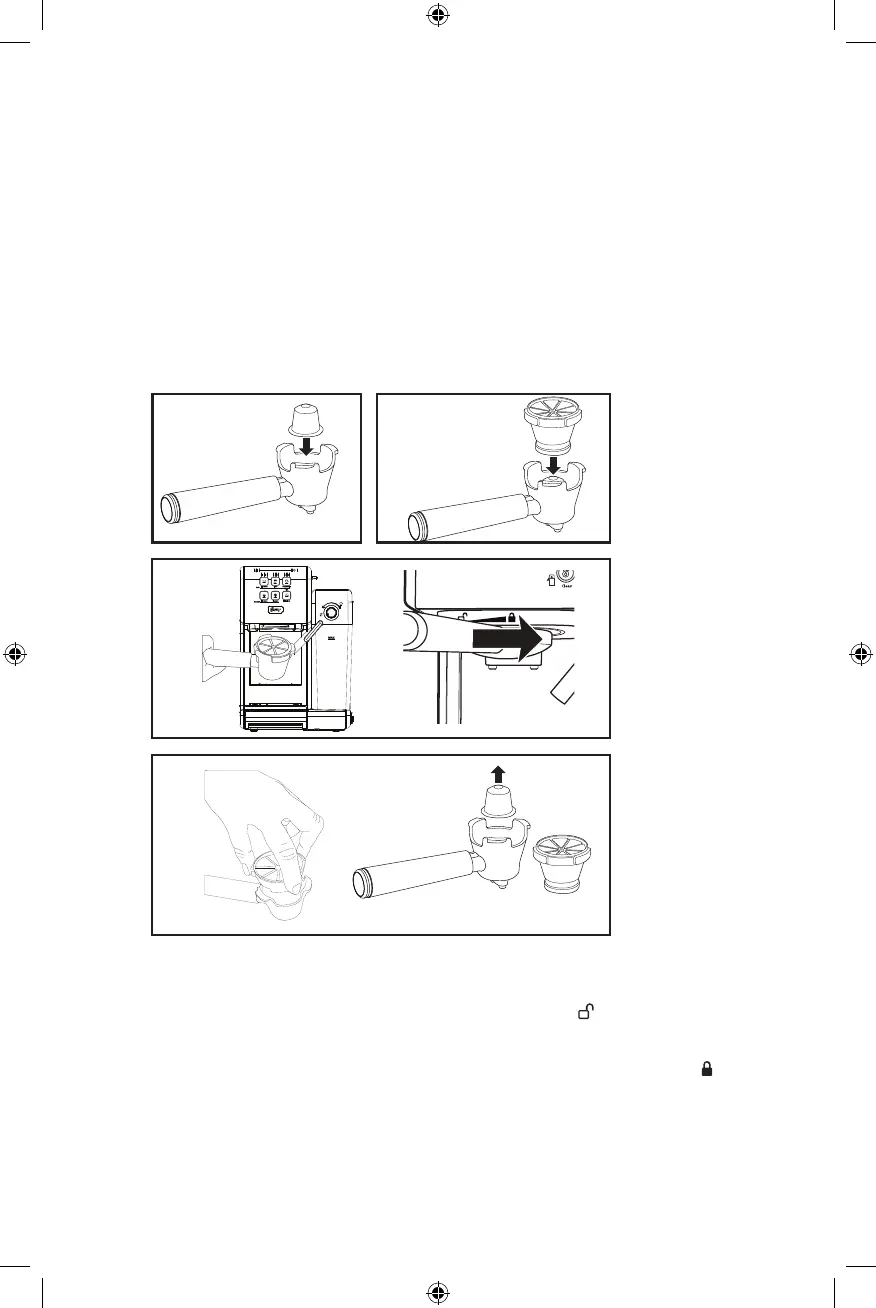
USING THE PORTA-FILTER FOR ORIGINAL NESPRESSO
®
* CAPSULES & OTHER
COMPATIBLE ORIGINAL NESPRESSO CAPSULES.
a. Select a capsule and place inside the portalter.
b. Place the capsule holder into the portalter and align by using the 3 tabs and press down to
secure capsule.
c. Once nished, insert the porta-lter into the machine.
d. After brewing, carefully remove the used pod by grabbing the adaptor for the portalter from
the 3 tabs. Take care when removing the used capsule as the metal parts may be hot.
NOTE: Be careful when taking out the capsule as hot water might be left on the top of the
portalter holder. Discard carefully.
a. b.
c.
d.
PLACING THE PORTA-FILTER
a. Position porta-lter underneath the brew head.
b. Position handle so that the handle lines up with the open lock icon “ ” on the unit and ts into
the groove.
c. Then, slowly turn it to the right until the handle is aligned with the closed lock symbol “ ” on
the unit.
CAUTION: Ensure you do not accidentally press a drinks button.
BVSTEM6801_22SEPM1 (LA).indd 9BVSTEM6801_22SEPM1 (LA).indd 9 2022/6/6 9:53 AM2022/6/6 9:53 AM


 To Next Page