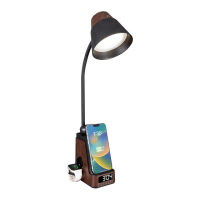
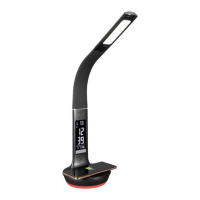
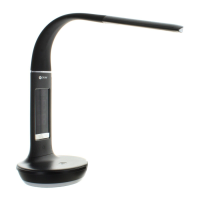
ENGLISH LED Desk Light with Multi Charging Station
LED Desk Light with Multi Charging Station
CSVQCG5Z-CA CSVQC02Z-CA 3703705 OT33H
INS-24-0782
REV031224
CONGRATULATIONS! You’ve purchased the nest in natural lighting technology with your new
OttLite
®
product.
WARNING: To prevent electric shock, make sure the lamp is not plugged in until all steps
are complete.
NOTE: THIS UNIT IS FULLY ASSEMBLED
1. Remove lamp from packing, placing lamp body base (A) at on a steady surface.
2. Connect power adapter input (J) into connector (K) in the rear-bottom of the lamp.
3. Plug the power adapter (L) into a standard household 120V outlet. Note: Only use with
the supplied power adapter to avoid damage or re. When lamp is rst plugged in
and receives power, green lights (S & V) will illuminate momentarily and a beep sound
will occur, indicating that a proper electrical connection is made.
4. Power switch (B) is a “touch” switch that controls ON/OFF power, the LED brightness
settings and the colour mode function of the lamp.
5. To power the main light, slightly touch the switch (B) to achieve the following:
• Turn lamp “ON” to 1st brightness setting; touch the switch “once”;
• for 2nd brightness setting; touch the switch “two-times”;
• for 3rd brightness setting; touch the switch “three-times”;
• to turn lamp “OFF”; touch the switch “four-times”.
6. This lamp provides three colour modes. To adjust lighting colour mode slightly “press
and hold” switch (B) for three seconds to switch light colour temperature mode; 5000K,
2700K, 4000K.
7. To reposition the light, hold the lamp base (A) steady and grasp either lamp body (H) or
shade (F) depending on needed adjustment.
8. Refer to Diagrams 1 and 2 for lamp maximum adjustment range. NOTE: DO NOT FORCE the
shade outside the allowable adjustment range as excessive adjustment may cause damage.
REFER TO THE FOLLOWING ICON LEGEND), AS IT PERTAINS TO THE INSTRUCTIONS
FOR VARIOUS SETTING FUNCTIONS BELOW.
“SETTING BUTTON” (C) – to set time, date. and alarm.
ˆ
“UP BUTTON” (D) – In setting mode, push to increase.
ˇ
“DOWN BUTTON” (E) – In setting mode, push to decrease.
CLOCK SETTING:
• When in Normal Mode and time is displayed, press and hold “SETTING BUTTON” to
enter Setting Mode, press “SETTING BUTTON” again for next setting. The sequence of
setting is: 12 HR or 24 HR Mode, HOUR - MINUTE
• Press
“SETTING BUTTON” to quit setting, or it will automatically quit to Normal Mode if idle.
CALENDAR SETTING:
•
Press “SETTING BUTTON” to display date. When date is displayed (i.e. 501 for May 1),
press and hold the “SETTING BUTTON” to adjust the date. The sequence of setting is:
YEAR – MONTH - DAY.
• When in Normal Mode, the date can also be displayed by pressing the “UP BUTTON.”
The date will automatically quit to Normal Mode if idle.
• Press
“SETTING BUTTON” to quit setting, or it will automatically quit to Normal Mode if idle.
ALARM SETTING:
• Press
“SETTING BUTTON” twice to display A1. Once the alarm is displayed, press and hold
the “SETTING BUTTON” to adjust the alarm time.
• The sequence of setting is: HOUR – MINUTE
• Press
“SETTING BUTTON” to quit setting, or it will automatically quit to normal mode if idle.
TURNING ALARM ON AND OFF
• To turn ON the alarm, Press “SETTING BUTTON” twice to display A1. Press “UP BUTTON”
to turn alarm ON and OFF. When alarm is enabled, the left two characters on the display
will switch from “
--
” to
“
on
”
and an “Alarm Clock” icon will appear on the display.
• Press
“SETTING BUTTON” to quit setting, or it will automatically quit to normal mode if idle.
• When the alarm sounds, press any of the buttons to turn off the alarm. The alarm will
automatically shut off within 10 minutes if buttons are not pressed.
• Snooze feature is not provided.
ADJUST CLOCK DISPLAY BRIGHTNESS
• To adjust the clock display brightness, press “DOWN BUTTON”.
There are 4 settings:
OFF, L1, L2, L3.
WIRELESS CHARGING INSTRUCTIONS:
Wireless charging requires a Qi-certied device. To determine if your device is
Qi-certied, please visit the Wireless Power Consortium website.
Wireless charging area (M) is for mobile phones. Wireless charging (N) can be used for earbuds.
To wirelessly charge a device, perform the following:
• Place the device face up on the middle of the wireless charging area (M) or (N).
• When the device is centered on the wireless charging areas (M) or (N), solid RED lights (S)
or (V) respectively will come on noting charging mode active. Your device should show
charging is taking place.
• Check charge level on your device periodically to determine when device is fully charged
NOTE: Product DOES NOT provide any indication of when device is fully charged.
CAUTION! Device may become warm during charging. This is normal and part of the
process. Charging times vary by device.
WATCH CHARGING STAND INSTRUCTIONS:
• To charge a watch, a wireless watch charger will need be provided (not included)
.
• Remove cover (T) and insert the watch charger cable into the slot located by watch stand (P).
Guide the cable through so it ts inside the compartment. If the watch charger doesn’t t
securely into the watch stand, use one of the two silicone covers provided before placing into
watch stand (P).
• Connect wireless watch charger with USB-A or USB-C connector into appropriate port (Q)
or (R) and replace cover (T).
NOTE: Check the device periodically to determine if device is fully charged, as lamp
DOES NOT give any indication of when the device is fully charged.
NOTE: USB ports (Q) and (R) are rated 5V, 1A and can be used to charge items such as
smartwatches, tablets, cellular phones, etc. Only one USB port will function at a time with
priority going to the rst one plugged in.
SAFETY WARNING: TO REDUCE THE RISK OF FIRE, ELECTRIC
SHOCK, OR INJURY TO PERSONS
1. Turn lamp off and WAIT UNTIL LAMP HEAD (F) IS COOL before handling.
2. The LED panel (G) might get hot after several hours of continuous use DO NOT place your
hands directly on LED light panel.
3. Never use with an extension cord unless the plug can be fully inserted into the
receptacles in the extension cord.
4. Do not alter the plug.
5. The lamp head included with this unit cannot be replaced by the consumer.
6. INDOOR USE ONLY.
NOTE: The important safety instructions appearing in this instruction sheet are not meant
to cover all possible conditions and situations that may occur. It must be understood that
common sense, caution, and care must be used with any electrical product.
BATTERY REPLACEMENT
• This lamp uses a CR2032 battery. For battery replacement see diagram. Battery
compartment is located on the underside of lamp base (A), and inside battery
compartment cover (U).
• To remove/install button cell battery: use a screwdriver to remove battery compartment
door (O). Button cell battery is to be installed with the “+” or at side facing upward.
BATTERY DISPOSAL:
Battery disposal should be in compliance with local regulations
pertaining to the disposal of hazardous materials. DO NOT INCINERATE.
SAFETY WARNING:
• CAUTION: DO NOT INGEST BATTERY; CHEMICAL BURN HAZARD!
• Remove and immediately recycle or dispose of used batteries according to local
regulations and keep away from children. Do NOT dispose of batteries in household
trash or incinerate. Even used batteries may cause severe injury or death.
• Call a local poison control center for treatment information.
• Non-rechargeable batteries are not to be recharged.
•
Do not force discharge, recharge, disassemble, heat above 158 °F (70°C), or incinerate. Doing
so may result in injury due to venting, leakage or explosion resulting in chemical burns.
• Ensure the batteries are installed correctly according to polarity (+ and -).
• Do not mix old and new batteries, different brands or types of batteries, such as
alkaline, carbon-zinc or rechargeable batteries.
• Remove and immediately recycle or dispose of batteries from equipment not used for an
extended period of time according to local regulations.
• Always completely secure the battery compartment. If the battery compartment does
not close securely, stop using the product, remove the batteries, and keep them away
from children.
NOTE: Coin/button cell batteries are small, single cell devices having a diameter greater
than their height.
Read instructions prior to use.
CAUTION!
BATTERY SAFETY: This
product contains a button
battery. If swallowed, it could
cause severe injury or death
in just 2 hours. Seek medical
attention immediately.
J
L
H
M
G
F
E
A
C
B
P
D
N
S
T
U
R
Q
Diagram 2
Diagram 1
V


 To Next Page
 Need help?
 General