4
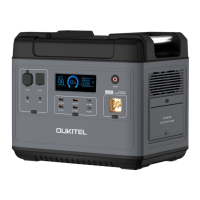
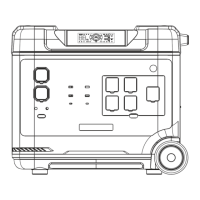
XT60 port for charging by car charging or solar panel charging.
XT60 input port
8
About two to get a full charge by 700W main AC from the power
grid.
AC input port
9
When the fans are working, please don’t block the channel.
Air intake/outlet
6
12V/3A 12V/10A
Output*2 Cigar Lighter*1
Present the remaining power and using data.
LCD display
5
Operate method:short press to turn on/off.
1.Please confirm the output voltage or frequency before using.
Notice:
2.Long press the button for 2s to entry the frequency changing mode, 50Hz and
60Hz will blink in the display, press again the button to chose the right frequency,
wait till the frequency is not blinking, then you will get the frequency you want.
3.Quick short press for 10 times to switch the voltage 100V or 110V.
AC control(AC output*4, total share 1200W)
7
To protect this product, an overload protector is added. Prevent
damage to the product due to excessive AC input current caused
by lightning and power grid fluctuations. When such a situation
occurs, the overload protector will start to cut off the AC input to
protect the product.
Please restart the AC input function of this product by following.
steps:
※When the overload protector is activated, it’s unable to charge the devices.
1. For safety reasons, turn the product OFF and unplug all ports.
2. After confirming that there is no abnormality in each part, turn on the product.
3. Press the overload protection button to restart AC input.
Overload protector


 To Next Page