20 21
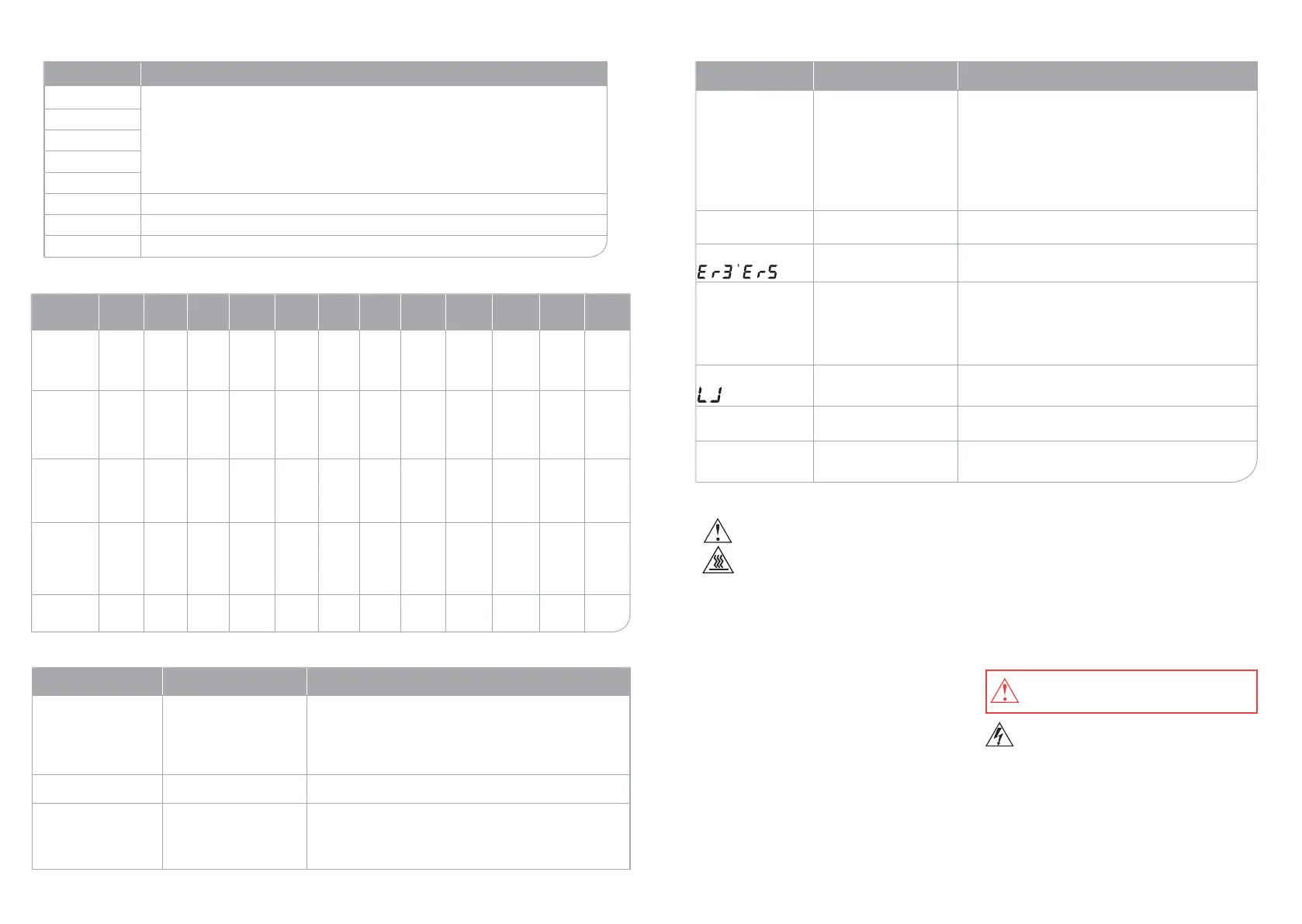
DESCRIPTION OF COOKING PROGRAMS AND MODES
POSSIBLE PROBLEMS AND SOLUTIONS
Programs Meat Steam
Hard
Boil
Soup
Pot
Stew
Roast
Por-
ridge
High
Steam
Cake Drink Yogurt Custom
Default
cooking
time, hours:
minutes
1:00 1:00 0:40 0:40 0:40 0:20 0:40 0:30 1:00 1:00 1:00 0:10
Setting
cooking time
from 40
min.
to 12
hours 59
min.
from 10
min.
to 12
hours 59
min.
from 10
min.
to 12
hours
59 min.
from 10
min. to
12 hours
59 min.
from 10
min.
tо 12
hours 59
min.
from 10
min.
tо 12
hours
59 min.
from 10
min.
tо 12
hours
59 min.
from 10
min.
tо 12
hours 59
min.
from 10
min.
tо 12
hours 59
min.
from 10
min.
tо 12
hours59
min.
from 60
min.
tо 48
hours
from 10
min.
tо 12
hours
59 min.
Setting
cooking
temperature
from 50
tо 130°C,
by default
120°C
Setting timer
for “delayed
start” mode,
8 hours by
default
from 1
hours tо
8 hours
50 min.
from 1
hours tо
8 hours
50 min.
from 1
hours tо
8 hours
50 min.
from 1
hours tо 8
hours 50
min.
“WARMING”
mode
12 hours 12 hours 12
hours
12 hours
Possible problems Possible causes Solutions
Dish is undercooked
• Check the power cord.
• There has been a power
failure.
• The button CANCEL was
pressed during cooking
process
• Plug carefully the power cord into outlet.
• If case of a long power failure, restart the device.
• Do not press the CANCEL button during cooking.
Lid does not open after the
end of cooking
• Check out whether the
pressure indicator is raised
• Turn the pressure controller counterclockwise to release the steam,
and then open the lid.
Condensation on display
• Check to see if water got
outside the cooking pot or
on the heating plate.
• Check to see if water got
inside the lid.
• Remove the water and wipe dry the device before use. Condensa-
tion on display will disappear by itself.
• After cleaning, wipe dry the lid.
Programs Recommendations
Meat
Check the recipe book for various recipes.
Roast
Porridge
High steam
Drink
Cake Used for baking cakes.
Yogurt Preparing homemade yogurt with the use of natural ingredients.
Custom You can set your own time and temperature.
Possible problems Possible causes Solutions
Steam escapes from
around the edges of
the lid
• Check if the Sealing ring is
damaged.
• Check the device for foreign
objects or dirt.
• Make sure the cooking pot
and the lid are not damaged
• Check the pressure
controller to see if the pin is
installed correctly, Pic.C-7
• Replace the sealing ring.
• Clean the edges of cooking pot.
• Do not use pans other than the original cooking pot.
• Install the pin properly, Pic.C-7
Water leaks through the
lid of pressure regulator
• Check the volume of ingredi-
ents
• Total volume of water and products must not exceed the MAX
mark
When display shows
• Temperature sensor has
failed
• Contact the Authorized Service Center
Clicks are heard during
cooking
• Check the source of this
clicks (control of cooking
process may be the cause).
• Check to see if it is water be-
tween the cooking pot and
the heating plate
• Сlicks during cooking process are allowed.
• Remove water and dry thoroughly.
When display shows
• Check if there is a cooking
pot
• The device does not work without a cooking pot. Place the
cooking pot into the multicooker. To preheat an empty pot,
close the lid.
More time needed for
cooking
• Check the quality of ingredi-
ents
• Restart the cooking process and set more time (cooking time
may vary for every ingredient).
“REHEATING” mode
does not work
• Check to see if the multi-
cooker is at “WARMING”
mode
• Press the CANCEL button, then the REHEAT button.
CLEANING AND MAINTENANCE, Рiс. E
• Stirring spoon, measuring spoons, measuring cups
and two-tier steamer with grid can be washed in a
dishwasher. Water temperature in the dishwasher
must not exceed 60 °С.
• Wash the cooking pot with warm water and detergent.
It can’t be washed in dishwasher. Do not use metal
scoring pads as they can damage the surface of the
pot. Wipe dry, Pic. E-1.
• Wipe the body and inner part of the device with damp
cloth. Remove crumbs and dirt from the inner part of
the device with a damp cloth, Pic. E-2. Wipe carefully
the temperature sensor and the heating plate. Wipe all
the parts dry, Pic. E-4. A foreign substance or object
on temperature sensor and heating plate may cause
wrong temperature settings and re, as consequence.
• Remove the sealing ring from the lid and wash them
separately. If water remains inside the lid, steam may
escape during cooking. Wipe dry all the lid parts
before use, Pic. E-2.
• Condensation tray – is a gutter that accumulates
moisture during cooking process and the “WARMING”
mode. Wipe it dry, Pic. E-3.
• To clean the openings for steam release, remove the
steam regulator lid, turning it where the arrow points,
and wash it with sponge and detergent after each use,
Pic. E-5.
Clean all the parts of the device immediately
after use.
• Never immerse the motor unit into the water
because of the danger of electric shock.
• Thoroughly dry all parts after cleaning.
Unplug your device and allow it to cool before
cleaning.
All the parts of pressure controller can be
washed with water.
For information on product certication, see http://www.oursson.com/rus/ru/about/partners/certicates/#tab0 or ask
seller for a copy.
PRODUCT CERTIFICATION


 To Next Page
 Loading...