The bluetooth pairing operation and related parameters
1. ON / OFF: switch the power ON, press the key “MODE” to enter the Bluetooth mode, the
display screen will show “BLUE”.
2. Switch on the Bluetooth function of Mobile phone and search, the Mobile phone will show
“OV-Idol-3.1”, click the connect directly. Mobile phone connection do not need password, if
need password, please input ”0000” to pair.
3. Play the music on your mobile phone.
Functional Operations and Features
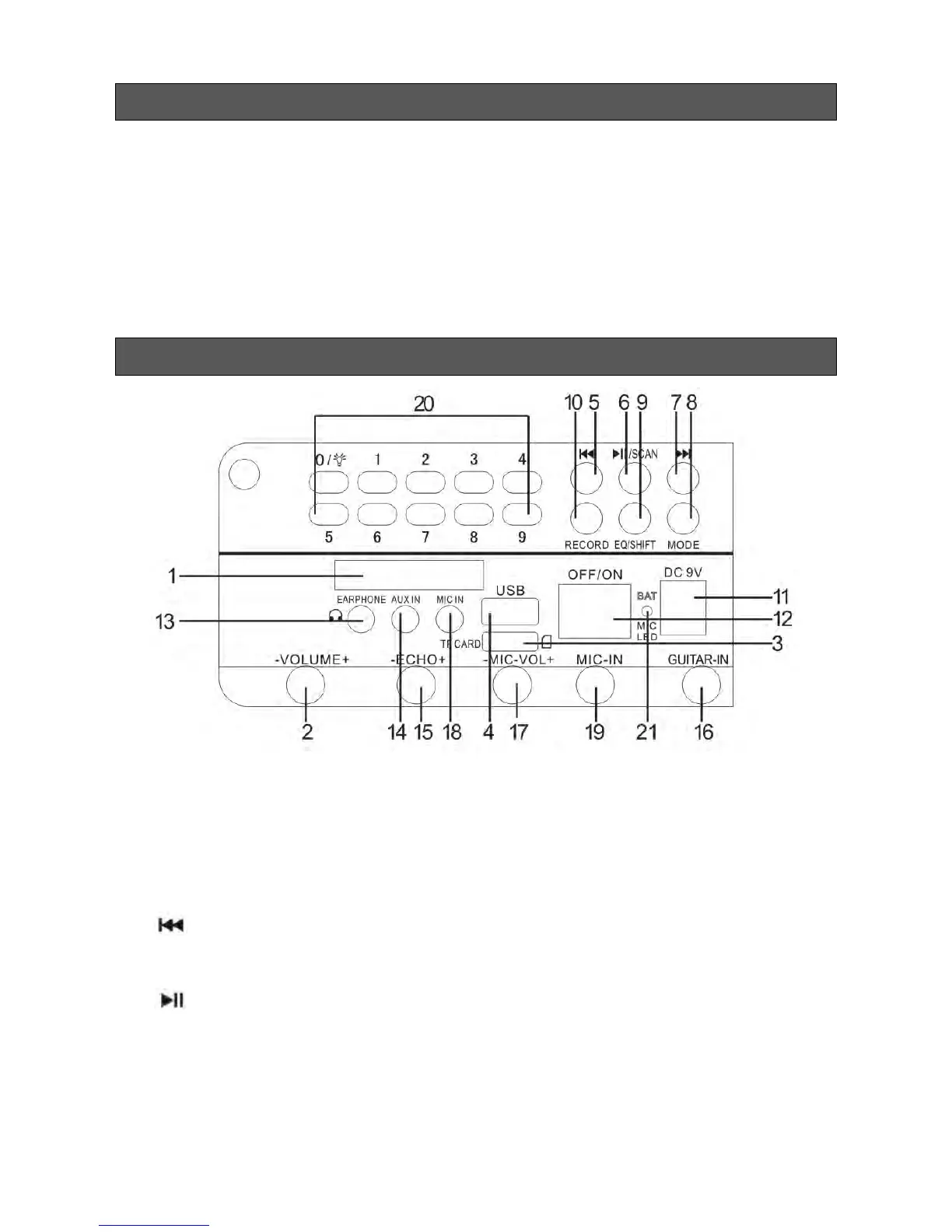
1. LED Display Screen
2. Master Volume: In MP3 / FM / LINE mode, use it to regulate volume output from the
speaker.
3. SD Port: Read audio files in MP3 format from micro SD card up to 32GB.
4. USB Port: Read audio files in MP3 format in USB storage device up to 32GB.
5. : In FM receiving status, short press to select the previous channel after a full
station search has been executed.
6. : In USB / SD card reading status, short press it to play/pause, or long press it to
select one of four playback sequencing modes:
A. All - play all tracks in sequence;
B. rdO - play in random;
C. ONE - repeat one track;


 To Next Page