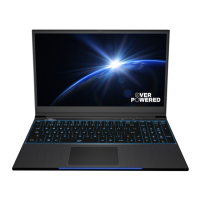
1 Webcam
The built-in webcam allows picture taking or video recording
from your computer.
2 Camera Status LED
The LED indicator shows when the build-in camera is in use.
3 Microphone
Built-in microphone.
4 LCD screen
Your notebook computer's default display.
5 Caps Lock Status LED
Default: Green.
Charging & Battery indicator
Charging(Power ON): Orange
Charging(Power Off): Orange
Battery Low (<6%): Orange (3 Sec/Cycle)
Charging finish (w/AC ): Green, (w/o AC): Off
Power Indicator
Power ON: Green
Suspend: Green, Slow/Smooth, Blinking Green (3
Sec/Cycle)
Power Off: OFF
6 Power Button
Press this button to turn the computer's power on or off.
7 Office/Gaming Mode Button
Gaming Mode increases preformance and power consumption.
8 Keyboard
Full keyboard with RGB backlight support.
(The keyboard will depend upon the actual product shipped)
9 TouchPad/ClickPad
Touch-sensitive pointing device which functions like the mouse.
Touchpad LED indicator/Touchpad switch
15


 To Next Page