Watch What OzarksGo Television Service Can Do
For Your Home Entertainment
With an easy-to-read programming guide and easy-to-use
menu and navigation screens, watching TV just got better.
With Whole-Home DVR, you can pause and rewind live TV
from any TV. You can even record all your favorite shows and
watch them when you want, where you want.
My Television Settings
TV Location TV Input Remote Code
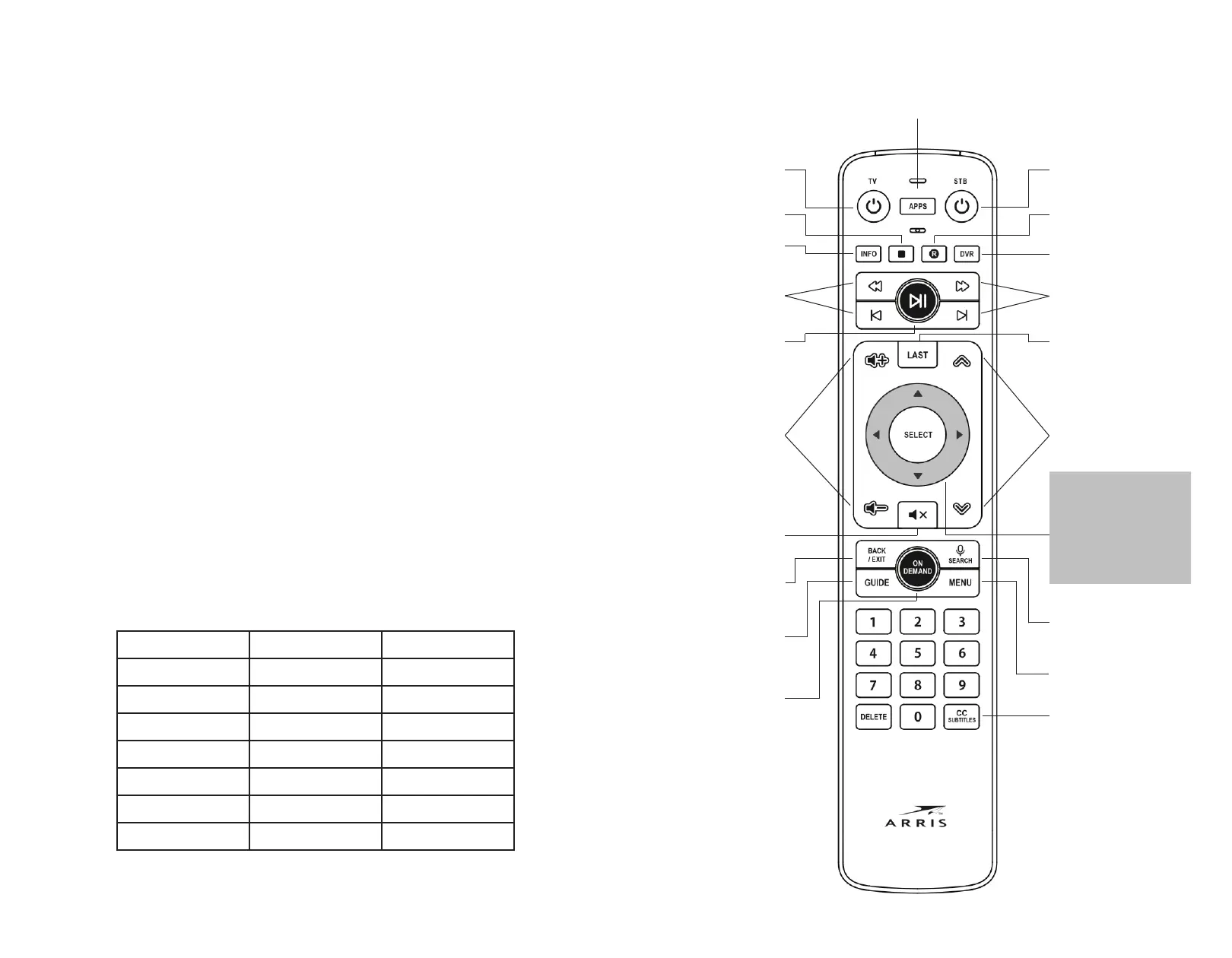
Get to know your OzarksGo Remote Control
Powers your TV
on and o
Powers your Set Top
Box on and o
Future Use
Records
current program
Shows list of
recorded programs
Fast Forward
and skip for
DVR and Live TV
Jumps to last
viewed program
Channel up or down
for live TV; Page up
or down in guide
Launches
program search
voice search not supported
Displays main
Set Top Box menu
Stops DVR playback
Shows info on
current program
REW Rewind and
restart for DVR
and live TV
Pause / Play for
DVR and live TV
Controls TV volume
Mutes TV volume
Menu exit or
previous screen
Displays
program guide
Launches
On Demand
Movie Menu
Toggles Closed
Captions or Subtitles
currently found in Options menu
Navigation for menu
and guide
Shortcuts:
▲ Last viewed
▼ On Now/On Next
⊳ Menu
⊲ Options



 To Next Page