SETUP
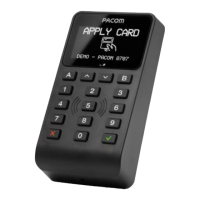
Basic reader configuration is done through the setup menu.
To enter the setup menu, make sure that 1) The reader is powered up, and 2) The reader tamper switch is active.
Press and hold the Service button on the back of the reader for 5 seconds to bring up the “Enter Setup?” prompt.
Confirm by pressing the key to enter the setup menu.
The contents of the setup menu may vary depending on reader firmware, but for most common installation scenarios
with a single reader using OSDP communication, the default settings do not have to be changed.
To save the settings, press the key while in the main menu.
RS485 Addressing and Termination
Up to four readers can be used at the same time on the RS485 bus. If more than one reader is used, please make sure that
each reader on the bus has its own unique address (1-4), and that the RS485 termination is set up correctly.
RS485 termination must be ON (Active) on the last device at each end of the bus. For a single reader connected to a Door
Controller, RS485 termination should be ON for both the Door Controller and the Reader. For other connection scenarios,
make sure that device at each end of the bus has termination ON to ensure communication is working properly.
RS485 Termination Examples
Door
Controller
87078707
T
T
Door
Controller
87078707
T T
T=RS485 Termination ON
If OSDP Secure Channel is enabled, a set of encryption keys are exchanged between the Door Controller and the Pacom
8707 Reader. Once the encryption keys have been exchanged, the Door Controller and the Pacom 8707 Reader are paired,
and are thereafter only able to communicate with each other.
If a Pacom 8707 Reader is to be moved to a different Door Controller once OSDP Secure Channel is enabled, it needs to be
reset to factory default and the Secure Channel Base Key (SCBK) cleared. It can then be paired again to a different Door
Controller (refer to system specific procedure on how to perform pairing operation).
Depending on the type of Door Controller and Management System used, the Pacom 8707 Reader is capable of download
of MIFARE Card Encryption Keys as well as new firmware. Please contact Pacom Support for more information on which
systems support these options.
DS-HW-8002-SE v240604
Specicaons subject to change without noce. Copyright © PACOM Systems
OSDP SECURE CHANNEL - MIFARE CARD ENCRYPTION KEYS & FIRMWARE
DOWNLOAD


 To Next Page
 Loading...