8/49
操 作 仕 様 書
Operation
Specification
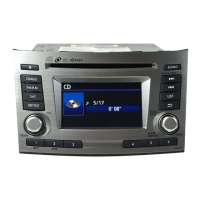
設定画面
ENTER
<操作>
/ Setting Screen
SETTING
・ ENTER/SETTINGノブ押下
・ SCROLL/TUNEノブ回転
and
※ 以降SCROLL/TUNEはTUNEノブと表記する。
SCROLL
TUNE
<有効条件>
・
設定画面への遷移条件は下記のいずれかとする
・ 再生画面中
<動作詳細>
・
ENTER/SETTINGノブ押下で設定画面に入る。
・
表示後、もしくは操作後、無操作5秒で前の表示に戻る
・
TUNEノブを回転することで下記<調整順>に示す
順番で選択中の調整項目を切り替える
・
ENTER/SETTINGノブ押下で選択中の調整項目を
決定し、調整モードとなる
<解除条件>
以下の条件にて、画面表示を解除する
・ モード移行後5秒間無操作
・ 調整項目を切り替え中にBACK釦押下
・ 音声ソース(CD, FM, AM, etc…)の変更操作
・ PWR off
・ ACC off
<Operation>
・ Push ENTER/SETTING Knob.
・ Turn SCROLL/TUNE Knob.
※SCROLL/TUNE is written at the following as the TUNE knob.
<Effective condition>
・
The transition condition to setting screen is as follows.
・ Screen under playing
<Detail Operation>
・ Enter to setting screen bypushing ENTER/SETTING knob.
・ It returns to the display of the previous state if there
is no operation for five seconds.
・ Turn the TUNE knob and switch the adjustment item.
・ The knob is pushed, the adjustment item under the
selection is decided, and it becomes to adjustment mode.
<Conditions subsequent>
・ The screen display is released on the following conditions.
・ No operation after mode shifts for five seconds
・ The BACK button is pressed while switching the adjustment item.
・ Change operation of sound source (CD, FM, AM, etc…)
・ PWR OFF
・ ACC OFF
4
パナソニック株式会社 / Panasonic Corporation


 To Next Page
 Loading...