ENGLISH
====
14
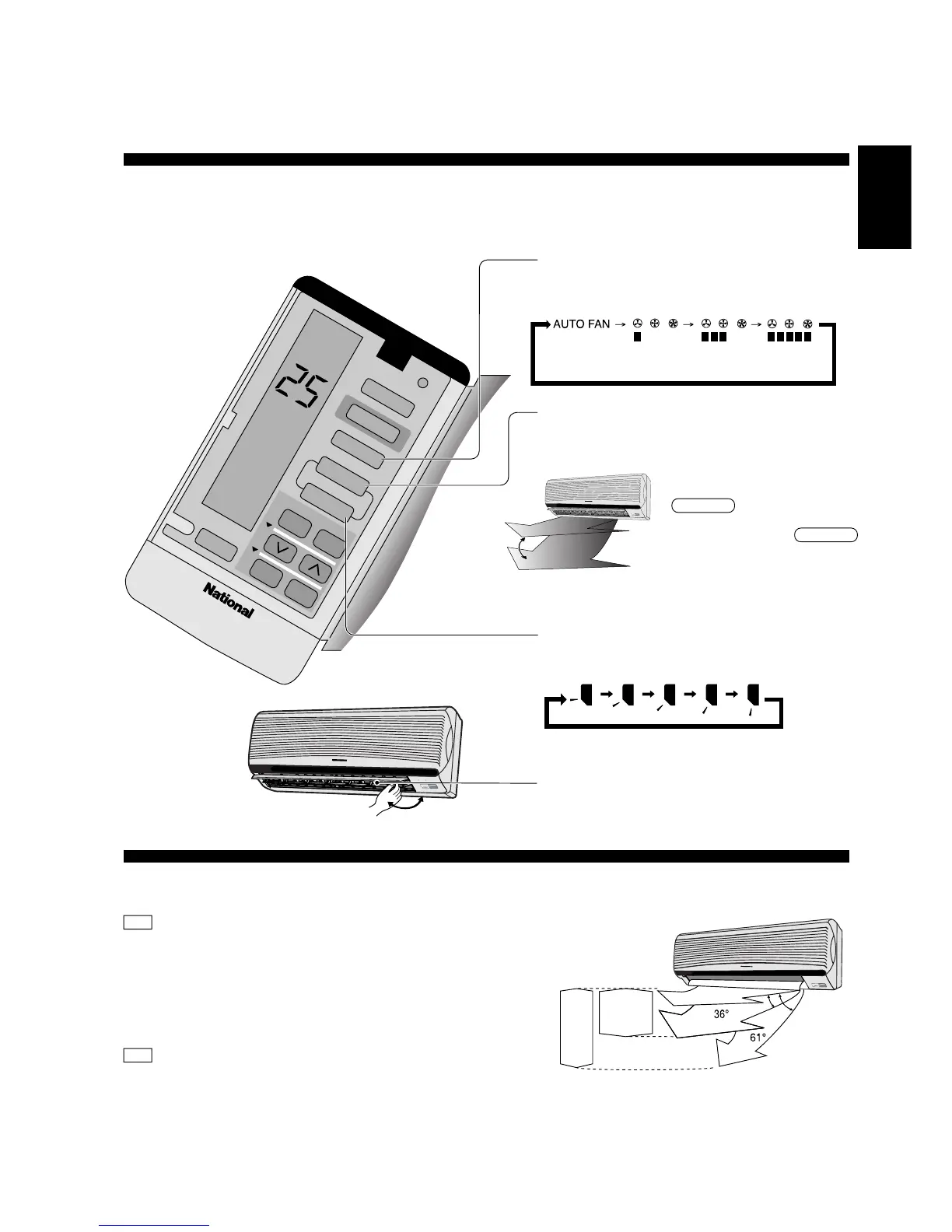
● Adjusting Airflow Direction And Fan Speed
!" #
■ Operation details
!
FAN – Air Circulation Operation
• When the room temperature reaches the setting
temperature, operation commences at Low airflow volume.
It stops when the room temperature drops to 2°C below the
setting temperature. (It is useful when using a heater).
Automatic Airflow Volume
• The speed of the Indoor fan is adjusted automatically
according to the operation. The Indoor fan stops
occasionally during cooling operation.
FAN !"#$
• !"#$%& '()*+,-./01234
!"#$%&=O= !"#$%&'()*+
!"#$
!"
• !"#$%&'()*+,-./012'(34
!"#$%&'(
* Five stages of adjustments can be made in
this range.
* !"#$%&'()*+,
Louver adjustment range
!"#$
Air Circulation
!
P
O
W
E
R
E
C
O
N
O
M
Y
P
O
W
E
R
F
U
L
S
L
E
E
P
T
I
M
E
R
Press to select Fan speed
• The display changes in this order
!"#$
• !"#$%&'
Automatic Low Medium High
Selecting Vertical Airflow Direction
Press AUTO,
!"#
=^rql
• The louver swing up and down
automatically.
• To stop this operation, press
MANUAL button.
• !"#$%"&
• !"#$%&=MANUAL
!"
Press MANUAL
• Manual selection of Vertical Airflow Direction
Louver.
• The display changes in this order,
==j^kr^i
• !"#$%&$'(
• !"#$%&'
Horizontal Airflow Direction
• Adjust it manually.
!
• !"#
P
O
W
E
R
E
C
O
N
O
M
Y
P
O
W
E
R
F
U
L
S
L
E
E
P
T
IM
E
R
Cooling
Soft Dry
!
P
O
W
E
R
E
C
O
N
O
M
Y
P
O
W
E
R
F
U
L
S
L
E
E
P
T
I
M
E
R
AIR SWING
TIMER
CLOCK
1
2
3
COOL
AUTO FAN
MODE
ECONOMY
FAN SPEED
AUTO
MANUAL
ON OFF
SET
C
A
N
C
E
L
SLEEP
!



 To Next Page