Getting started
- 14 -
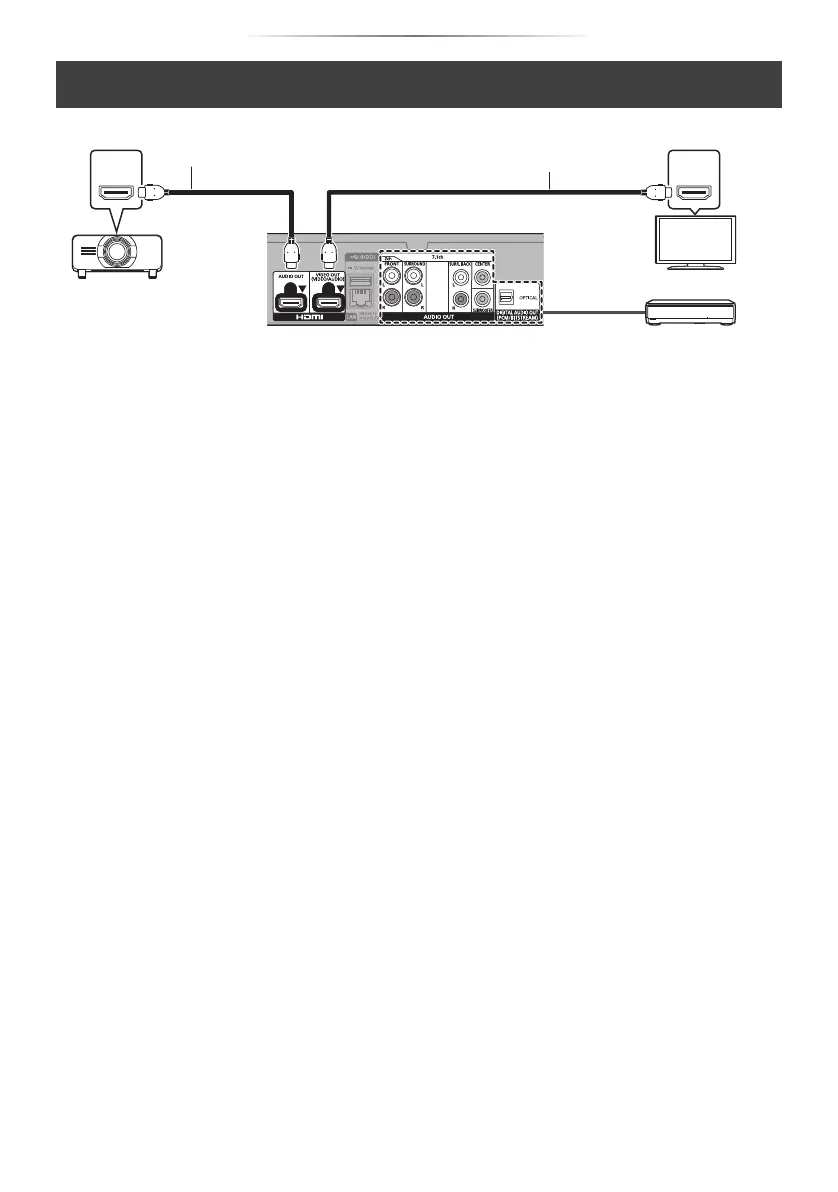
Enjoying video with a 4K-compatible TV in combination with a 2K-compatible projector and an
amplifier that is connected to the OPTICAL/2ch AUDIO OUT/7.1ch AUDIO OUT terminal
HDMI INHDMI IN
HDMI cable
HDMI cable
(18 Gbps)
Projector
(2K-compatible)
Amplifier/receiver
Setting
Set the following items in the setup menu (> 29):
≥ Set “HDMI(VIDEO) Output Mode” to “Automatic ( Video Only / Video+Audio )”. (> 29)
≥ Set “HDMI(AUDIO) Output Mode” to “Audio Only”. (> 29)
≥ To enjoy audio with an amplifier connected to the OPTICAL terminal:
Set “Audio Output” to “Off” in “Advanced Settings”. (> 30)
≥ To enjoy audio with an amplifier connected to the 7.1ch AUDIO OUT terminals:
Set “Analogue Audio Output” to “7.1ch”. (> 32)
≥ To enjoy audio with an amplifier connected to the 2ch AUDIO OUT terminals:
Set “Analogue Audio Output” to “2ch (Downmix)”. (> 32)
≥ To enjoy audio with a TV
Set “HDMI(VIDEO) Output Mode” to “Video+Audio”. (> 29)
Set “Audio Output” to “On” in “Advanced Settings”. (> 30)
≥ To enjoy video with a projector
Set “HDMI(AUDIO) Output Mode” to “Video+Audio”. (> 29)
(It is not possible to output 3D, 4K or HDR content from the HDMI AUDIO OUT/HDMI VIDEO OUT
terminal when “Video+Audio” is selected.)
DP-UB820-GN-TQBS0253_eng.book 14 ページ 2018年5月23日 水曜日 午前10時33分





 To Next Page