Getting started
- 13 -
Set the speaker presence and size according to your environment. ( 33)
(Audio is not output from HDMI OUT terminal.)
3D or 4K images can be played back when this unit is connected to a 3D or 4K compatible TV.
≥ This connection only supports up to 5.1ch.
≥ To connect a TV and amplifier with an HDMI cable, connecting terminals on both the TV and amplifier
must be ARC-compatible. ( 11, “About ARC”)
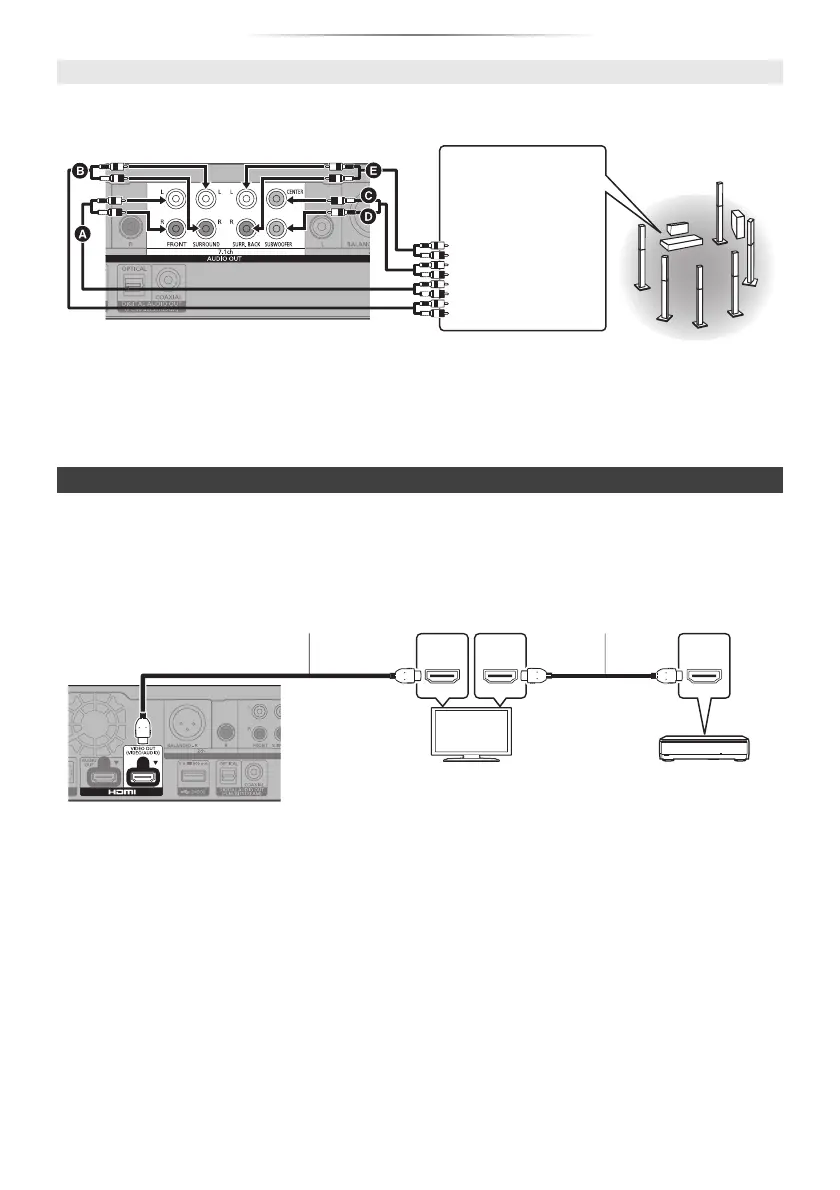
7.1ch AUDIO OUT (Analogue AUDIO OUT)
Cable connections
A Front speaker (L/R)
B Surround speaker (L/R)
C Centre speaker
D Subwoofer
E Surround back speaker (L/R)
(Only for 7.1ch AUDIO OUT)
Connect Audio
cables to terminals
corresponding to
the speakers you
have connected.
Connecting an amplifier to a 4K-compatible TV
Setting
Set the following items in the Setup menu ( 30):
≥ Set “HDMI(VIDEO) Output Mode” to “Automatic ( Video Only / Video+Audio )”. ( 30)
≥ Set “HDMI(AUDIO) Output Mode” to “Audio Only”. ( 30)
HDMI OUT
(ARC)
HDMI IN
(ARC)
HDMI IN
Amplifier/receiver
HDMI cable
HDMI cable
(18 Gbps)




 To Next Page