- 46 -
Replacing HEPA Media Exhaust Filter
The HEPA media exhaust filter
removes dirt from exhaust air. Check
filter after emptying dust bin. Replace
when dirty.
Filter cannot be cleaned and should be
replaced at least once each year. Part
Number: MC-V194H
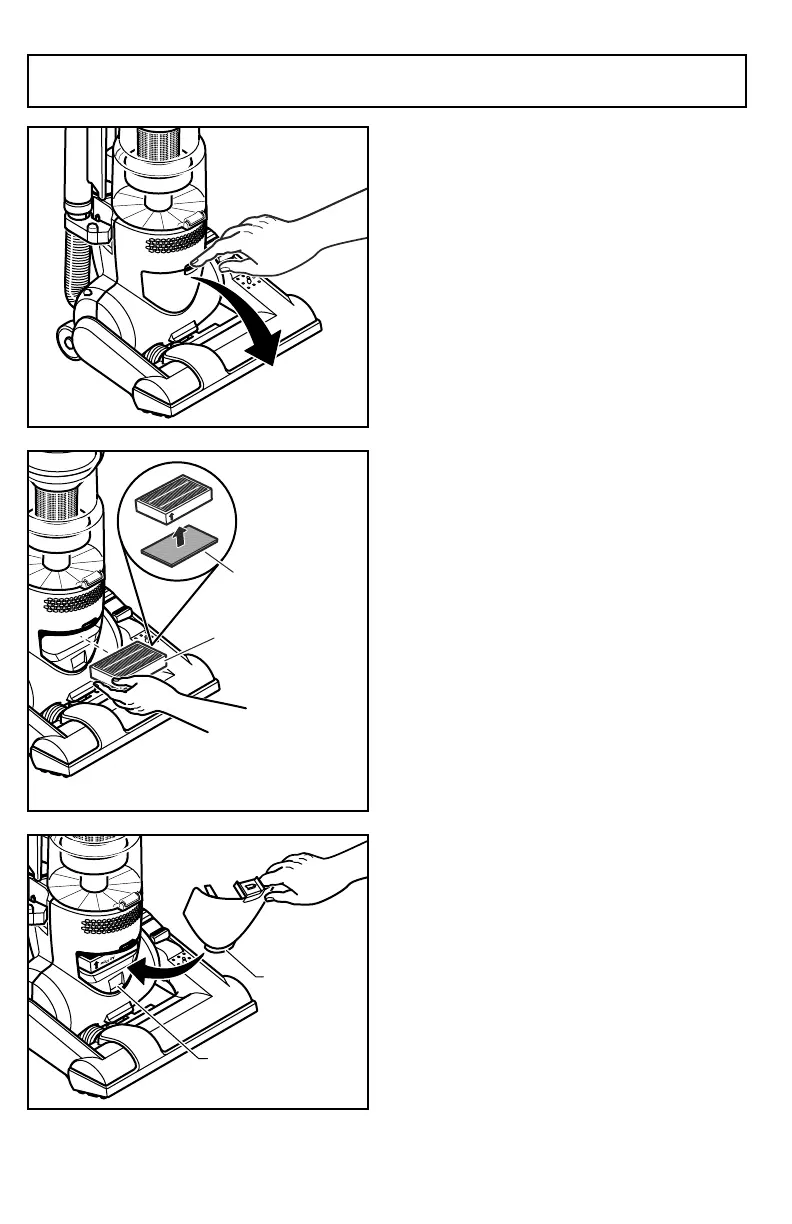
➢ Turn off and unplug the vacuum
cleaner.
➢ Press latch to remove exhaust filter
cover.
➢ Grasp the exhaust filter and pull out
to remove.
➢ Place the new filter into the vacuum
cleaner with the foam seal down.
➢ Be sure air flow arrow on filter is
pointing upward.
➢ The carbon filter (some models) is
located beneath the HEPA media
exhaust filter.
➢ The carbon filter should be placed
under the foam seal.
➢ Reinstall the exhaust filter cover by
inserting the tab into the slot in the
vacuum cleaner. Press firmly to
snap exhaust filter cover into place.


 To Next Page
 Loading...