[PICTURE] menu
ENGLISH
- 47
Settings
POINT
Display the currently selected
point number. The number is in
the order of 1 to 15 starting from
the lower input level. The selected
point ashes in yellow on the
adjustment screen.
INPUT
Display the input level of the
currently selected point. Can
be set in the range of 1 to 99%
in increments of 1%. When
dispatching from the factory, the
input level is set in the order of
5%, 10%, 15%, 20%, 25%, 30%,
35%, 40%, 45%, 50%, 60%, 70%,
80%, 90%, and 95% starting from
point 1.
OUTPUT
Display the output level of the
currently selected point. The
difference from the standard value
can be set in the range of -252
to +252. The adjustable range
depends on the input level. The
standard value is 0.
6) Change the POINT, adjust the INPUT level,
and also adjust the OUTPUT level.
z
In the screen displayed in 5), select any one
from [Y], [R], [G], or [B], and then perform the
operation after pressing the <ENTER> button.
The respective operations are described below.
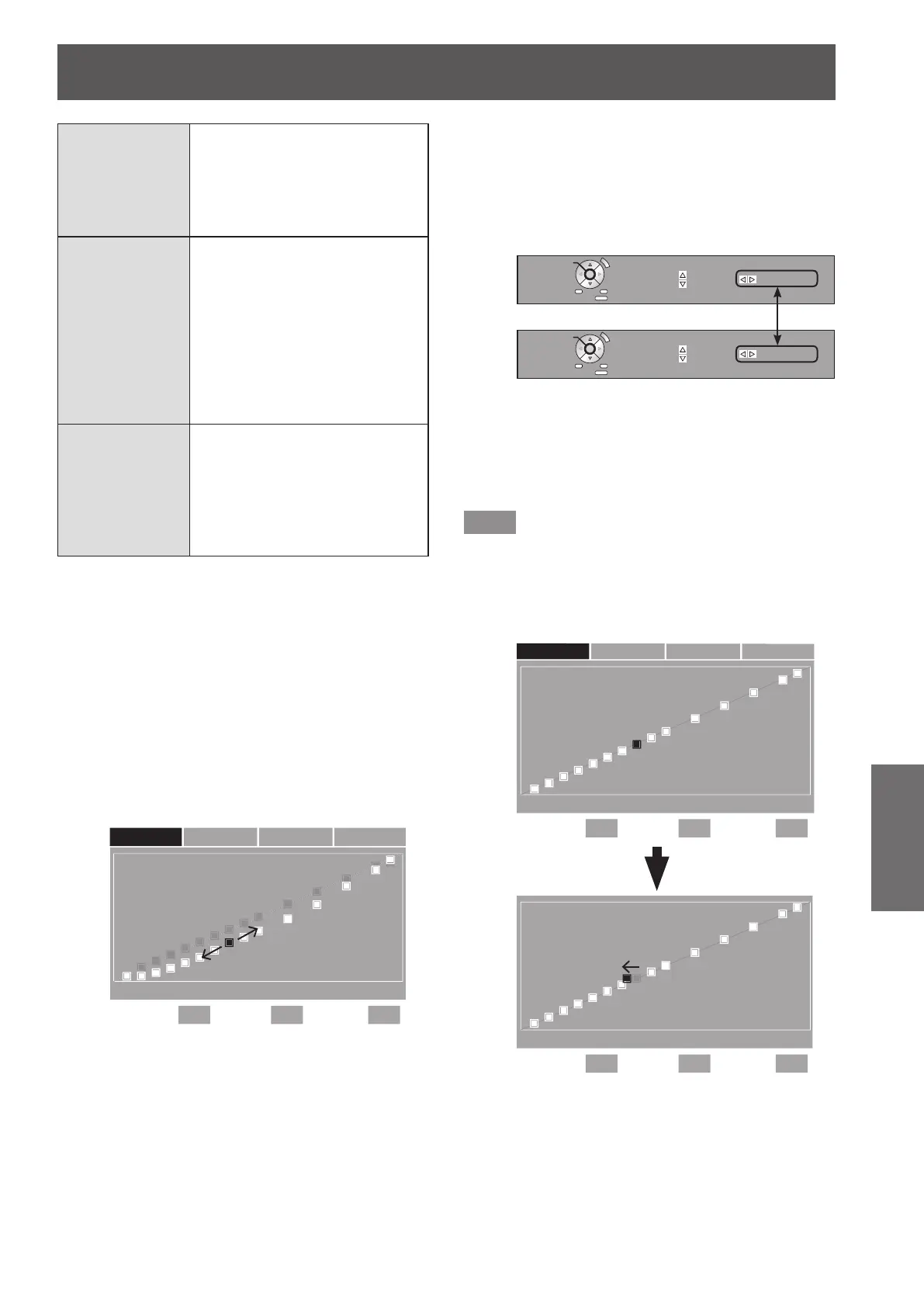
a. Changing the point to be adjusted
z
Press the ◄► buttons to move the cursor for
selecting the point, to the left or right.
Press the
►
button to move one point to the right.
Press the
◄
button to move one point to the left.
PICTURE
POSITION
LANGUAGE
3D SETTINGS
LENS CONTROL
OPTION
0%
POINT 8
INPUT OUTPUT
50% 100%
40% -16
ADVANCED ADJUST
GAMMA PRESET
REFERENCE POINTS
+0.40
ON
Y R G B
b. Adjusting the input level (only [Y])
z
Press the <SUB MENU> button to set the
[OPERATION MODE] to [INPUT ADJUSTMENT].
See the operation guide to check if the current
status is the [CHANGE POINT] mode or the [INPUT
ADJUSTMENT] mode.
Operation Guide
OPERATION MODE
RESET
(RESET ALL: 3 sec)
OUTPUT ADJ. CHANGE POINT
RETURN
SET AS NEW REF.
CHANNEL
CHANGE
OPERATION MODE
RESET
(RESET ALL: 3 sec)
OUTPUT ADJ. INPUT ADJ.
RETURN
SET AS NEW REF.
CHANNEL
CHANGE
z
If you press the ◄► buttons, you can adjust the
input level of the currently selected point.
The input level can be set in the range of 1 to 99%
in increments of 1%. However, you cannot set an
input level more than that of the adjoining points.
Note
z
The input level can be adjusted only when [Y] is being
adjusted.
The input level cannot be adjusted when [R], [G], or [B]
are being adjusted.
Ex: When the
◄
button is pressed on [Y].
ADVANCED ADJUST
GAMMA PRESET
REFERENCE POINTS
0.00
ON
PICTURE
POSITION
LANGUAGE
3D SETTINGS
LENS CONTROL
OPTION
0%
POINT 8
INPUT OUTPUT
50% 100%
37% +8
ADVANCED ADJUST
GAMMA PRESET
REFERENCE POINTS
0.0
ON
PICTURE
POSITION
LANGUAGE
3D SETTINGS
LENS CONTROL
OPTION
0%
POINT 8
Y R G B
INPUT OUTPUT
50% 100%
40% 0
Move left


 To Next Page