Care and replacement
ENGLISH
- 93
Maintenance
20) Press the <MENU> button to display the
menu screen and select [OPTION] with
the ▲▼ buttons.
21) Press the <ENTER> button and select
[LAMP RUNTIME] with the ▲▼ buttons.
22) Hold the <ENTER> button down for 3
seconds.
z
The conrmation message is displayed.
LAMP RUNTIME
LAMP RUNTIME RESET.
CANCELOK
23) Select [OK] with the ◄ ► buttons and
then press the <ENTER> button.
z
LAMP RUNTIME is reset to “0”, and the projector
powers off. After a short while, the projector enters
standby mode.
■
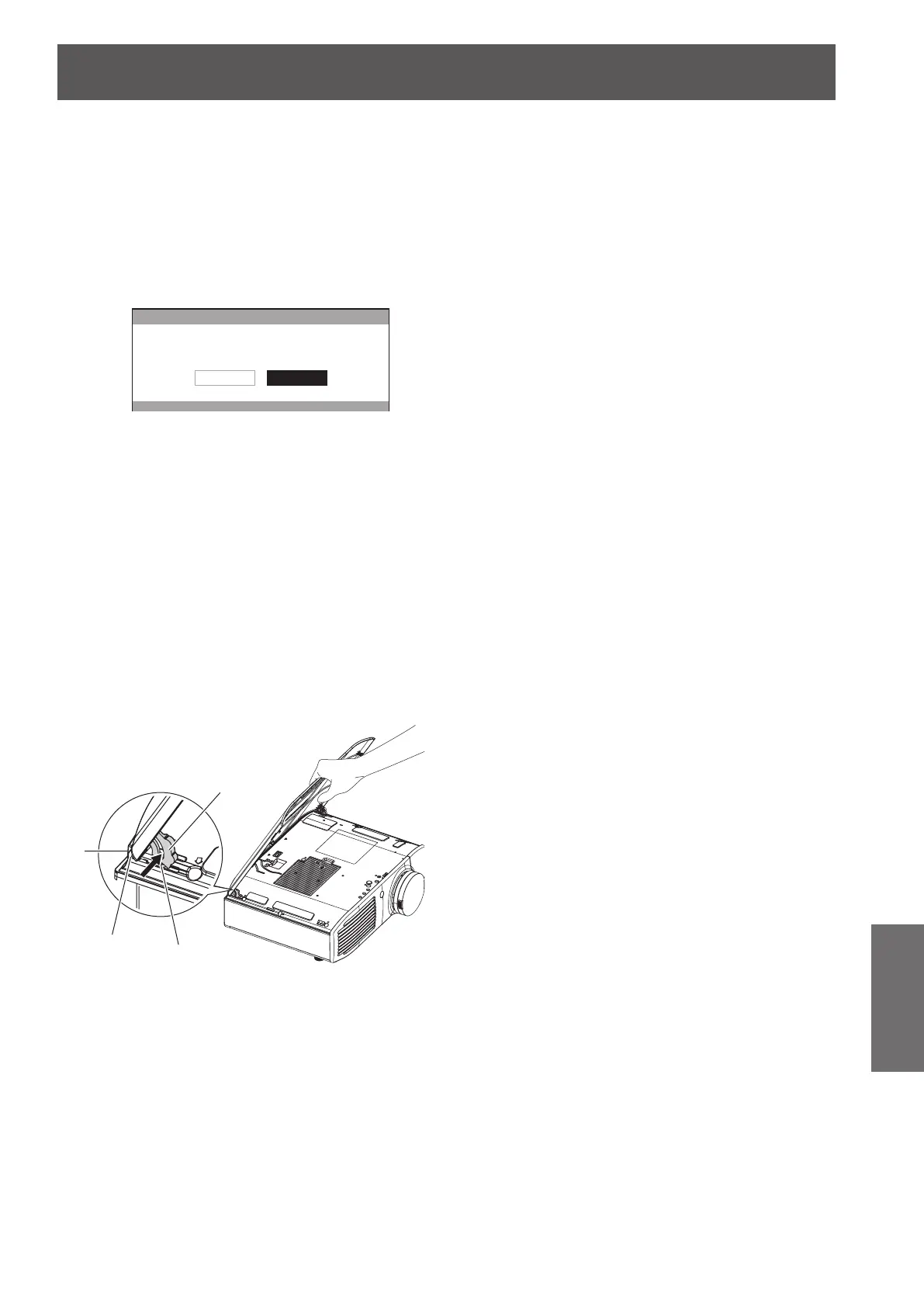
Attaching the top cover
Hold the top cover as shown in the
diagram below, align the hinge with the
support, and while pushing the arm in the
direction of the arrow (towards the inner
side of the projector), push it into the
groove.
Arm
Groove
Hinge
Support


 To Next Page