EasyManua.ls Logo

Panasonic SC-AKX660 - User Manual

Panasonic SC-AKX660
20 pages
Print Icon
To Next Page IconTo Next Page
Loading...
RQT0A62-B
GNE
Operating Instructions
CD Stereo System
Model No. SC-AKX660
Thank you for purchasing this product.
For optimum performance and safety, please read these instructions carefully.
Please keep this manual for future reference.
SC-AKX660 E.GN RQT0A62-B En.fm Page 1 Tuesday, March 1, 2016 8:47 AM
Question and Answer IconNeed help?

Do you have a question about the Panasonic SC-AKX660 and is the answer not in the manual?

Summary

Safety Precautions

Unit Safety Precautions

Essential safety guidelines for operating the main unit and preventing hazards.

AC Mains Lead Safety

Instructions for safe use and handling of the power cord and plug.

Battery Safety

Precautions regarding battery installation, handling, and disposal for the remote control.

AC Mains Lead Caution

Fuse Replacement Procedure

Step-by-step guide on how to safely replace the fuse in the AC mains plug.

References

About Bluetooth

Information regarding Bluetooth connectivity, frequency band, and usage restrictions.

Licenses

Details on trademarks, logos, and third-party software licenses used in the system.

Supplied Accessories

Speaker Placement

Placement Guidelines

Recommendations for optimal speaker positioning to ensure sound quality and system safety.

Speaker Handling Cautions

Warnings against modifying speakers or touching sensitive components to prevent damage.

Maintenance

Making Connections

Connecting Antennas

Guide for connecting AM loop and FM indoor/outdoor antennas for radio reception.

Connecting AC Mains Lead

Instructions for connecting the system to the household power supply.

Power Conservation

Advice on reducing power consumption by disconnecting the system when not in use.

Overview of Controls

Remote Control Buttons

Detailed explanation of functions for each button on the remote control.

Main Unit Controls

Identification of buttons on the main unit that correspond to remote control functions.

Preparing the Remote Control

Remote Control Sensor

Information on the effective distance and angle for operating the remote control.

Component Identification

Details on USB ports, AUX IN jack, display panel, and disc tray functions.

Preparing Media

Disc Preparation

Instructions for inserting and selecting discs for playback.

USB Device Preparation

Steps for connecting and preparing USB devices for playback and recording.

Bluetooth Device Pairing

Guide on how to pair Bluetooth devices for wireless audio streaming.

Media Playback

Basic Playback Controls

Instructions for playing, stopping, pausing, and skipping tracks on various media.

Playback Modes

Options for selecting playback modes like track repeat, album repeat, and random playback.

Link Mode Settings

How to adjust Bluetooth link mode for connectivity or sound quality emphasis.

Radio Operations

Radio Tuning Methods

Manual and automatic tuning procedures for selecting radio stations.

Station Presetting

How to automatically preset stations or manually store favorite frequencies.

Sound Quality Improvement

Adjusting FM mode to MONO or AM mode for better reception and sound.

Signal Status and Recording

Checking FM Signal Status

How to check signal strength and stereo reception for FM broadcasts.

RDS Broadcasting Information

Displaying text data transmitted via RDS for radio stations.

Basic Recording Procedures

Steps for recording audio from CD, radio, or external equipment.

Recording Management

Recording Controls

Using stop, pause, and high-speed recording functions for various sources.

Track Marking and MP3 Recording

Adding track marks and recording MP3 files from discs or USB devices.

Deleting Recorded Tracks

Instructions for deleting single tracks, albums, or formatting storage devices.

Sound and Illumination Effects

Sound Effect Adjustments

Configuring preset EQ, manual EQ, and D.Bass for audio enhancement.

Illumination Effect Control

Changing system illumination colors, auto mode, or turning it off.

DJ Functions

DJ Jukebox Operations

Enabling DJ jukebox for cross-fade and sample mixing with repeat settings.

DJ Sampler Usage

Applying scratch sounds or sample effects to playing tracks.

Clock and Timers

Setting and Checking Clock

How to set the 24-hour clock and check the current time.

Sleep Timer Function

Setting the sleep timer to automatically turn off the system after a specified duration.

Play and Record Timers

Configuring timers for waking up or recording audio from sources.

External Equipment Connection

Auxiliary Input Usage

Connecting and listening to external audio sources like VCR or DVD players via AUX IN.

Portable Audio Connection

Connecting portable audio devices for playback through the system's AUX IN 2.

System Settings

Auto Off Feature

Enabling or disabling the automatic system shutdown after a period of inactivity.

Bluetooth Standby Mode

Activating standby mode for automatic system power-on via Bluetooth connection.

Software Version Check

How to view the system's current software version.

Troubleshooting

Common Problems

Solutions for general unit operation, display, and sound issues.

Disc Playback Issues

Troubleshooting disc read errors, playback failures, and incorrect track displays.

USB Device Issues

Resolving problems with USB device recognition, compatibility, and slow operation.

Bluetooth Connectivity Issues

Addressing Bluetooth pairing failures, connection errors, and audio interruptions.

Radio Reception Issues

Solutions for distorted sound or beat sounds during radio tuning.

Main Unit Display Messages

Explanations for specific messages shown on the unit's display panel.

Remote Control Codes

System Memory Reset

Specifications

Amplifier Specifications

Technical details of the system's amplifier section, including output power.

Tuner and Antenna Specifications

Frequency ranges and antenna terminal details for FM and AM tuning.

Disc and USB Specifications

Supported disc formats, USB standards, and file system compatibility.

Bluetooth Specifications

Details on Bluetooth version, class, supported profiles, and operating distance.

Speaker and General Specifications

Information on speaker units, dimensions, power supply, and consumption.

Limited Warranty (Australia)

Declaration of Conformity

Disposal of Electrical Equipment

Summary

Safety Precautions

Unit Safety Precautions

Essential safety guidelines for operating the main unit and preventing hazards.

AC Mains Lead Safety

Instructions for safe use and handling of the power cord and plug.

Battery Safety

Precautions regarding battery installation, handling, and disposal for the remote control.

AC Mains Lead Caution

Fuse Replacement Procedure

Step-by-step guide on how to safely replace the fuse in the AC mains plug.

References

About Bluetooth

Information regarding Bluetooth connectivity, frequency band, and usage restrictions.

Licenses

Details on trademarks, logos, and third-party software licenses used in the system.

Supplied Accessories

Speaker Placement

Placement Guidelines

Recommendations for optimal speaker positioning to ensure sound quality and system safety.

Speaker Handling Cautions

Warnings against modifying speakers or touching sensitive components to prevent damage.

Maintenance

Making Connections

Connecting Antennas

Guide for connecting AM loop and FM indoor/outdoor antennas for radio reception.

Connecting AC Mains Lead

Instructions for connecting the system to the household power supply.

Power Conservation

Advice on reducing power consumption by disconnecting the system when not in use.

Overview of Controls

Remote Control Buttons

Detailed explanation of functions for each button on the remote control.

Main Unit Controls

Identification of buttons on the main unit that correspond to remote control functions.

Preparing the Remote Control

Remote Control Sensor

Information on the effective distance and angle for operating the remote control.

Component Identification

Details on USB ports, AUX IN jack, display panel, and disc tray functions.

Preparing Media

Disc Preparation

Instructions for inserting and selecting discs for playback.

USB Device Preparation

Steps for connecting and preparing USB devices for playback and recording.

Bluetooth Device Pairing

Guide on how to pair Bluetooth devices for wireless audio streaming.

Media Playback

Basic Playback Controls

Instructions for playing, stopping, pausing, and skipping tracks on various media.

Playback Modes

Options for selecting playback modes like track repeat, album repeat, and random playback.

Link Mode Settings

How to adjust Bluetooth link mode for connectivity or sound quality emphasis.

Radio Operations

Radio Tuning Methods

Manual and automatic tuning procedures for selecting radio stations.

Station Presetting

How to automatically preset stations or manually store favorite frequencies.

Sound Quality Improvement

Adjusting FM mode to MONO or AM mode for better reception and sound.

Signal Status and Recording

Checking FM Signal Status

How to check signal strength and stereo reception for FM broadcasts.

RDS Broadcasting Information

Displaying text data transmitted via RDS for radio stations.

Basic Recording Procedures

Steps for recording audio from CD, radio, or external equipment.

Recording Management

Recording Controls

Using stop, pause, and high-speed recording functions for various sources.

Track Marking and MP3 Recording

Adding track marks and recording MP3 files from discs or USB devices.

Deleting Recorded Tracks

Instructions for deleting single tracks, albums, or formatting storage devices.

Sound and Illumination Effects

Sound Effect Adjustments

Configuring preset EQ, manual EQ, and D.Bass for audio enhancement.

Illumination Effect Control

Changing system illumination colors, auto mode, or turning it off.

DJ Functions

DJ Jukebox Operations

Enabling DJ jukebox for cross-fade and sample mixing with repeat settings.

DJ Sampler Usage

Applying scratch sounds or sample effects to playing tracks.

Clock and Timers

Setting and Checking Clock

How to set the 24-hour clock and check the current time.

Sleep Timer Function

Setting the sleep timer to automatically turn off the system after a specified duration.

Play and Record Timers

Configuring timers for waking up or recording audio from sources.

External Equipment Connection

Auxiliary Input Usage

Connecting and listening to external audio sources like VCR or DVD players via AUX IN.

Portable Audio Connection

Connecting portable audio devices for playback through the system's AUX IN 2.

System Settings

Auto Off Feature

Enabling or disabling the automatic system shutdown after a period of inactivity.

Bluetooth Standby Mode

Activating standby mode for automatic system power-on via Bluetooth connection.

Software Version Check

How to view the system's current software version.

Troubleshooting

Common Problems

Solutions for general unit operation, display, and sound issues.

Disc Playback Issues

Troubleshooting disc read errors, playback failures, and incorrect track displays.

USB Device Issues

Resolving problems with USB device recognition, compatibility, and slow operation.

Bluetooth Connectivity Issues

Addressing Bluetooth pairing failures, connection errors, and audio interruptions.

Radio Reception Issues

Solutions for distorted sound or beat sounds during radio tuning.

Main Unit Display Messages

Explanations for specific messages shown on the unit's display panel.

Remote Control Codes

System Memory Reset

Specifications

Amplifier Specifications

Technical details of the system's amplifier section, including output power.

Tuner and Antenna Specifications

Frequency ranges and antenna terminal details for FM and AM tuning.

Disc and USB Specifications

Supported disc formats, USB standards, and file system compatibility.

Bluetooth Specifications

Details on Bluetooth version, class, supported profiles, and operating distance.

Speaker and General Specifications

Information on speaker units, dimensions, power supply, and consumption.

Limited Warranty (Australia)

Declaration of Conformity

Disposal of Electrical Equipment

Overview

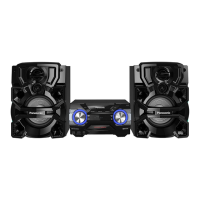
This document provides operating instructions for the Panasonic SC-AKX660 CD Stereo System, covering its functions, usage, and maintenance.

Function Description

The Panasonic SC-AKX660 is a CD Stereo System designed for audio playback from various sources, including CDs, USB devices, and Bluetooth®-enabled devices. It also features an AM/FM radio tuner and recording capabilities. The system supports sound and illumination effects, as well as DJ functions for mixing and sampling.

Key Functions:

  • CD Playback: Plays CD-DA format discs and CD-R/RW discs containing MP3 files.
  • USB Playback: Supports playback of MP3 files from USB devices connected to either USB A or USB B ports.
  • Bluetooth® Connectivity: Allows wireless audio streaming from paired Bluetooth® devices.
  • Radio Tuner: Receives FM and AM broadcasts, with options for automatic and manual presetting of stations. It also supports RDS broadcasting in some regions.
  • Recording: Records audio from CD-DA, MP3 files (from disc or USB A), radio, or external equipment to a USB B device or the internal memory. High-speed recording for CDs is available.
  • Sound Effects: Offers preset EQ settings and manual EQ adjustments for BASS, MID, TREBLE, and SURROUND. It also includes a D.BASS function to emphasize drumbeats.
  • Illumination Effects: Provides various illumination effects, including single-color and automatic color-changing modes.
  • DJ Functions: Allows users to add sound effects or sample sounds between songs, with a DJ jukebox feature for cross-fade and sample sound mixes. A DJ sampler function for scratch and sample sounds is also available.
  • Clock and Timers: Includes a 24-hour clock, a sleep timer to automatically switch off the system, and play/record timers for scheduled operation.
  • External Equipment Connectivity: Features AUX IN 1 and AUX IN 2 jacks for connecting external audio devices like DVD players or portable audio equipment.
  • Auto Off: Automatically switches off the system after 20 minutes of inactivity (not active for radio or Bluetooth® sources).
  • Bluetooth® Standby: Automatically switches on the system when a Bluetooth® connection is established from a paired device.

Usage Features

The system can be operated using both the main unit controls and the supplied remote control.

Basic Playback:

  • Power On/Off: Press the standby/on switch.
  • Source Selection: Use the [CD/RADIO/AUX], [USB], or [D.BASS] buttons on the remote or main unit to select the desired audio source. For Bluetooth®, press the Bluetooth® button.
  • Volume Adjustment: Use the [VOLUME] buttons on the remote or turn the [MULTI CONTROL] knob on the main unit.
  • Mute: Press [MUTE] to temporarily silence the sound.
  • Play/Pause/Stop: Use the basic playback control buttons [►/II], [■], [K], [►►I].
  • Skip Tracks/Albums: Use [K] or [►►I] to skip tracks, and [▲, ▼] to skip MP3 albums.
  • Search: Press and hold [K] or [►►I] during playback.
  • Display Information: Press [DISPLAY] to view track, album, or radio station information.

Disc Playback:

  • Open/Close Disc Tray: Press [CD] (or [스 OPEN/CLOSE] on the main unit).
  • Playback Modes: Access the [PLAY MENU] to select various playback modes like 1-TRACK, 1-ALBUM, RANDOM, ALL REPEAT, and combinations thereof.

USB Playback:

  • Connecting USB Devices: Connect the USB device to the USB A or USB B port. It is recommended to decrease the volume before connecting/disconnecting.
  • Selecting USB Port: Press [USB] (or [MEMORY/USB] on the main unit) to select "USB A" or "USB B".
  • Playback Modes: Similar to CD playback, various playback modes are available via [PLAY MENU].

Bluetooth® Usage:

  • Pairing: Press and hold [ -PAIRING] on the remote or main unit until "PAIRING" is shown. Select "SC-AKX660" from the Bluetooth® menu on your device.
  • Connecting: Press [] on the remote. "BLUETOOTH READY" will be shown. Select "SC-AKX660" from your device's Bluetooth® menu.
  • Disconnecting: Press [] and then select "DISCONNECT?" from the [PLAY MENU].
  • Link Mode: Adjust the link mode (MODE 1 for connectivity, MODE 2 for sound quality) via [PLAY MENU] to optimize performance.

Radio Usage:

  • Source Selection: Press [CD/RADIO/AUX] to select "FM" or "AM".
  • Automatic Presetting: Press [AUTO PRESET] and select "LOWEST" or "CURRENT" to automatically scan and store stations.
  • Manual Presetting: Tune to a station using [K] or [►►I], then press [OK] and select a preset number.
  • Selecting Preset Stations: Use numeric buttons or [K]/[►►I] to select a preset station.
  • Improving Sound Quality: For FM, select "MONO" from [PLAY MENU] if reception is poor. For AM, select "B.PROOF" from [PLAY MENU] for best reception.
  • AM Allocation Setting: On the main unit, press and hold [CD/RADIO/AUX] to change the AM frequency step.

Recording:

  • Source Selection: Select the desired source (CD-DA, MP3 from disc/USB A, radio, external equipment).
  • Recording Destination: Record to internal memory or USB B.
  • Start Recording: Press [MEMORY REC ●/II] or [USB REC ●/II].
  • High-Speed Recording: For CDs, select "HI-SPEED" from [REC MODE] before recording.
  • Adding Track Marks: Use "MANUAL", "SYNCHRO", or "TIME MARK" modes (selected via [REC MODE]) to divide tracks during recording.
  • Deleting Recorded Tracks: In stop mode, select "MEMORY" or "USB B", then navigate to the desired album/track and select "TRACK DEL", "ALBUM DEL", "FORMAT", or "ALL DEL" from [EDIT MODE].

Sound and Illumination Effects:

  • Preset EQ: Press [EQ] and select "PRESET EQ", then choose a setting.
  • Manual EQ: Press [EQ] and select "MANUAL EQ", then adjust BASS/MID/TREBLE/SURROUND.
  • D.BASS: Press [D.BASS] to select "D.BASS LEVEL" or "D.BASS BEAT".
  • Illumination: Press [ILLUMINATION] to select "COLOR", "AUTO", or "OFF".

DJ Functions:

  • DJ Jukebox: Press [JUKEBOX] to select "ON JUKEBOX" for cross-fade/sample mix. Change repeat settings via [PLAY MENU].
  • DJ Sampler: On the main unit, press [DJ JUKEBOX/SAMPLER] to select "SAMPLER", then turn [MULTI CONTROL] to apply scratch/sample sounds.

Clock and Timers:

  • Setting Clock: Press [SETUP] and select "CLOCK", then set the time.
  • Sleep Timer: Press [SLEEP] and select the desired duration (30, 60, 90, 120 minutes) or "OFF".
  • Play/Record Timer: Press [SETUP] and select "TIMER ADJ", then set start/end times, source, and recording destination (for record timer). Activate the timer via "TIMER SET".

External Equipment:

  • Connecting: Connect audio cables to AUX IN 1 or AUX IN 2.
  • Source Selection: Press [CD/RADIO/AUX] to select "AUX 1" or "AUX 2".
  • Input Level: For AUX 2, adjust "INPUT LEVEL" (NORMAL/HIGH) via [PLAY MENU].

Maintenance Features

Cleaning:

  • Wipe the system with a soft, dry cloth.
  • Avoid using alcohol, paint thinner, or benzine.
  • If using chemically treated cloth, follow its instructions.

Fuse Replacement (for AC mains plug of three pins):

  • If the 5-ampere fuse needs replacement, open the fuse cover with a screwdriver, replace the fuse with an ASTA or BSI approved 5-ampere fuse (BS1362), and close the cover.

Battery Replacement (Remote Control):

  • Use alkaline or manganese batteries.
  • Install the battery with correct polarity (+ and –).
  • Remove the battery if the remote control will not be used for a long period.

System Memory Reset:

  • If the system is unresponsive or you wish to clear memory contents, disconnect the AC mains lead. While pressing and holding [0/1] on the main unit, reconnect the AC mains lead until "----" is shown, then release. This resets all settings to factory defaults.

Safety Precautions:

  • Unit: Avoid exposure to rain/moisture, do not place liquid-filled objects on it, use recommended accessories, do not remove covers or attempt self-repair. Ensure good ventilation and avoid obstructing openings. Do not place naked flame sources on the unit.
  • AC Mains Lead: Ensure the mains plug is easily accessible for disconnection.
  • Battery: Replace with the recommended type. Dispose of batteries properly. Do not heat, expose to flame, or leave in direct sunlight in a car. Do not break open or short-circuit.
  • Speakers: Use only supplied speakers. Keep them at least 10 mm from the main unit. Place on a flat, safe surface. Avoid placing near equipment sensitive to magnetism. Reduce volume if sound is distorted or when adjusting sound quality to prevent damage. Do not modify speakers or wires. Do not touch speaker cone's reverberating surfaces.
  • Antenna Plug Adaptor: Keep out of reach of children to prevent swallowing.
  • Outdoor Antenna: Do not use during a lightning storm. Disconnect if not using the system.

Panasonic SC-AKX660 Specifications

General IconGeneral
EqualizerYes
Equalizer bands quantity3
TypeHome audio mini system
Cassette deckNo
Product colorBlack
Speaker type3-way
RMS rated power1700 W
Woofer diameter200 mm
Tweeter diameter60 mm
Number of speakers2
Peak Music Power Output (PMPO)18700 W
Tuner typeDigital
Supported radio bandsAM, FM
Preset stations quantity45
Display typeFL
Internal memory4000 MB
Apple docking compatibility-
Power sourceAC
Input voltage220-240 V
Input frequency50 - 60 Hz
Power consumption (standby)0.5 W
Power consumption (typical)190 W
Headphone connectivity3.5 mm
USB 2.0 ports quantityUSB 2.0 ports have a data transmission speed of 480 Mbps, and are backwards compatible with USB 1.1 ports. You can connect all kinds of peripheral devices to them.
Recording onUSB
Disc types supportedCD, CD-DA, CD-R, CD-RW
Playback disc formatsCD audio
Audio formats supportedMP3
Weight and Dimensions IconWeight and Dimensions
Main unit weight3200 g
Main unit dimensions (WxDxH)348 x 251 x 193 mm

Related product manuals