Owner’s Manual
Wireless Speaker System
Model No. SC-NP10
Thank you for purchasing this product.
Please read these instructions carefully before using this product, and save this manual for future use.
Register online at www.panasonic.com/register (U.S. customers only)
If you have any questions, contact:
U.S.A. and Puerto Rico : 1-800-211-PANA (7262)
Canada : 1-800-561-5505
P PC
Printed in Malaysia
Panasonic Corporation 2013
One Panasonic Way, Secaucus,
New Jersey 07094
http://www.panasonic.com
Panasonic Consumer Marketing
Company of North America,
Division of Panasonic Corporation
of North America
5770 Ambler Drive
Mississauga, Ontario
L4W 2T3
Panasonic Canada Inc.
www.panasonic.ca
IMPORTANT SAFETY INSTRUCTIONS
Read these operating instructions carefully before using the unit. Follow the safety instructions
on the unit and the applicable safety instructions listed below. Keep these operating
instructions handy for future reference.
1 Read these instructions.
2 Keep these instructions.
3 Heed all warnings.
4 Follow all instructions.
5 Do not use this apparatus near water.
6 Clean only with dry cloth.
7 Do not block any ventilation openings. Install in accordance with the manufacturer’s instructions.
8 Do not install near any heat sources such as radiators, heat registers, stoves, or other
apparatus (including amplifiers) that produce heat.
9 Do not defeat the safety purpose of the polarized or grounding-type plug. A polarized plug has
two blades with one wider than the other. A grounding-type plug has two blades and a third
grounding prong. The wide blade or the third prong are provided for your safety. If the provided
plug does not fit into your outlet, consult an electrician for replacement of the obsolete outlet.
10 Protect the power cord from being walked on or pinched particularly at plugs,
convenience receptacles, and the point where they exit from the apparatus.
11 Only use attachments/accessories specified by the manufacturer.
12 Use only with the cart, stand, tripod, bracket, or table specified by the
manufacturer, or sold with the apparatus. When a cart is used, use caution
when moving the cart/apparatus combination to avoid injury from tip-over.
13 Unplug this apparatus during lightning storms or when unused for long periods of time.
14 Refer all servicing to qualified service personnel. Servicing is required when the
apparatus has been damaged in any way, such as power-supply cord or plug is
damaged, liquid has been spilled or objects have fallen into the apparatus, the
apparatus has been exposed to rain or moisture, does not operate normally, or has been dropped.
WARNING
Unit
To reduce the risk of fire, electric shock or product damage,
• Do not expose this unit to rain, moisture, dripping or splashing.
• Do not place objects filled with liquids, such as vases, on this unit.
• Use only the recommended accessories.
• Do not remove covers.
• Do not repair this unit by yourself. Refer servicing to qualified service personnel.
AC power supply cord
The power plug is the disconnecting device.
Install this unit so that the power plug can be unplugged from the socket outlet immediately.
CAUTION
Unit
• Do not place sources of naked flames, such as lighted candles, on this unit.
Placement
To reduce the risk of fire, electric shock or product damage,
• Do not install or place this unit in a bookcase, built-in cabinet or in another confined
space. Ensure this unit is well ventilated.
• Do not obstruct this unit’s ventilation openings with newspapers, tablecloths, curtains,
and similar items.
Check the supplied accessories before using this unit.
1 AC power supply cord (K2CB2CB00022)
• Product numbers provided in this Owner’s Manual correct as of February 2013. These
may be subject to change.
• Do not use AC power supply cord with other equipment.
• (ONLY FOR CANADA) The enclosed Canadian French label sheet corresponds to the
English display on the unit.
THE FOLLOWING APPLIES ONLY IN THE U.S.A.
FCC Note:
This equipment has been tested and found to comply with the limits for a Class B digital
device, pursuant to Part 15 of the FCC Rules.
These limits are designed to provide reasonable protection against harmful interference in
a residential installation. This equipment generates, uses and can radiate radio frequency
energy and, if not installed and used in accordance with the instructions, may cause
harmful interference to radio communications. However, there is no guarantee that
interference will not occur in a particular installation. If this equipment does cause harmful
interference to radio or television reception, which can be determined by turning the
equipment off and on, the user is encouraged to try to correct the interference by one or
more of the following measures:
≥ Reorient or relocate the receiving antenna.
≥ Increase the separation between the equipment and receiver.
≥ Connect the equipment into an outlet on a circuit different from that to which the receiver
is connected.
≥ Consult the dealer or an experienced radio/TV technician for help.
Any unauthorized changes or modifications to this equipment would void the user’s
authority to operate this device.
This device complies with Part 15 of the FCC Rules. Operation is subject to the following
two conditions:
(1) This device may not cause harmful interference, and
(2) this device must accept any interference received, including interference that may
cause undesired operation.
Responsible Party:
Panasonic Corporation of North America
One Panasonic Way,
Secaucus, NJ 07094
Support Contact:
Panasonic Consumer Marketing Company of
North America
Telephone No.: 1-800-211-PANA (7262)
THE FOLLOWING APPLIES IN THE U.S.A. AND CANADA
This device complies with Part 15 of FCC Rules and Industry Canada licence-exempt
RSS standard(s).
Operation is subject to the following two conditions:
(1) This device may not cause interference, and
(2) this device must accept any interference, including interference that may cause
undesired operation of this device.
FCC ID : ACJ-SC-NP10
IC : 216A-SCNP10
This transmitter must not be co-located or operated in conjunction with any other antenna
or transmitter.
This equipment complies with FCC/IC radiation exposure limits set forth for an
uncontrolled environment and meets the FCC radio frequency (RF) Exposure Guidelines
in Supplement C to OET65 and RSS-102 of the IC radio frequency (RF) Exposure rules.
This equipment has very low levels of RF energy that is deemed to comply without
maximum permissive exposure evaluation (MPE). But it is desirable that it should be
installed and operated keeping the radiator at least 20 cm (7
7
/8q) or more away from
person’s body (excluding extremities: hands, wrists, feet and ankles).
Accessories
The lightning flash with arrowhead symbol, within an
equilateral triangle, is intended to alert the user to the
presence of uninsulated “dangerous voltage” within
the product’s enclosure that may be of sufficient
magnitude to constitute a risk of electric shock to persons.
CAUTION
CAUTION :
TO REDUCE THE RISK OF ELECTRIC
SHOCK, DO NOT REMOVE SCREWS.
NO USER-SERVICEABLE PARTS
INSIDE.
REFER SERVICING TO QUALIFIED
SERVICE PERSONNEL.
The exclamation point within an equilateral triangle is
intended to alert the user to the presence of important
operating and maintenance (servicing) instructions in
the literature accompanying the appliance.
RISK
OF
ELECTRIC
SHOCK
DO
NOT
OPEN
A: You can adjust the tilt of the backrest. Align the support for the backrest with the desired
position between the lines A.
To close the backrest, lift up the support slowly, and push it towards the backrest.
Note
•
When using the AUX input,
the Bluetooth
®
and NFC features are not available.
• When using the AUX input, the volume may seem low depending on the connected device.
In that case, check if the volume limit can be changed on the device. For details, refer to the
operating instructions of the device.
• When the backrest is propped up, do not move this unit or subject this unit to a strong shock.
Preparation
After inserting the AC power supply cord to this unit, turn on the Bluetooth
®
feature of the device and place the device near this unit.
If you intend to use an NFC (Near Field Communication)-compatible Bluetooth
®
device, proceed to
“
One-Touch Connection (Connecting by NFC)”.
For each Bluetooth
®
device you want to connect to via Bluetooth
®
, perform pairing first.
Pairing with
Bluetooth
®
device
1 Press [Í/I] to turn this unit on.
• The Bluetooth
®
indicator blinks slowly.
•
If this unit is being used for the first time (factory preset state):
The Bluetooth
®
indicator blinks fast.
→
The unit will enter pairing standby.
→
Skip to step 3.
2 Press and hold [-PAIRING] until the Bluetooth
®
indicator blinks fast.
• The unit will enter pairing standby.
3 Select “SC-NP10” from the Bluetooth
®
device’s Bluetooth
®
menu.
• When the Bluetooth
®
device is paired and connected,
the Bluetooth
®
indicator on the unit lights up.
• If prompted for a passkey, input “0000”.
• After the connection is established, proceed to “Selecting Transmission mode setting” (right).
Connecting a paired Bluetooth
®
device and listening to audio
When this unit is turned on, it searches for the last-used Bluetooth
®
device.
If a connection to the last-used one is successful, the Bluetooth
®
indicator on
the unit lights up.
If the Bluetooth
®
indicator blinks, you need to connect the Bluetooth
®
device.
1 Select “SC-NP10” from the Bluetooth
®
device’s Bluetooth
®
menu.
• When the Bluetooth
®
device is connected,
the Bluetooth
®
indicator on the unit lights up.
2 Start playing back music, a movie, etc. on your Bluetooth
®
device.
• Adjust the volume using the [- VOL +] buttons on the unit.
When the maximum or minimum volume is reached, you will be notified by a beep sound.
For NFC-compatible Android
TM
devices only
By simply touching this unit to an NFC (Near Field Communication)-compatible
Bluetooth
®
device, this unit automatically turns on, and performs the starting
operation, from pairing the Bluetooth
®
device to establishing a connection.
Designed to skip the starting operation, this feature is very convenient.
About NFC (Near Field Communication)
It is a short range wireless technology that makes use of interacting radio communications.
Preparation
Turn on the NFC feature of the device. And connect the device to the internet to
install a dedicated app. Separate data charges apply for the internet use.
1 Download the app “Panasonic Music Streaming” (free of charge) to
your Bluetooth
®
device from Google Play
TM
Store.
• Enter “Panasonic Music Streaming” in the search box of Google Play
TM
Store and search
→
select “Panasonic Music Streaming”
to download the app
2
Start the app “Panasonic Music Streaming” on your
Bluetooth
®
device.
• Follow on-screen instructions on your device.
• Always use the latest version of the app.
3
Touch and hold your device on the NFC touch area of this unit.
(Until a pop-up window on your device indicates that the connection is established.)
• When this unit turns on and a connection is established, the Bluetooth
®
indicator lights up.
• When the Bluetooth
®
indicator does not light up even if you have touched the NFC
touch area, change the touching position.
4 Start playing back music, a movie, etc. on your Bluetooth
®
device.
Connecting to another device
• If you touch another device to this unit, you can update the Bluetooth
®
connection. The previously connected device will be disconnected automatically.
Turning off/on the NFC feature of this unit
You can also turn off the NFC feature, if you want to disable the One-Touch
Connection. Perform the step below while this unit is turned on.
NFC OFF :
1 While pressing and holding [- VOL], press and hold [VOL +] until the
Bluetooth
®
indicator and the “D.SURROUND” indicator blink once.
NFC ON : Refer to “Reset (To the factory preset state)” (back side)
• This unit returns to the factory preset state by resetting it.
This unit has two transmission modes: “Connectivity Priority MODE” and
“Sound Quality Priority MODE”. After confirming that audio can be played back,
select the mode while this unit is turned on.
1 Set either of the following modes.
■
Connectivity Priority MODE:
While pressing and holding [D.SURROUND], press and hold [VOL +] until
the Bluetooth
®
indicator and the “D.SURROUND” indicator blink once.
■
Sound Quality Priority MODE:
While pressing and holding [LIGHT], press and hold
[VOL +] until the
Bluetooth
®
indicator and the “D.SURROUND” indicator blink once.
2
Press [
Í
/I] to turn this unit off, and press [
Í
/I] again to turn on.
• The Bluetooth
®
connection is automatically established, and the Bluetooth
®
indicator lights up.
• Switch off this unit or the device.
• Stop / disable the Bluetooth
®
transmission of the device.
• (For NFC-compatible devices only)
Touch and hold your device to NFC touch area of this unit again.
Note
• This unit can only be connected to one device at a time.
• This unit can register up to 8 devices.If a 9th device is paired, the device that has not been
used for the longest time will be replaced.
• This unit automatically turns off (Auto Power Off) if no operation is performed for approximately
30 minutes when not connected to Bluetooth
®
(when the Bluetooth
®
indicator is blinking).
When using the AUX input,
the Auto Power Off function does not work.
• If the image and sound are out of sync during playback, restart the playback app you are using. If
the problem persists, connect
the Bluetooth
®
device
and this unit with an audio cable.
• The One-Touch Connection may not work properly depending on the type of device being used.
Control reference guide
Listening to audio from a Bluetooth
®
device
Connecting via Bluetooth
®
menu
9
STEP 1 STEP 2
2
1
76
58
3 4
10
11
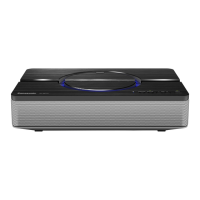
1 NFC touch area
•Refer to “One-Touch Connection
(Connecting by NFC)”.
2 Bluetooth
®
indicator
3
Light button/Bluetooth
®
pairing button
•You can turn on/off the circle light by
pressing this button.
4 D.SURROUND button
5
“D.SURROUND” indicator
6 Volume buttons
7 Standby/on switch [Í/I]
•Press to switch the unit from on to standby
mode or vice versa. In standby mode, the unit
is still consuming a small amount of power.
8 Power indicator
9 AC IN terminal
10 USB (type A) DC output ports
•
When using these ports, use a USB (type A)
cable (not supplied).
(See “
About the DC output ports (USB)”)
11 AUX jack
One-Touch Connection (Connecting by NFC)
Selecting Transmission mode setting
The default mode is set to “Connectivity Priority MODE” to facilitate
checking of the connection after a device registration.
When cordless phones, wireless LAN routers, and other wireless devices that
may interfere with this unit are not present in the surrounding area, select
"Sound Quality Priority MODE". You can enjoy audio with higher quality sound.
Disconnecting
Bluetooth
®
VQT4X82
F0213DT0
SC-NP10PPC.fm 1 ページ 2013年2月7日 木曜日 午前10時31分

 Need help?



 To Next Page


 General