EasyManua.ls Logo

Panasonic SR-W10GHP - Page 4

Panasonic SR-W10GHP
15 pages
Print Icon
To Next Page IconTo Next Page
To Previous Page IconTo Previous Page
Loading...
cae
i
Sees
Pat
ea
veneer
ts
ite
=
Rais
PLAST:
1
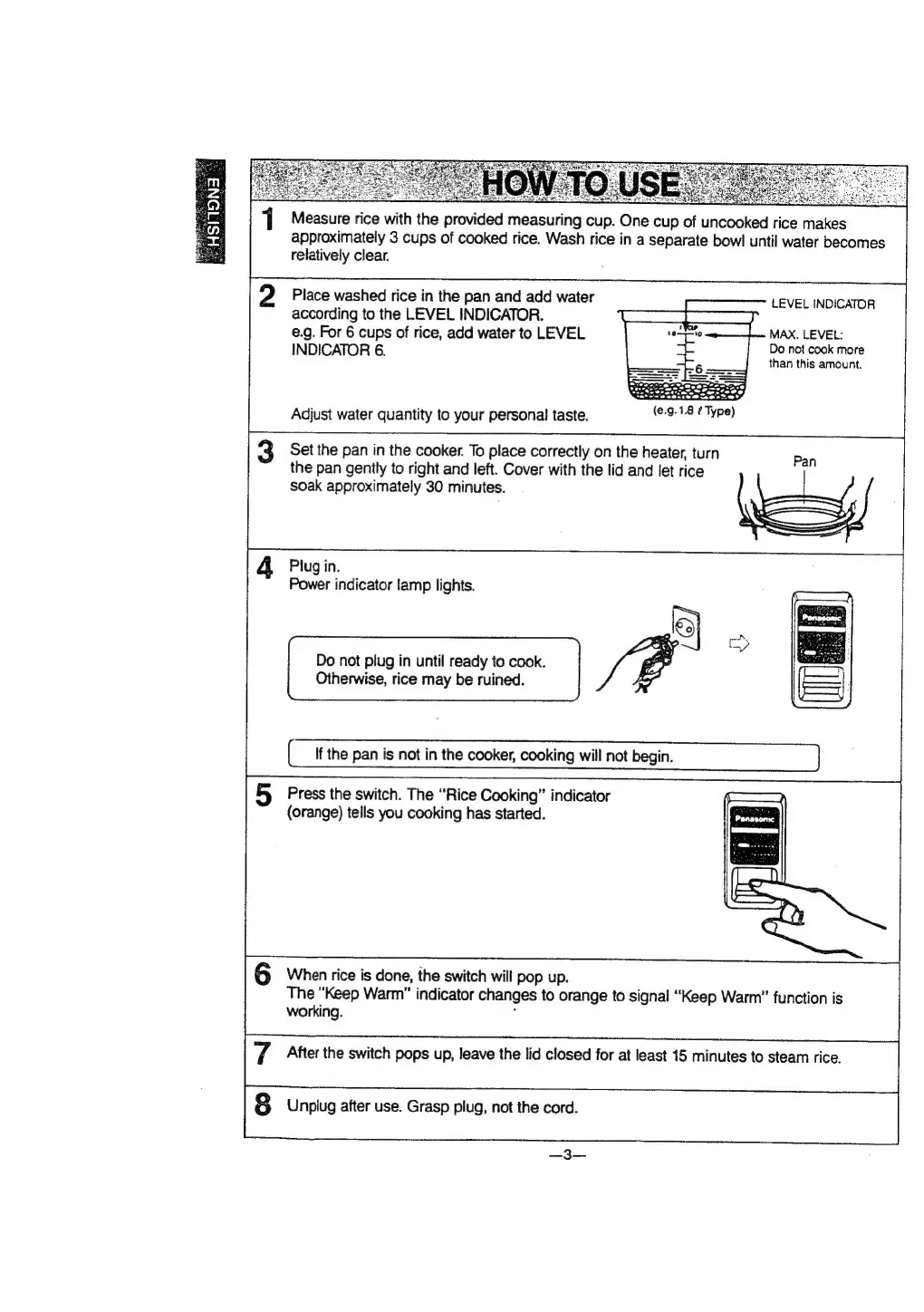
Measure
rice
with
the
provided
measuring
cup.
One
cup
of
uncooked
rice
makes
approximately
3
cups
of
cooked
rice.
Wash
rice
in
a
separate
bowl
until
water
becomes
relatively
clear.
2
Place
washed
rice
in
the
pan
and
add
water
according
to
the
LEVEL
INDICATOR.
e.g.
For
6
cups
of
rice,
add
water
to
LEVEL
INDICATOR
6.
LEVEL
INDICATOR
MAX.
LEVEL:
Do
not
cook
more
than
this
amount.
Pease
msl
cleee
icameste
(e.9.1.8
¢
Type)
Adjust
water
quantity
to
your
personal!
taste.
3
Set
the
pan
in
the
cooker.
To
place
correctly
on
the
heater,
turn
the
pan
gently
to
right
and
left.
Cover
with
the
lid
and
let
rice
soak
approximately
30
minutes.
Pan
Plug
in.
Power
indicator
lamp
lights.
Do
not
plug
in
until
ready
to
cook.
Otherwise,
rice
may
be
ruined.
Press
the
switch.
The
“Rice
Cooking”
indicator
(orange)
tells
you
cooking
has
started.
When
rice
is
done,
the
switch
will
pop
up.
The
“Keep
Warm”
indicator
changes
to
orange
to
signal
“Keep
Warm”
function
is
working.
:
After
the
switch
pops
up,
leave
the
lid
closed
for
at
least
15
minutes
to
steam
rice.
Unplug
after
use.
Grasp
plug,
not
the
cord.
92.