English
17
■ Common Interface
●
Turn the TV off with Mains Power On / Off switch
whenever inserting or removing the CI module.
●
If a smart card and a CI module come as a set, first
insert the CI module, then insert the smart card into
the CI module.
●
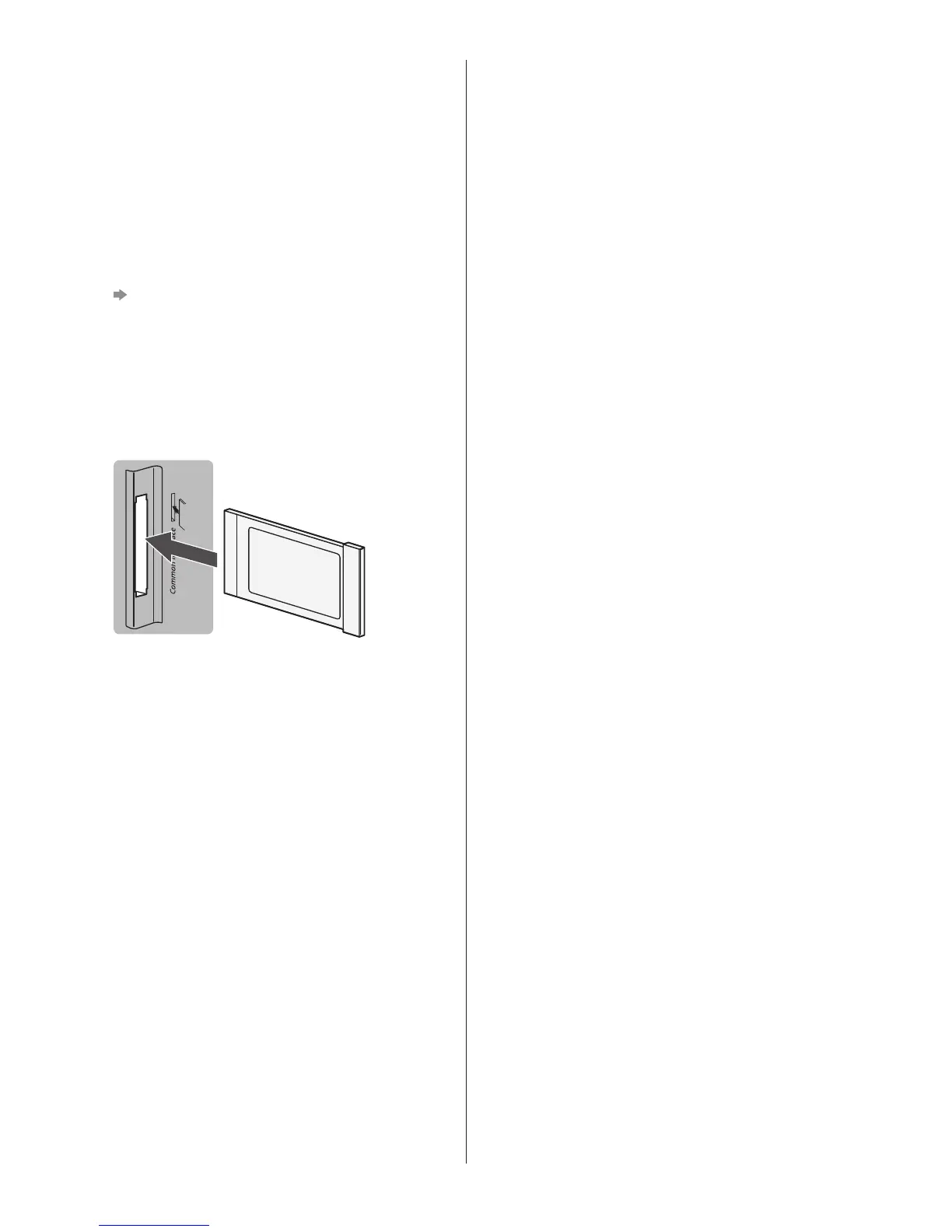
Insert or remove the CI module completely in the
correct direction as shown.
●
Normally encrypted channels will appear. (Viewable
channels and their features depend on the CI
module.)
If encrypted channels do not appear
[Common Interface] in the Setup Menu
●
There might be some CI modules in the market
with older firmware versions that do not work fully
interoperable with this new CI+ v1.3 TV. In this case,
please contact your content provider.
●
For details, refer to [eHELP] (Search by Purpose >
Functions > Common Interface), read the manual of
the CI module, or check with the content provider.
TV
CI module
■ USB HDD (for recording)
●
Use USB 2 port for connecting the USB HDD.
●
For details, refer to [eHELP] (Search by Purpose >
Recording).
■ VIERA Link
●
Use HDMI1 - 3 for VIERA Link connection.
●
For details, refer to [eHELP] (Search by Purpose >
Functions > VIERA Link “HDAVI Control™”).









 To Next Page