Panda Wireless User’s Manual
Page 7
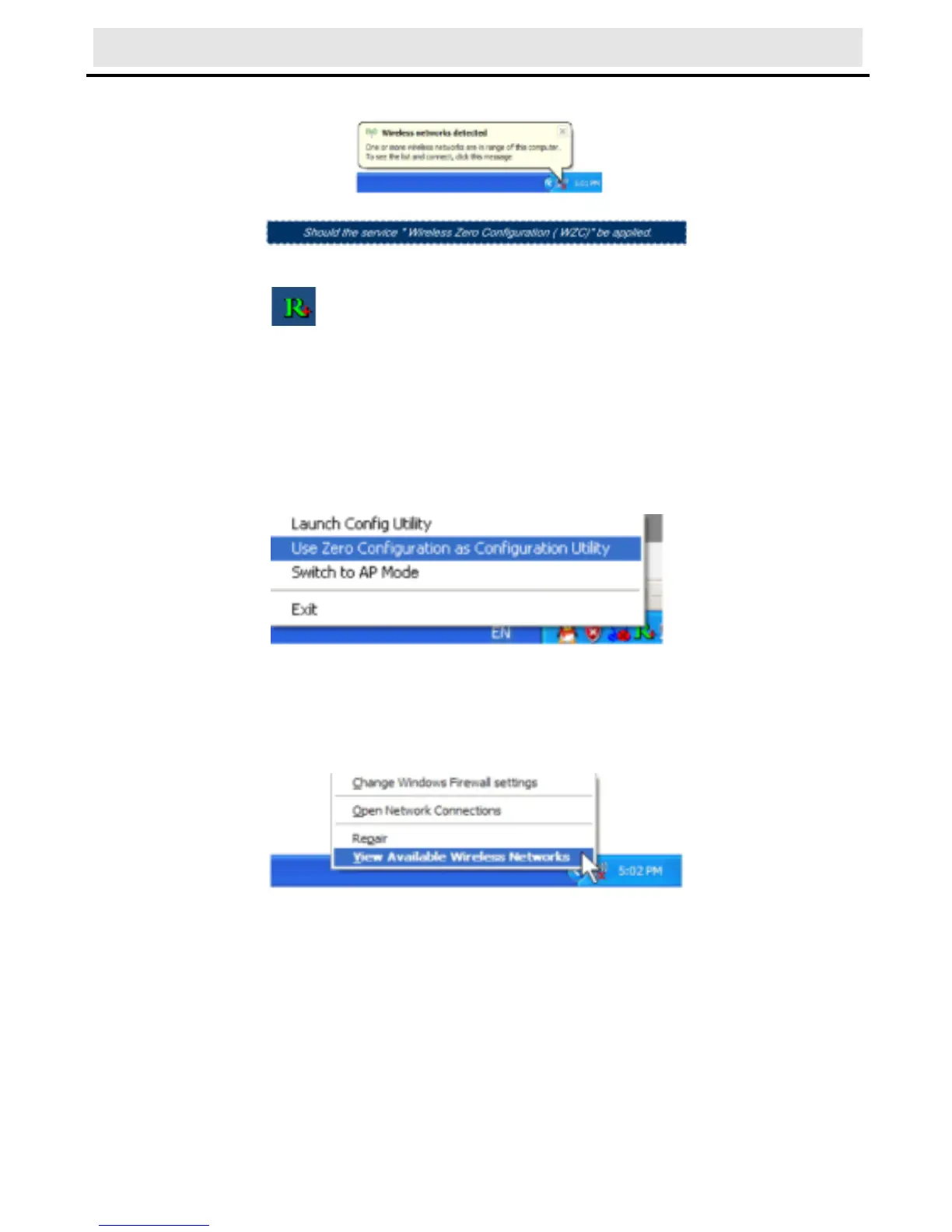
hardware is found and installed, something like this:
3) Before you begin, ensure WZC is enabled, by right-clicking on
the Ralink icon in the task bar in the bottom right corner of your
screen.
In the menu that appears, select “Use Zero Configure as
Configuration Utility” to use Windows wireless management feature,
Windows Zero Configuration (W ZC) helps to manage your Wireless
Network Connection.
4) Right click the icon and then select “View Available Wireless
Networks” to launch the utility, the Wireless Network Connection
window appears and displays your wireless network listed with the
SSID you chose.
Notes: Before configuring your WiFi access, you need to have
your network’s SSID (service set identifier), security key and
authentication type handy. Check the documentation coming with
your router, ask your network administrator to get the information.
5) If you don't see your network, click “Refresh network list” in the
upper left corner. If you are locating within the valid range of WiFi
Hotspots or wireless routers, all available networks will be
recognized and listed automatically. Click your preferred network,



 To Next Page