Appendix
© Copyright 2008 Panoramic Corporation
It is recommended that the panoramic and
cephalometric cassettes be loaded with fi lm just
prior to use. Do not leave a fi lm loaded in the
cassettes for an extended period of time. This will
prevent background radiation from prematurely
exposing the fi lm. The fi lm should be stored in a
cool and dark place.
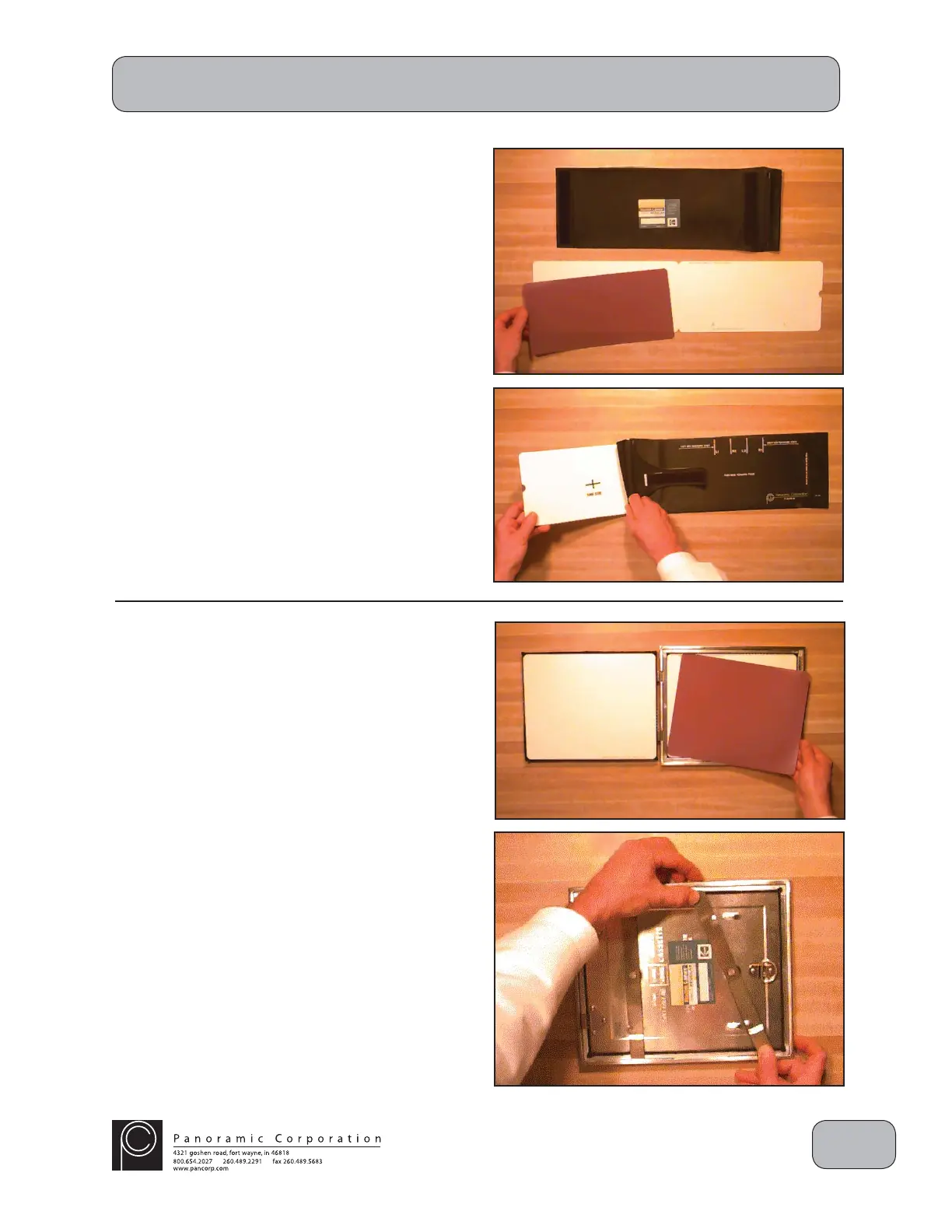
Loading The Panoramic Cassette
In a lighttight darkroom, open the fl exible,
panoramic cassette sleeve and slowly remove
the intensifying screens. Open the screens on
the counter and place a sheet of panoramic fi lm
on top of one of the screens. Close the screens
and slowly slide them back into the cassette
sleeve. Ensure that the hinged end of the screens
is placed into the cassette sleeve fi rst and the
"TUBESIDE" decal is facing the same direction as
the writing on the outside of the cassette sleeve.
Ensure that all excess air is expelled from the
cassette sleeve.
Loading The Cephalometric Cassette
In a lighttight darkroom, unlock and open the
rigid, cephalometric cassette. Place a sheet of
cephalometric fi lm on top of one of the screens.
Close and lock the cassette.
Note: Remove and discard the protective sheet
from between new intensifying screens before
Darkroom Procedures


 To Next Page
 Loading...