#WVJQT
0GY(WPM[5WG[QUJK㨯;WOK/CVUWVQ[C#OK1\CMK6GVUWLK*C[CUJK6CVUWTQ;COCUJKVC
-C\WOCUC1FC/CTKC6CMGWEJK
*+../+.&4'&,%*74%*+..(4#0-'
㨯㨯㨯㨯㨯㨯64#&+6+10#.
0QDW[QUJK-QUJKDG
6CMGUJK5JKDW[C
5%*7$'46(4#0<
/#4-5,1*0&
#OGTKECPHQNMUQPI
㧯㧴㧝 㧯㧴㧞 㧯㧴㧟 㧯㧴㧠
㧭
Group
4WPPGT
Mamotte Agetai
㧯
㧮
Doyoubino Koibito
Saafu Tengoku Sukii Tengoku
Oribiao Kikinagara
Akino Kehai
#5GRVGODGT
㧱
㧰
*K*Q
Bear Song
Iro Howaitoburendo
㧳
㧲
4WPPGT
Doyoubino Koibito
Oh My Darling Clementine
Mamotte Agetai
Yankee doodle
Oribiao Kikinagara
#5GRVGODGT㧶
㧵
Konnako Irukana
Rudolph the Red-nosed Reindeer
Mamotte Agetai
4WPPGT
A September
Oribiao Kikinagara
Akino Kehai
Doyoubino Koibito
Iro Howaitoburendo
Saafu Tengoku Sukii Tengoku
Hi Ho
Bear Song
Happy Birthday
I've been working on the Railroad
Konnako Irukana
Toys Go Cha Cha Cha
Rudolph the Red-nosed Reindeer
Wiegenlied
Oh My Darling Clementine
She Wore a Yellow Ribbon
Yankee doodle
Yellow Rose of Texas
Londonderry Air
When the Saints Go Marching In
㧴
*CRR[$KTVJFC[
*K*Q
Akino Kehai
Saafu Tengoku Sukii Tengoku
Bear Song
Iro Howaitoburendo
㧸
㧷
She Wore a Yellow Ribbon
When the Saints Go Marching In
Toys Go Cha Cha Cha
Oh My Darling Clementine
Konnako Irukana
Yellow Rose of Texas
Wiegenlied
Yankee doodle
Rudolph the Red-nosed Reindeer
㧺
㧹
Londonderry Air
4WPPGT
Mamotte Agetai
*+*1
Yankee doodle
When the Saints Go Marching In
㧼
㧻
ޓ Sound groups
٨Sound Chart type D (BD-غD)
ޓ Sound List
6-3.How to Combine Sounds
When the sound group P is selected, sounds can be chosen from
the 32 sounds and combined freely using an SD card.
٨Items prepared by customers
ޓSD card (Type: SDV-128P Sold separately), Personal computer, SD card Reader/Writer
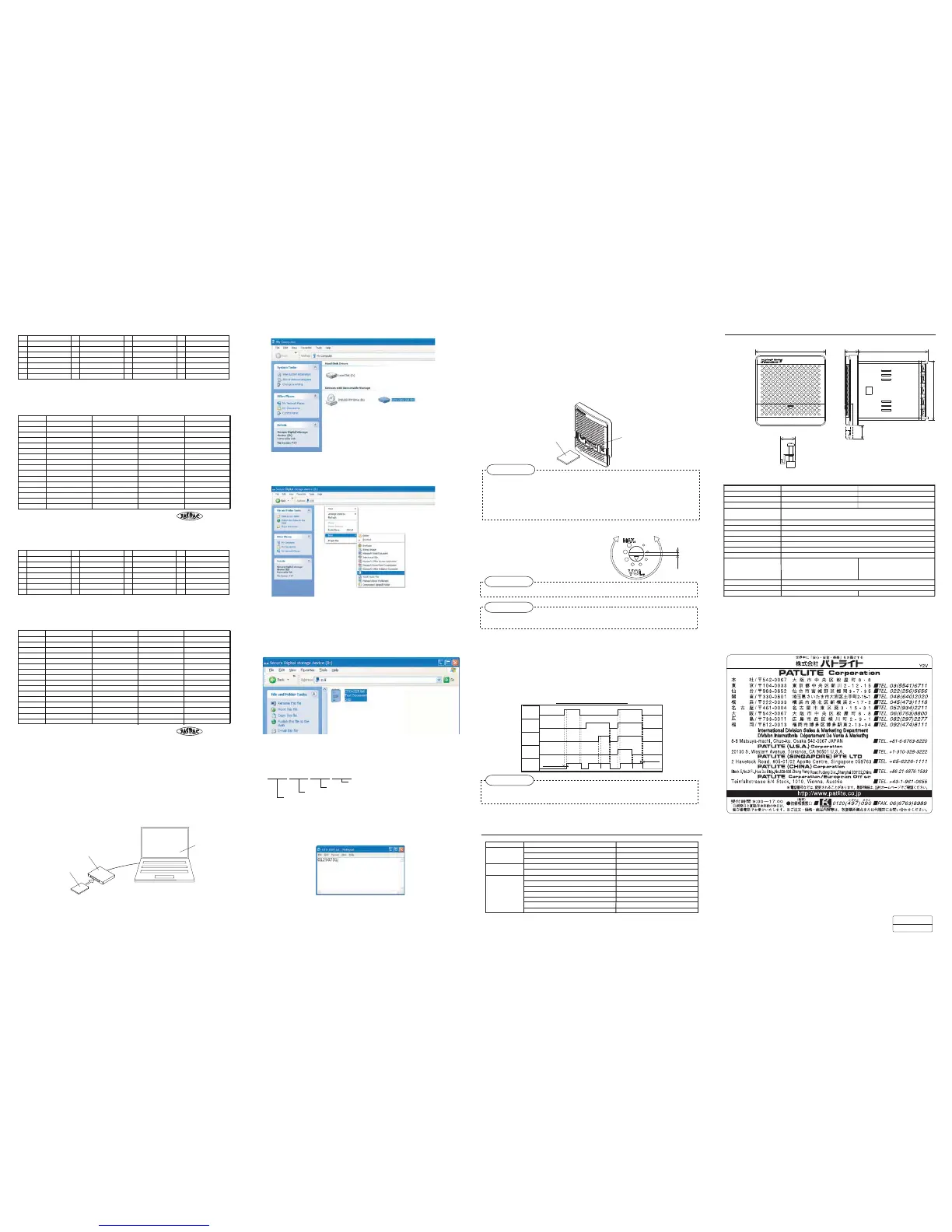
1.Creating the sound combination data
ޓBy using a personal computer, data consisting of different sounds is created
ԘConnect SD card Reader/Writer to PC, and then insert an SD card.
6-4.
Adjusting the Sound Volume
The sound volume can be adjusted using the
volume control. Use a flat-blade screwdriver
with the blade thickness of 1.0mm or thinner
for turning the volume control.
٨Turn the volume control lightly. It may be damaged if a torque of 0.3Nm or more is applied.
٨When the volume is set to high, the sound may be distorted in some sounds.
٨In some cases the volume may not be zero even if the volume control is set to the minimum.
2.Transferring the sound combination data
ޓ
The sound combination data created in "1. Creating the sound combination data" is transferred to this product.
Ԙ Turn off the power of this product.
ԙ Open the front cover, and insert the SD card, in which the data created in "1. Creating the sound combination
data" is stored, into the card slot.
Ԛ Turn on the power of this product.
ԛ When transferring the sound data is completed, you will hear a high-pitched tone. After hearing the
sound, pull out the SD card.
ޓ* The writing completes in 1 second or less. When you hear the high-pitched tone repeatedly or hear no sound at all,
it means that the writing was unsuccessful. Confirm the descriptions for the procedures 1 and 2.
But take note that if the volume control is set to the minimum, you will not hear the sound of completion.
Ԝ Set the sound group selection switch to P, and confirm the sound of each channel .
Card slot
SD card
٨ As for the SD card, use the type SDV-128P sold separately. Operation is not guaranteed if an SD card of any
other type is used.
٨ When formatting the SD card, do it in either FAT12 or FAT16.
٨ When inserting the SD card, pay attention to the orientation of the SD card. And do not forcibly insert the
SD card into the card slot. Doing so may cause damage to the SD card and/or the product.
٨ Pay attention that no foreign object enter into the card slot.
Volume
larger
Volume
smaller
OO
6-5.How to Play Sounds
When the COM terminal and the terminal CH 1 - CH 4 are short-circuited after turning on the power, the sound of the
channel of the selected group is played.
٨Sound is played while the terminals are short-circuited.
٨When 2 or more CH terminals are short-circuited to the COM terminal, the sound of the channel with a larger number
will be played.
ޓޓޓޓPriority order for the channelsޓCH 4㧪CH 3㧪CH 2㧪CH 1
٨When this product is operated by turning on the power, it takes about 1 second to play a sound.
٨Refer to the table below for the time chart when this product is operated by the CH terminals.
٨Pop noise may be generated when the power is turned on or off, or at the beginning
ޓof playing a sound. But it is normal.
Sound
CH signal input time chart
%*
%*
%*
%*
%* %* %*
170ms or less
50ms or less
%* %*
٨If the product does not operate correctly even after it is properly installed and handled,
ޓcontact a branch office or the technical support printed on the last page.
Symptom Points to be checked Coping strategies
Is the power supplied?
Are the COM terminal and CH terminal short-circuited correctly?
Are the COM terminal and CH terminal short-circuited correctly?
Is the volume control not set to the minimum?
Is the power supplied?
It is correctly selected with the tone color group selection switch?
Confirm the wiring.
Confirm the wiring.
Adjust the volume.
Is the volume control not set to the minimum?
Adjust the volume.
Confirm the tone color group selection switch.
Confirm the wiring.
Confirm the wiring.
Confirm the location of the stored file.
No sound is played
Is there a text document stored in the SD card?
Is the SD card correctly inserted?
Confirm the orientation of the insertion.
Create a text document in the SD card.
It does not read SD card
Is the data not placed in a folder?
Is the extension of text document “.txt”?
Are the file name and the content of the text document correct? Confirm the file name and the content of the text document.
Confirm the extension of document file name.
A sound of a different
channel is played
7. Before You Request a Repair
٨ Please note that we will not be held responsible for the failure or damage caused by handling the product in ways
ޓnot observing the warnings or cautions contained in this document.
٨ Please note also that the contents in this document may be changed for improvement without notification
ޓ in advance.
Please use the power-supply voltage with DC24V in case you use in quiet place.
غ
غ
8. Specifications
ޣExternal viewޤ(mm)
Mounting hardware
(Extended length with cover open)
%
9'6
ԛChange the file name of the created text document to
ޓ ޓޓޓޓޓޓ
ޣޓOTO-LIST.txtޓޤ
ޓ
ޓ * Use half-size upper- or lowercase letters for the file name.
If the extension ".txt" is not displayed when the text document is created, change the file
name to [ OTO-LIST ].
Enter the number of the sound (see 6-2. Sound List) you want to combine into the text
document created in ԛ and store it in the SD card. * Enter the sound number with
half-size numbers of 8 digits.
ޓ غغغغغغغغ
ޓExample
ޓ
When a combination of the following sounds are to be created with the type BD-غA.
CH 1: Beep CH 2: Amaryllis CH 3: Synthesized Piano CH 4: Grandfather's Clock
Enter the number shown below into the text document, and save the file.
ޓޓ
ޣ 01250731 ޤ
Sound number of CH 4
Sound number of CH 3
Sound number of CH 2
Sound number of CH 1
SD card Reader/Writer
SD card
Personal computer
I've been working on the Railroad
I've been working on the Railroad
6$
6
6
Stutter (rapid intermittent horn)
Beep (slow intermittent horn)
Yelp (rapid siren)
Bell (clear highpitched bell)
Melody Chime
Rapid Hi-Lo
Synthesized Bell
Synthesized Piano
Call Sign
Chime
Beep (slow intermittent horn)
Rapid Hi-Lo
Stutter (rapid intermittent horn)
Bell (clear highpitched bell) Yelp (rapid siren)
Melody Chime
Chime
Synthesized Piano
Call Sign
Synthesized Bell
Chime
Chime
Call Sign
Call Sign
Chime
Chime
Call Sign
Call Sign
Chime Call Sign
Chime Call Sign
Other Precautions
Other Precautions
Information
Information
Model $&غ $&غ
Rated Voltage
Power Consumption
8&%ޓ 8#%8#%*\
Voltage Range 8&% 8r#%8r#%
4W / Standby power consumption 0.5W 5W / Standby power consumption 1.1W
Mass Ir Ir
Sound Pressure Level
Max. :90dB (at a distance of 1m when the panel is attached)Volume adjustment is possible.
* The sound pressure level may be lower depending on the tone color, usage environment, and supplied voltage.
Bit input
Level hold input (Sound is played while COM terminal and CH terminal are short-circuited.))
Operation by turning on the power: 1s or less Operation by CH signal: 170ms or less
4 channels
CH4㧪CH3㧪CH2㧪CH1
-20 㨪 55
RH 85% or lower (no condensation)
Indoor use only: * Normal, * reverse, and * lateral
direction are possible (Normal direction only in
places
where water may be splashed on it).
Indoor : * Normal, * reverse, and * lateral direction
are possible (Normal direction only in places where
water may be splashed on it).
Outdoor:*Normal direction only.
CH Input
Input Method
Starting Time
Number of Channels
Priority Order for the Channels
Operating Temperature Range
Relative Humidity
Mounting Direction
IP54 (When the panel is mounted in normal direction; Front only)
Protection Level
OU
Resistance to Vibration
㧯㧴㧝 㧯㧴㧞 㧯㧴㧟 㧯㧴㧠
㧭
Group
㧯
㧮
㧱
㧰
㧳
㧲
㧶
㧵
Call sign
Chime
Galloping Hi-Lo
Galloping Hi-Lo
Train Ride
Train Ride
Falling Crystals
Falling Crystals
Alien Chatter
Alien Chatter
Garactic Motor
Garactic Motor
Two Tone
Ringing Hi-Lo
Inverted Reveille
Inverted Reveille
Ringing Phone
Alarm Clock
Fur Elise
Fur Elise
Two Tone
Two Tone
Minuet
Minuet
Minuet
Ringing Phone
Alarm Clock
Alarm Clock
Fur Elise
Ringing Hi-Lo
London bridge is falling down
London bridge is falling down
London bridge is falling down
Annie Laurie
Annie Laurie
Annie Laurie
The camptown Races
The camptown Races
Mary had a little Lamb
Mary had a little Lamb
Symphony No.40
Symphony No.40
Symphony No.40
Amaryllis
Amaryllis
Grandfather’s Clock
Grandfather’s Clock
Ave Maria
Ave Maria
Ave Maria
㧴
㧸
㧷
㧺
㧹
㧼
㧻
ޓ Sound groups
٨Sound Chart type E(BD-غE)
ޓ Sound List
6$
6
6
Stutter (rapid intermittent horn)
Beep (slow intermittent horn)
Yelp (rapid siren)
Yelp (rapid siren)
Bell (clear highpitched bell)
Melody Chime
Rapid Hi-Lo
Synthesized Bell
Synthesized Bell
Synthesized Piano
Synthesized Melody Chime
Synthesized Melody Chime
Stutter+Bell
Stutter+Bell
Beep (slow intermittent horn)
Rapid Hi-Lo
Stutter (rapid intermittent horn)
Bell (clear highpitched bell)
Melody Chime
Chime
Synthesized Piano
Call Sign
Chime
Chime
Call Sign
Call Sign
Chime
Chime
Call Sign
Call Sign
Chime Call Sign
Call Sign
Call Sign
Call Sign
Call Sign
Call Sign
Call Sign
Chime Call Sign
ޓԙIn the My Computer of the PC, open the drive into which the SD card is inserted.
ޓԚWithin the window opened, click with the right mouse button, and point New Document
and then choose Text Document.
ޓ* The name may vary such as notepad depending on the OS and its version.
Chime
Chime
Chime
Chime
Chime
Chime


 To Previous Page
 Loading...