OPERATING INSTRUCTIONS
Place the heater on a firm level surface free from obstructions, and at least 3 ft. away from any
wall and any other objects such as furniture, curtains, plants or combustible material.
Insert the power plug into an AC supply socket.
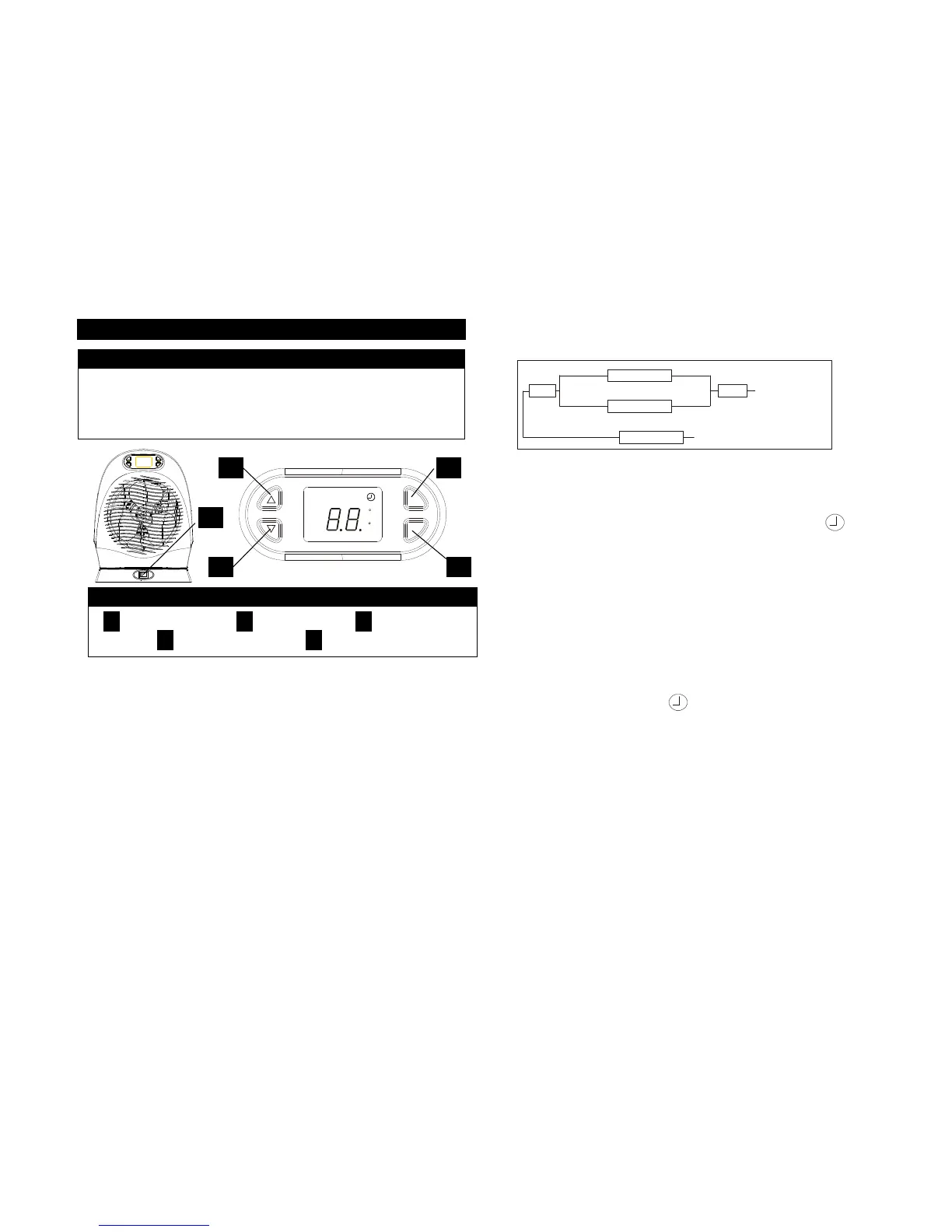
Press the “POWER”button D, the unit will cycle as OFF-Standby-Low-High-Fan-OFF.
OFF— the unit is off and the display is off also;
Standby— the unit is off and the display shows the environment temp. You can set
Timer on.
Low-- the heater operates at low power.
High-- the heater operates at high power.
Fan— The Fan circulates room air only. The heating elements are “OFF”.
If the heater turns on first time, it will be on for two minutes automatically.
The ∧ or ∨ button B and C can be used to adjust Timer and the desired temperature.
Please see the following fig:
How to use the Timer: this heater has a 8-hour-timer, which can automatically turn the
unit ON when it is in Standby mode, or turn the unit OFF when it is LO, HI or FAN mode.
TIMER ON: When the heater is Standby mode (the unit doesn’t work but the display is
on), press the Timer button, the buzzer sounds, the symbol
will illuminate, it shows the time on the display. Press ∧ or ∨ button B and C one time,
the buzzer sounds, and the time add or reduce 0.5 hours. It will be automatically turns on
at the time you set.
For example: it is now 6:00 AM. If you want the heater turns on at 11:30 AM, firstly you
press the POWER button to select Standby mode. Then press Timer button and ∧ or ∨
button to adjust to 5.5. Now the heater will turn on after 5.5 hours. That is to say, it will
automatically be on at 11:30 AM.
TIMER OFF: when the heater is on LOW, HIGH or FAN mode, press the Timer button, the
buzzer sounds, it shows the timer on display. Press∧ or ∨ button B and C to adjust your
desired time to shut off the unit automatically.
Note: If the timer is on, the symbol illuminate. At this time, if you press the POWER
button, the timer will be cancelled and the unit work will be the status as you select OFF,
Standby, Low, High or Fan.
How to set Temperature: If the heater has not any control for over 5 seconds, the display
will show the environmental temperature. At this time, press ∧ or ∨ button to set your
desired temperature. The adjustable range is from 40
o
F to 95
o
F.
If the set temperature is higher than room temperature, the unit works normally; if the set
temperature is lower than room temperature, the display flashes, and the heating element
was turned off automatically, after a few seconds, the fan will be off. The heater will
resume until the room temperature gets lower than set temp.
Note: If press both ∧ and ∨ buttons, the
o
C and
o
F can be interchanged.
To turn on the Oscillation feature (optional), turn the Oscillation switch “ON”.
Note: If the fan was shut off, either because of by pressing POWER to select OFF or
Standby, or the unit was turn off automatically for high room temperature, the oscillation
will be off.


 To Next Page
 Loading...