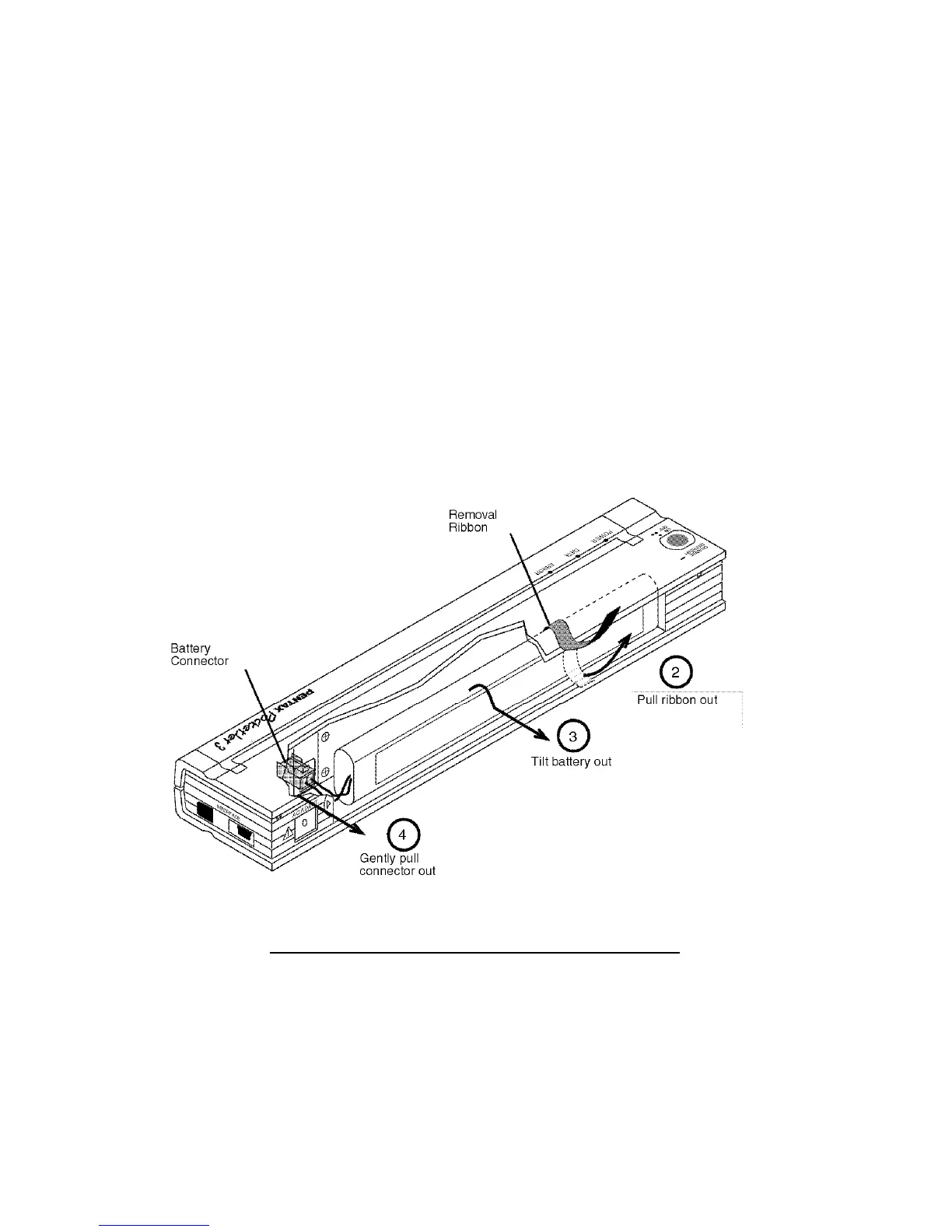
Removing the Battery
1. Open the printer’s battery cover by pressing the cover latch. Swing
the cover open and remove it.
2. Pull out on the battery removal ribbon as shown in Figure 13
until the battery starts to tilt out of its compartment.
NOTE: If the battery removal ribbon is caught behind the battery,
insert a thin metal object such as a flat-blade screwdriver
between the battery and the case at the end away from the
AC adapter receptacle and tilt it out of its compartment.
3. Remove the battery from the compartment.
4. Gently pull the battery connector from the terminal inside the
printer.
FIGURE 13. Instructions for removing the battery
Page 40








![Preview: DA FISH-EYE 10-17mm f/3.5-4.5ED [IF]](https://data.easymanua.ls/products/1474233/200x200/pentax-da-fish-eye-10-17mm-f-3-5-4-5ed-if.webp)


 To Next Page