EasyManua.ls Logo

Pentax 645N - Page 17

Pentax 645N
86 pages
Print Icon
To Next Page IconTo Next Page
To Previous Page IconTo Previous Page
Loading...
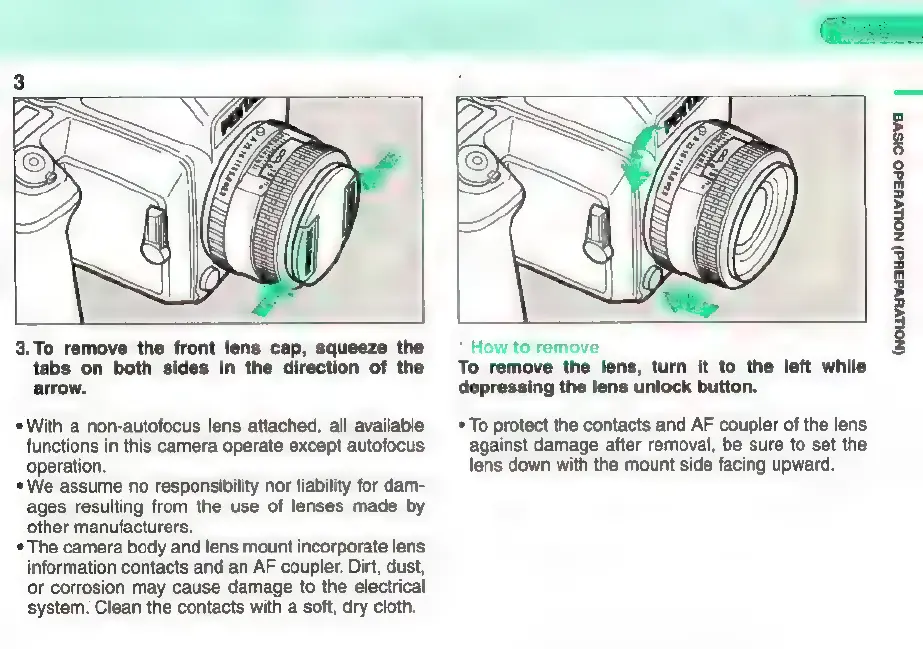
3.
To
remove
the
front
lens
cap,
squeeze
the
tabs
on
both
sides
in
the
direction
of
the
arrow.
*
With
a
non-autofocus
lens
attached,
all
available
functions
in
this
camera
operate
except
autofocus
operation.
*
We
assume
no
responsibility
nor
liability
for
dam-
ages
resulting
from
the
use
of
lenses
made
by
other
manufacturers.
*
The
camera
body
and
lens
mount
incorporate
lens
information
contacts
and
an
AF
coupler.
Dirt,
dust,
or
corrosion
may
cause
damage
to
the
electrical
system.
Clean
the
contacts
with
a
soft,
dry
cloth.
*
How
to
remove
To
remove
the
lens,
turn
it
to
the
left
while
depressing
the
lens
unlock
button.
*
To
protect
the
contacts
and
AF
coupler
of
the
lens
against
damage
after
removal,
be
sure
to
set
the
lens
down
with
the
mount
side
facing
upward.
(NOLuvuvdasid)
NOLLvH3dO
SIS
|

Other manuals for Pentax 645N

Related product manuals