EasyManua.ls Logo

Pentax 645N - Page 20

Pentax 645N
86 pages
Print Icon
To Next Page IconTo Next Page
To Previous Page IconTo Previous Page
Loading...
TONY
DEPRESSING
THE
SHUTTER RELEASE
BUTTON
(Novuvdaud)
NouvH3do
oisva
|
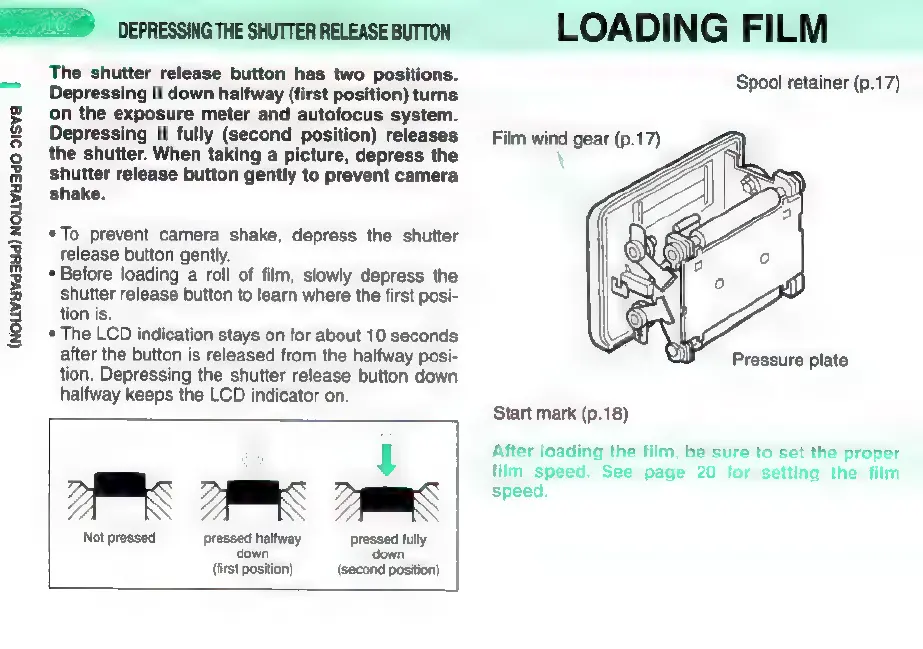
The
shutter
release
button
has
two
positions.
Depressing
it
down
halfway
(first
position)
turns
on
the
exposure
meter
and
autofocus
system.
Depressing
it
fully
(second
position)
releases
the
shutter.
When
taking
a
picture,
depress
the
shutter
release
button
gently
to
prevent
camera
shake.
eTo
prevent
camera
shake,
depress
the
shutter
release
button
gently.
*
Before
loading
a
roll
of
film,
slowly
depress
the
shutter
release
button
to
learn
where
the
first
posi-
tion
is.
*
The
LCD
indication
stays
on
for
about
10
seconds
after
the
button
is
released
from
the
halfway
posi-
tion.
Depressing
the
shutter
release
button
down
halfway
keeps
the
LCD
indicator
on.
om
m
Not
pressed pressed
halfway
pressed
acy
down
(first
position)
NES
position)
LOADING
FILM
Spool
retainer
(p.17)
Film
wind gear
(p.17)
X
Start
mark
(p.18)
After
loading
the
film,
be
sure
to
set
the
proper
film
speed.
See
page
20
for
setting
the
film
speed.

Other manuals for Pentax 645N

Related product manuals