EasyManua.ls Logo

Pentax 645N - Page 24

Pentax 645N
86 pages
Print Icon
To Next Page IconTo Next Page
To Previous Page IconTo Previous Page
Loading...
(NOU
vu
vdasid)
NOLvH34O
JISE
lj
1
2
SETTING
THE
FILM
SPEED
(ISO)
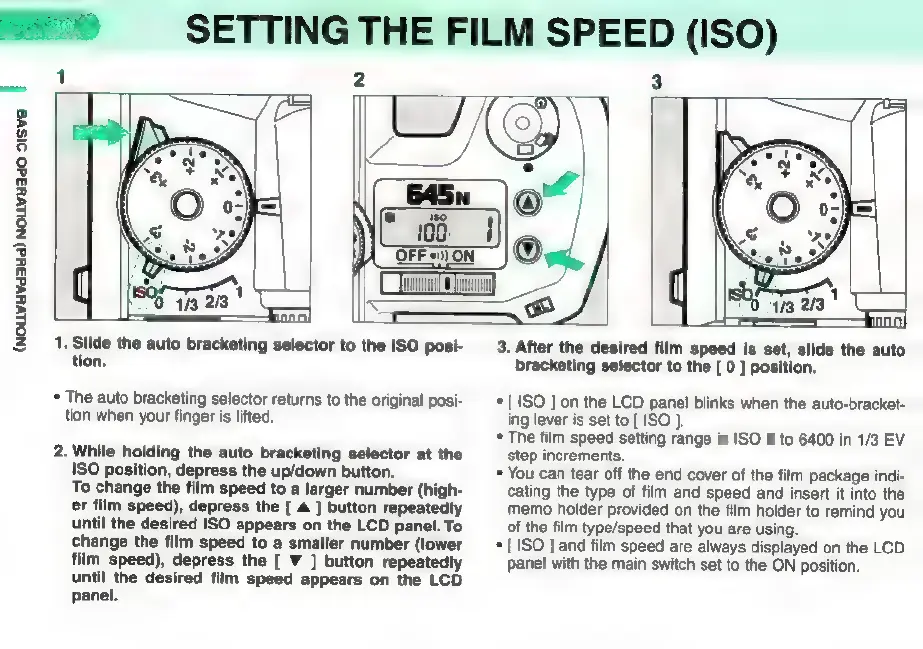
1.
Slide
the
auto
bracketing
selector
to
the
ISO
posi-
tion.
*
The
auto
bracketing
selector
returns
to
the
original
posi-
tion
when
your
finger
is
lifted.
2.
While
holding
the
auto
bracketing
selector
at
the
ISO
position,
depress
the
up/down
button.
To
change
the
film
speed
to a
larger
number
(high-
er
film
speed),
depress
the
[
A
]
button
repeatedly
until
the
desired
ISO
appears
on
the
LCD
panel.
To
change
the
film
speed
to
a
smaller
number
(lower
film
speed),
depress
the
[
V
]
button
repeatedly
until
the
desired
film
speed
appears
on
the
LCD
panel.
3.
After
the
desired
film
speed
is
set,
slide
the
auto
bracketing
selector
to
the
[
0
]
position.
*
[ISO
]
on
the
LCD
panel
blinks
when
the
auto-bracket-
ing
lever
is
set
to
[
ISO
].
*
The
film
speed
setting
range
is
ISO
6
to
6400
in
1/3
EV
Step
increments.
*
You
can
tear
off
the
end
cover
of
the
film
package
indi-
cating
the
type
of
film
and
speed
and
insert
it
into
the
memo
holder
provided
on
the
film
holder
to
remind
you
of
the
film
type/speed
that
you
are
using.
*
[
ISO
]
and
film
speed
are
always
displayed
on
the
LCD
panel
with
the
main
switch
set
to
the
ON
position.

Other manuals for Pentax 645N

Related product manuals