EasyManua.ls Logo

Pentax 645N - Programmed AE Mode

Pentax 645N
86 pages
Print Icon
To Next Page IconTo Next Page
To Previous Page IconTo Previous Page
Loading...
USING
THE
PROGRAMMED
AE
MODE
1
(oNuooHs)Nouvuado
aisya
|!
|
MUTT]
©
22161108608
[T]
L-e
oa
——-
Sewn
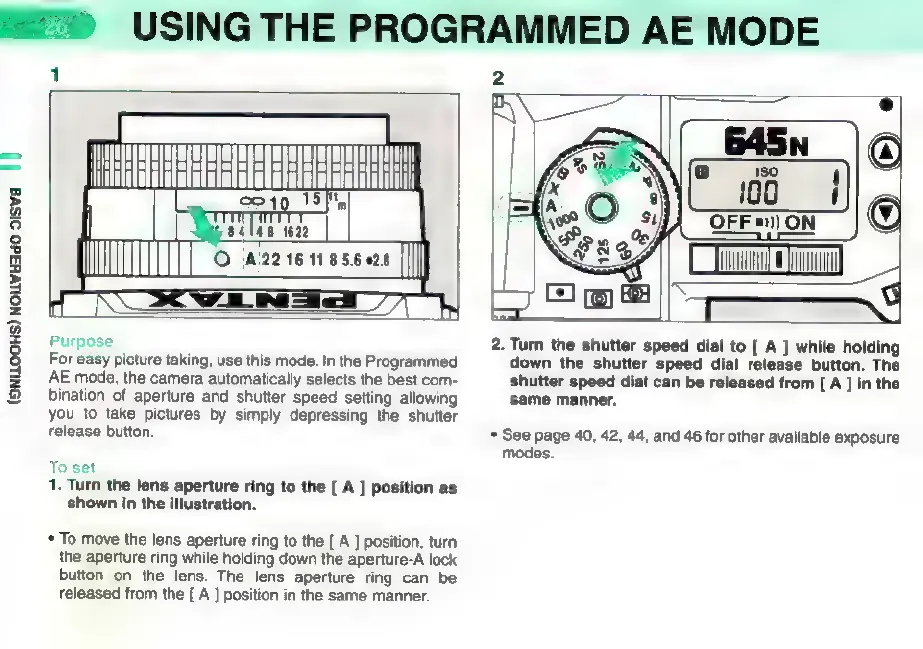
Purpose
For
easy
picture
taking,
use
this
mode.
In
the
Programmed
AE
mode,
the
camera
automatically
selects
the
best
com-
bination
of
aperture
and
shutter
speed
setting
allowing
you
to
take
pictures
by
simply
depressing
the
shutter
release
button.
To
set
1.
Turn
the
lens
aperture
ring
to
the
[
A
]
position
as
shown
in
the
illustration.
*
To
move
the
lens
aperture
ring
to
the
[
A
]
position,
turn
the
aperture
ring
while
holding
down
the
aperture-A
lock
button
on
the
lens.
The
lens
aperture
ring
can
be
released
from
the
[
A
]
position
in
the
same
manner.
OFF
=)
ON
2.
Turn
the
shutter
speed
dial
to
[
A
]
while
holding
down
the
shutter
speed
dial
release
button.
The
shutter
speed
dial
can
be
released
from
[
A
]
in
the
same
manner.
*
See
page
40,
42,
44,
and
46
for
other
available
exposure
modes.

Other manuals for Pentax 645N

Related product manuals