EasyManua.ls Logo

Pentax 645N - Focus Lock and Manual Focusing

Pentax 645N
86 pages
Print Icon
To Next Page IconTo Next Page
To Previous Page IconTo Previous Page
Loading...
FOCUS
LOCK
FUNCTION
1
2
3
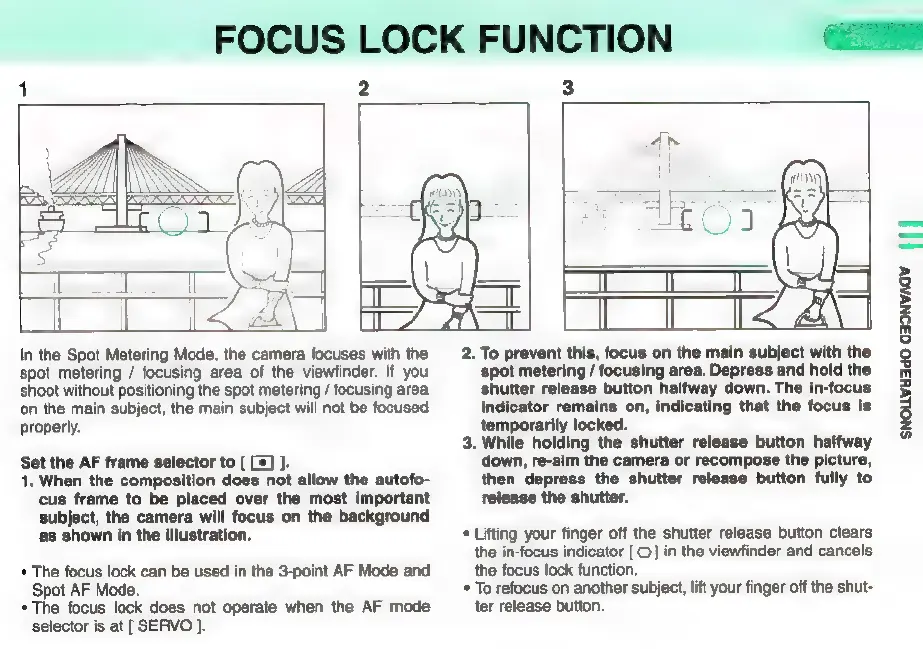
In
the
Spot
Metering
Mode,
the
camera
focuses
with
the
spot
metering
/
focusing
area
of
the
viewfinder.
If
you
shoot
without
positioning
the
spot
metering
/
focusing
area
‘on
the
main
subject,
the
main
subject
will
not
be
focused
properly.
Set
the
AF
frame
selector
to
[
[*]
].
1.
When
the
composition
does
not
allow
the
autofo-
cus
frame
to
be
placed
over
the
most
important
subject,
the
camera
will
focus
on
the
background
as
shown
in
the
illustration.
*
The
focus
lock
can
be
used
in
the
3-point
AF
Mode
and
Spot
AF
Mode.
*
The
focus
lock
does
not
operate
when
the
AF
mode
selector
is
at
[
SERVO
].
2.
To
prevent
this,
focus
on
the
main
subject
with
the
spot
metering
/
focusing
area.
Depress
and
hold
the
shutter
release
button
halfway
down.
The
in-focus
indicator
remains
on,
indicating
that
the
focus
is
temporarily
locked.
3.
While
holding
the
shutter
release
button
halfway
down,
re-aim
the
camera
or
recompose
the
picture,
then
depress
the
shutter release
button
fully
to
release
the
shutter.
*
Lifting
your
finger
off
the
shutter
release
button
clears
the
in-focus
indicator
[
O
]
in
the
viewfinder
and
cancels
the
focus
lock
function.
*
To
refocus
on
another
subject,
lift
your
finger
off
the
shut-
ter
release
button.
SNOLLVH3dO
G39NVAGV
f
|
[|

Other manuals for Pentax 645N

Related product manuals