EasyManua.ls Logo

Pentax 645N - Page 76

Pentax 645N
86 pages
Print Icon
To Next Page IconTo Next Page
To Previous Page IconTo Previous Page
Loading...
SNOLLVH34O
G3DNVAGY
| | |
INFRARED
INDEX
VR
|
mms]
|
NEEE
SS
eS
|
\
SEV
2
INE
Sec
77
RET
"
l
m
m
LILITIT
LUI
lii
HAHA
LETRA
FEE
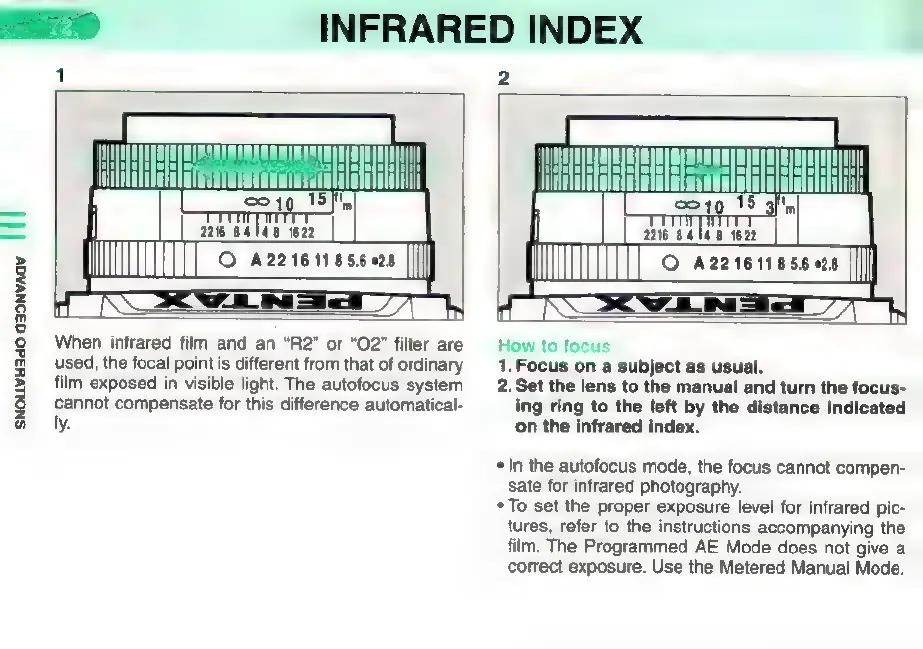
When
infrared
film
and
an
"R2"
or
"O2"
filter
are
used,
the
focal
point
is
different
from
that
of
ordinary
film
exposed
in
visible
light.
The
autofocus
system
cannot
compensate
for
this
difference
automatical-
ly.
How
to
focus
1.
Focus
on
a
subject
as
usual.
2.
Set
the
lens
to
the
manual
and
turn
the
focus-
ing
ring
to
the
left
by
the
distance
indicated
on
the
infrared
index.
*
In
the
autofocus
mode,
the
focus
cannot
compen-
sate
for
infrared
photography.
*
To
set
the
proper
exposure
level
for
infrared
pic-
tures,
refer
to
the
instructions
accompanying
the
film.
The
Programmed
AE
Mode
does
not
give
a
correct
exposure.
Use
the
Metered
Manual
Mode.

Other manuals for Pentax 645N

Related product manuals