EasyManua.ls Logo

Pentax 6x7 - Rear Lens Filter Attachment; Built-in Filters on Fish-Eye Takumar

Pentax 6x7
32 pages
Print Icon
To Next Page IconTo Next Page
To Previous Page IconTo Previous Page
Loading...
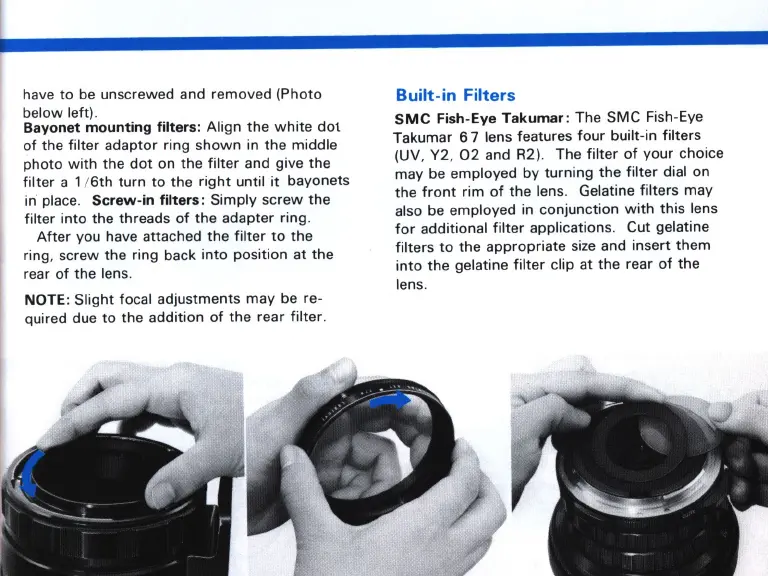
have
to
be unscrewed and
removed
(Photo
below
left).
Bayonet
mounting
filters:
Align
the
white
dot
of
the
filter
adaptor
ring
shown
in
the
middle
photo
with
the
dot
on
the
filter
and give the
filter
a 1 1
6th
turn
to
the
right
until
it
bayonets
in place.
Screw-in
filters:
Simply
screw
the
filter
into
the threads
of
the adapter ring.
After
you have attached
the
filter
to
the
ring,
screw
the ring back
into
position
at
the
rear
of
the
lens.
NOTE:
Slight
focal adjustments
may
be re-
quired due
to
the
addition
of
the
rear filter.
Built-
in
Filters
SMC
Fish-Eye
Takumar
:
The
SMC
Fish-Eye
Takumar
67
lens features
four
built-in filters
(UV, Y2,
02
and R2). The
filter
of
your
choice
may be
employed
by
turning
the
filter
dial on
the
front
rim
of
the lens. Gelatine
filters
may
also be
employed
in
conjunction
with
this
lens
for
additional
filter
applications. Cut gelatine
filters
to
the
appropriate
size and
insert
them
into
the
gelatine
filter
clip at
the
rear
of
the
lens.

Related product manuals